Rockit 5

To many ads? Support ODJT and see no ads!
I discovered over the weekend that font size changes you make in any V5 skin allows you to save the change to the skin's map!

So the next time you use the skin, that change is there - very cool!

BTW Rick, on skin DJ-1100, when changing the song display from waveform to the other choice, it says an error has occurred and Rockit must close.

It does this even when a song is not playing - loaded but not playing.

Is it just me?
 
BTW Rick, on skin DJ-1100, when changing the song display from waveform to the other choice, it says an error has occurred and Rockit must close.

It does this even when a song is not playing - loaded but not playing.

Is it just me?


It'll reopen in the morning at 9am... :D


I just tried it -- works fine for me, both playing and not playing... :dontknow:
 
Rick,

Been using v5 now for almost a year, and I love it. Just a few quick questions or request for future upgrades. In the que areas under the players can there be a scroll bar like in the music list areas, so you don't have to click on a song to use the up & down keys. Also is it possible when you right click on a song that is in one of the que's, you could send it to any of the other players. When we start the night out we will pull a bunch of songs and put them in the que areas so we have a general Idea of songs to play. This second feature would help with this.

Thanks Alot.
Rick
 
Rick,

Been using v5 now for almost a year, and I love it. Just a few quick questions or request for future upgrades. In the que areas under the players can there be a scroll bar like in the music list areas, so you don't have to click on a song to use the up & down keys. Also is it possible when you right click on a song that is in one of the que's, you could send it to any of the other players. When we start the night out we will pull a bunch of songs and put them in the que areas so we have a general Idea of songs to play. This second feature would help with this.

Thanks Alot.
Rick

1) The scroll bars are controlled via the skin mappers. If you want a vertical scroll bar, you have to change it in the skin file. For example, the a-queue (waitlist for deck A). NVS="1", means hide the vertical scroll bar. If you put a "0" in there, the scroll bar will be visible. NHS is for the horizontal scroll bar. See below:

<listctrl action="a-queue" visible="0" x="028" y="393" w="460" h="351" bkcolor="000000" txcolor="ffffff" border="1" font="Arial Bold" fsize="09" Header="1" NHS="0" NVS="0" value="Deck A Waitlist - Drop tracks here" LHI="0" FH="0" FHBkColor="ff4040" FHTxColor="ffffff" IJ="0" FW="0" STI="0" HB="1"/>


2) You can drag and drop songs from any list, into any player. No need for a right-click.
 
Rick, Version 4.2 skips tracks in auto play. They load early (about 15 sec.) and then auto play loads another replacing it at my set time of 5 sec.
Solution?


Get a Mac.

Sorry, couldn't help myself... :D


Is this something new that just started happening...?
 
I just tried your settings, and it's working fine here on 4.2...


There are only a couple reasons why it would load an additional track:

1) The track was moved -- in which case it should bounce to the next track in the list immediately after it tries to load the moved track, at the default 18 second load mark.

2) The duration of the track is wrong. The decoder figures that out when it loads the track, and is pretty good about it. The only exceptions would be some odd VBR files that it can't calculate. I haven't run across many of those, maybe 2 or 3 in the last 5 years or so, and they were corrupted files.

The potential third possibility, is that something else is eating most of your CPU resources, which would cause our timer to not fire on time.

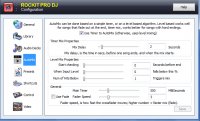
You can try setting the Main Timer value down a bit (or maybe up a bit) if you want to experiment. AutoMix has to be off to change that setting.
 
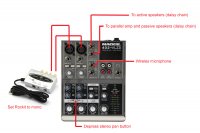
Alright Ricky, I just upgraded to v5 and I'm totally loving the mono option. Now I can zone two sets of speakers with my little Mackie 402.
I use the stereo pan option on the mixer to deliver channel 1 to the left and channel 2 to the right. The only other software I have that has mono out is PCDJ, but the signal didn't come out anywhere as good as with Rockit. You may have finally got me losing the PCDJ.

I hooked up the new amp along with my actives today for a test drive. The system kicks some ass now. I have an outdoor family event for the city on Saturday and should have no worries. Thanks for the feature and continuing on with your great products.

544708.jpg
 
Alright Ricky, I just upgraded to v5 and I'm totally loving the mono option. Now I can zone two sets of speakers with my little Mackie 402.
I use the stereo pan option on the mixer to deliver channel 1 to the left and channel 2 to the right. The only other software I have that has mono out is PCDJ, but the signal didn't come out anywhere as good as with Rockit. You may have finally got me losing the PCDJ.

I hooked up the new amp along with my actives today for a test drive. The system kicks some ass now. I have an outdoor family event for the city on Saturday and should have no worries. Thanks for the feature and continuing on with your great products.

544708.jpg

Hank - How do you hook up the amp on the mixer to use the passive speakers as well as two active speakers. I have a 450 BullRoast this Saturday and want to use both my active and passive speakers at the same time.
 
Hank - How do you hook up the amp on the mixer to use the passive speakers as well as two active speakers. I have a 450 BullRoast this Saturday and want to use both my active and passive speakers at the same time.

This is what I did today with the Mackie. It worked great.
 

Attachments

  • Untitled-1.jpg
    Untitled-1.jpg
    59 KB · Views: 17
Just my $.02 worth but I'd still like to request flac capabilities in the players(not the vid players). I'm still using wav becuase I don't want lossy compression(but proper name tags would be sweet)and my library is set up ALL with flac and wav. I don't carry even 1 mp3
 
Just my $.02 worth but I'd still like to request flac capabilities in the players(not the vid players). I'm still using wav becuase I don't want lossy compression(but proper name tags would be sweet)and my library is set up ALL with flac and wav. I don't carry even 1 mp3

Rockit, in it's current incarnation, cannot read or play FLAC files.

It can read MP3 tags that have been attached to WAV files though. For example, AudioGrabber can append the MP3 tag to the end of WAV files (Rockit can do it as well). You can also use the filename mask in the library settings, to handle WAVs.


The next "version" of Rockit, is actually a separate version -- sorta like PCDJ had blue, red, fx. I haven't named it yet, so I don't know what it will be called. It has support for many file formats, and features designed for more intricate mixing, wiki-wiki type stuff, etc... It has entirely new decoders, and in-memory mixing. It's meant to compete with Serato and other high end club systems.

It will also cost a bunch more money.


Rockit 5 will be upgraded when I find something wrong with it -- right now, it's an extremely stable platform, that does well for the few bucks it costs (I have a bunch of summer sales going on right now -- I like summer sales)... :)
 
Hey Rick, in that netbook blue skin, when you bring up a search result, how can you load a track from there into a request list or a deck que?

I see tabs for those choices in the search list, but cannot move a search result track into any other list.

I'm stumped...unless I'm missing something totally simple...yea probably that...
 
Hey Rick, in that netbook blue skin, when you bring up a search result, how can you load a track from there into a request list or a deck que?

I see tabs for those choices in the search list, but cannot move a search result track into any other list.

I'm stumped...unless I'm missing something totally simple...yea probably that...


The netbook skins are meant for backup. There is limited space available, hence no deck queues are shown.

You can drag and drop into a deck, but that's about it. You could technically map a shortcut key sequence to load a track into a deck queue, but you would not see it, unless you modified the skin to show the queues.

Those skins were not designed for regular playback -- just backup purposes. Feel free to design your own... :)
 
Those skins were not designed for regular playback -- just backup purposes. Feel free to design your own... :)

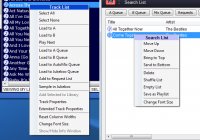
Yes, but couldn't you make the "right click" menu have the same options as the one for the main library window? In the library, you can right click and add a track to the "request" list. It would be useful to have that option in the search window as well.

View attachment 23792

In fact, the options in the search list make no sense.
 

Attachments

  • Untitled-2.jpg
    Untitled-2.jpg
    56.6 KB · Views: 3
Yes, but couldn't you make the "right click" menu have the same options as the one for the main library window? In the library, you can right click and add a track to the "request" list. It would be useful to have that option in the search window as well.

View attachment 23792

In fact, the options in the search list make no sense.


I wish it were that easy Hank -- but it's a separate window, with a separate message queue.


I could do it, but do you want to pay $479 for Rockit...?


I didn't think so... ;)


I do the best I can, to make a product that is fully worth its price. I can't make it beam people up for a hundred bucks or so... ;)