Rockit 5

To many ads? Support ODJT and see no ads!
Do a Windows search on your entire C: drive for *.rpf files, and see what you come up with. If you find any in any other folder then C:\SoftJock\RockitProDJ50\History, then something is hosed in your configuration.

If not, is the time and date set properly on your machine, as well as the locale? Rockit generates the history names by reading that from Windows.

Ok, I just searched, and I have several that are in my I:/ drive, which is my external drive. And, they are from the 4.2 version that I no longer have on this computer. What do I have to do for this? As for the time, its all set to the correct time, including Rockit.
 
The RockIt created playlists folders load very slow on Ultimate...just like if it was reading from an external or hard drive windows config in the V4 version (before you implemented the new fast threading system in V5). Very heavy CPU usage.

I'm not here to slam V5 intentionally, but from my testing & personal opinion, it wasn't an upgrade due to the problems I'm encountering. I'd love to be able to utilize some of the perks V5 offers, but at this time it's still too buggy for me to use; so I'll continue to use V4.2 as it's been rock solid...just a bit less user-friendly when doing some tasks.


My guess is it's something to do with how that system is configured. The same code is used in V4 and V5 to display playlists -- nothing changed there.


Can you verify that they display slower on different skins? I know you use a modded V4 skin, and just to make sure there's no issue with the implementation of skins...

The other thing I would ask, is if you are using a Windows classic theme? V5 makes heavy use of the themes code in Vista and above to do many things, and it will not work properly with the classic theme of old days, because some functions do not exist using the classic theme...
 
My guess is it's something to do with how that system is configured. The same code is used in V4 and V5 to display playlists -- nothing changed there.


Can you verify that they display slower on different skins? I know you use a modded V4 skin, and just to make sure there's no issue with the implementation of skins...

The other thing I would ask, is if you are using a Windows classic theme? V5 makes heavy use of the themes code in Vista and above to do many things, and it will not work properly with the classic theme of old days, because some functions do not exist using the classic theme...

I'll check on the theme version, but point me in the right direction to verify it correctly.

As for the skin, yes it's slow on all skins. I thought the same that it might have been an issue with my V4 skin.
 
I'll check on the theme version, but point me in the right direction to verify it correctly.

As for the skin, yes it's slow on all skins. I thought the same that it might have been an issue with my V4 skin.

To check what theme you're using, right-click on the Desktop, and choose Personalize, and it will show you at the bottom. If it says Classic under Color, then you are using the classic Win2k theme. Basically, you should be using Aero, or your own custom implementation of it.


One other question -- do you have the Show bad link icon in lists checked in Config->General? If so, it will check each file for existence as it displays each of the songs, thereby slowing it way down if your HDD is not really fast.
 
I am using Aero, no customization. <check>

Show Bad Links Option is not turned on. <check>

For a RockIt created playlist for 1650 songs, it takes 9 seconds to pull up. :( In V4.2 on the same machine, it's instant.

(Btw, all playlists were recreated from the ground up in V5 when I was trouble shooting because I thought maybe there was an issue with just copying them from V4.2)
 
Ok, I just searched, and I have several that are in my I:/ drive, which is my external drive. And, they are from the 4.2 version that I no longer have on this computer. What do I have to do for this? As for the time, its all set to the correct time, including Rockit.

The only thing I can think of, is you lost ownership or permissions for Rockit to save to its history folder, or somehow or other, you managed to turn off the NoHistory option for the decks...


Try this for S&G -- go to Config->General, and turn on Ask for history name on save. Then click Save, restart Rockit, and bounce a half dozen songs through deck A. Then close Rockit, and when it asks for a name, type in something you will easily remember (try ricktest).

Then see if you get an error. If not, do a Windows search for ricktest.rdf...
 
The only thing I can think of, is you lost ownership or permissions for Rockit to save to its history folder, or somehow or other, you managed to turn off the NoHistory option for the decks...


Try this for S&G -- go to Config->General, and turn on Ask for history name on save. Then click Save, restart Rockit, and bounce a half dozen songs through deck A. Then close Rockit, and when it asks for a name, type in something you will easily remember (try ricktest).

Then see if you get an error. If not, do a Windows search for ricktest.rdf...

Ok, that worked. I used ricktest, and ricktest1, and they both showed up in Rockit. But, I did a Windows search, and it said no match found.
 
Ok, that worked. I used ricktest, and ricktest1, and they both showed up in Rockit. But, I did a Windows search, and it said no match found.

Sorry, I meant ricktest.rPf :sqembarrassed:

.RDF are library files, .RPF are playlist files.


Ok, try this -- do the same thing, but don't change the name when Rockit asks on shutdown, and see if it saves using the default name based upon date and time.


Also, did those history lists have songs listed when you click on them?
 
Sorry, I meant ricktest.rPf :sqembarrassed:

.RDF are library files, .RPF are playlist files.


Ok, try this -- do the same thing, but don't change the name when Rockit asks on shutdown, and see if it saves using the default name based upon date and time.


Also, did those history lists have songs listed when you click on them?

It asked me for a name as I was shutting it down, and I used the default name that showed up, but its not showing up in the history when I restart it. I did a windows search and its is showing up in that, but not the rockit
 
It asked me for a name as I was shutting it down, and I used the default name that showed up, but its not showing up in the history when I restart it. I did a windows search and its is showing up in that, but not the rockit

What folder is it in?

Also, what is the name?
 
All of the history that is showing up when I do a Windows search is showing the C:\SoftJock\RockitProDJ50\History, plus, what history ISNT showing up on rockit itself, IS showing up in the Windows search.
 
All of the history that is showing up when I do a Windows search is showing the C:\SoftJock\RockitProDJ50\History, plus, what history ISNT showing up on rockit itself, IS showing up in the Windows search.

It's important for me to know the filename ;)

It should look like 010811-144410.rpf

It's a date/time stamp.
 
No. Thats from the Windows search. The last one that is showing on Rockit is 123010-155642.


Totally bizarre...

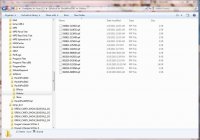
Can you do a screenshot of the History folder in Explorer, and post it or email to me.


Should look something like this...
 

Attachments

  • historyfolder.jpg
    historyfolder.jpg
    91.9 KB · Views: 3