Reworking My Large System

To many ads? Support ODJT and see no ads!
If you need a backup - backup mixer, PSSL has the Akai on sale today for $129.99 .. AKAI AMX DJ Controller & Mixer for Serato DJ - (https://www.pssl.com/AKAI-AMX-DJ-Controller-Mixer-for-Serato-DJ)

PSSL is where I got mine, and I paid $129, but the eBay posting said it was USED. When I got it, it had obviously never even been opened. It’s brand new. Good thing, I guess, ‘cause I would not have been happy had I bought a used one for the same price as they’re now selling a new one.[emoji4]


Sent from my iPhone using Tapatalk
 
PSSL is where I got mine, and I paid $129, but the eBay posting said it was USED. When I got it, it had obviously never even been opened. It’s brand new. Good thing, I guess, ‘cause I would not have been happy had I bought a used one for the same price as they’re now selling a new one.[emoji4]


Sent from my iPhone using Tapatalk
I think MAP restrictions cause a number of items to be advertised as used or open box, but are brand new.
 
  • Like
Reactions: ittigger
... I found a link to a newer map (for my AKAI AMX) that purportedly fixed ALL my issues. Hallelujah!!![emoji1] Unfortunately, it’s too late to download and install it tonight. I’ll have to do it tomorrow. I was up ‘til 1:30AM this morning playing with this little mixer and it’s catching up with me.[emoji1]

INCREDIBLE!!!... I downloaded the newer MIDI map for Traktor, and WOW!!!... Not only does it fix all the functions I need that were not working, it does stuff I never even thought of using. The original basic map was good, but this new one is beyond fantastic. The guy even provided excellent documentation and videos!...

View: https://youtu.be/TzAgENM55DE


...Now I feel like this little mixer was a GREAT choice. At $129, I highly recommend it as a backup.

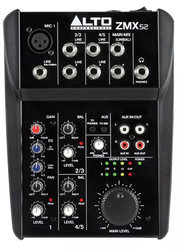
I’m thinking seriously of going ahead and making my little mic mixer a part of this (backup) system. I’ve had it for a while, but never used it...

523cfc5617a38f111ff61d4ccdbf4252.jpg

... I only bought it because of it’s great brand name.[emoji1] Seriously though, It will give me the one wired microphone I’d be lacking if my controller failed and I had to use the AKAI AMX. It is one more little bit of kit that adds additional complexity, but it might be worth it.

Until I make the tabletop, it’s kind of a PITA setting this stuff up. I have the AMX sitting on the edge (side) of my DDJ-TI case stood up vertically, to where it’s somewhat closer to the top of my rack, but since the sides have handles and are not flat, and to get some additional height, I have the AMX sitting on top of the box it came in. Certainly not ideal. I need to get busy and make that tabletop. The AMX is a blast to play with, but it will be much more fun when it has a stable platform to sit on.[emoji4]
 
THAT would be my MAIN mixer in my Small System if I had one of those... nice mixer.[emoji4] Shoot... I’d even try to find 1U in my Large System for it.
They occasionally have used ones on eBay .. MP4 has USB inputs (2 stereo channels) and 2 sets RCA .. MP2 has 4 sets RCA, no USB.
 
Not much more to add on the topic of the AKAI AMX (mixer for my backup computer). It works GREAT... wish I had read the installation instructions first though. It’s maybe a little complicated with all the layers. It’s gonna take some practice. I watch the guy who made the MIDI map in his video demo, and he’s using the AMX like there’s nothing to it. It’s NOT that easy. It makes you appreciate a bigger controller with dedicated knobs and sliders. I’ll get it down eventually, but the question is; will I remember it???[emoji1] If I go for a week without using some of my gear, I have to learn how to use it all over again.[emoji1]

Tomorrow I’ll go to the home improvement store and buy the materials for my tabletop. Can’t go today... the wife is off work, and we’re taking our girls to their veterinarian appointments.
 
Last edited:
  • Like
Reactions: ittigger
Things happen when you get down to the REAL measurements. What am I talking about you ask (OK; I asked myself, but play along)?[emoji1]

It seems I only have 2 1/2 inches at the back of the top side of the tabletop as currently designed...

3222dfc81d1b2cad0e9686d355d2a757.jpg

It’s not so much that I need more space (between the monitors and the facade), as that is pretty useless space. The problem is it needs to be substantial enough to hold the two wings on either side. If not for the wireless mic antennas on the back of the rack...

47c2f1e183317bdf70775f81cfc405f8.jpg

... it could be wider, but I’m not planning to change that at this point. Of course my little “make it better” brain is going 100 miles per hour, and I’m seeing a bunch of ways I could incorporate the tabletop into the antennas and facade, but NO... not gonna rework that part again![emoji1]

I think 2 1/2 inches will be wide enough, but I may need to increase the thickness a bit to ensure that the tabletop wings won’t break off of the back piece from their own weight.

Tomorrow I’m going to go buy my materials. I’m gettin’ pretty anxious to get started on this project.[emoji4]
 
  • Like
Reactions: ittigger
Well... I can’t say I’m altogether happy with my choice of wood for my tabletop. They didn’t really have a NICE piece of solid oak, maple, or walnut. What they had was poplar and pine, and it was WAY too thick anyway. So I ended up with a piece of finish plywood. The bad part about plywood is the end grain. I’ll have to fill and sand it, and it’s still unlikely to accept the Ebony stain very well. So I’ll either have to paint the edges or attach some trim. More work either way. Also, I thought I had a nice piece of wood for the back piece. WRONG... couldn’t find it, so I gotta go back and get another piece... cr@p!!![emoji1] Think I’ll go to a different lumber supplier and see if I can find something better. I really hate settling![emoji1]

First thing to do though, is to make a template of the top of the rack. Coulda (shoulda) made the template days ago, but oh well.[emoji1] However, that meant taking the controller out of the rack in order for the paper to lay flat, then I traced around the area that needs to be cut out...

7a46c0ce99f5a80632646a3a8608d30f.jpg

... And naturally, the blue tape doesn’t stick to the rack. Got it done though, so now I’m ready to transfer the opening to my wood... whatever and whenever that may be.[emoji1]

UPDATE: Got my knobs and anchors ordered... not from the same vendors, so I’m hoping they’re gonna work. Ordering stuff online can be a crapshoot. They’re supposed to be delivered tomorrow, but if they don’t work out, it’s back to the drawing board.[emoji1]
 
Last edited:
  • Like
Reactions: ittigger
After laying the template out on my plywood, it became apparent that my rack is out of square. It’s larger in the front than it is in the rear by 3/8 inch. That’s quite a bit really, in a space of only 20 inches. How it got out of square???... Could be I did it when I cut a space out of the front to accommodate the controls on the front of my controller, and created the support to which my folding keyboard shelf attaches...

73a566063bbe169207353c24182a717a.jpg

... Could be it was out of square all along. I never had a reason to check. Be that as it may, I can compensate for the difference and it shouldn’t be noticeable when it’s done. It’s just gonna be a little harder to make the cuts.
 
  • Like
Reactions: ittigger
I prefer curvy racks ...
 
I prefer curvy racks ...

Huh???.... OK then. Back to the subject at hand... the tabletop. The next thing to do is transfer the paper template to the wood. For that I use carbon paper. Do millennials even know what carbon paper is?[emoji1] Back in the olden days, if you wanted to keep a copy of a letter you were writing, you put a piece of carbon paper between two pieces of paper and put all three into the typewriter... TYPEWRITER!!![emoji1] As an artist, I used carbon paper all the time to transfer a sketch to a canvas or to some form of more expensive paper. Now I just scan the sketch and print it on a piece of paper, and I can even adjust the size. My how things have changed.[emoji1] In any case, I still have a stash of carbon paper around here somewhere... if I can just remember where???... I came upon it not too long ago, so I just need to look for it. The good news is, you can still buy it at the office supply store. I don’t suppose they sell much of it anymore.[emoji4]

But first... while I have the controller out of the rack, there are a couple of things that need attention inside the rack. I noticed one of the USB ports on the rear patch panel that connects to the backup computer isn’t working... Probably a loose (or bad) USB cable. Also, the knob on switch for the internal LED light fell off, as did one of the clips that attaches the switch to one of the internal supports. I need to dig around in the bottom of the rack and find those two pieces.

While I’m working inside the rack, I might as well figure out how I’m gonna connect the AKAI mixer to the Denon DN-410X. A USB cable connects the AMX to the backup computer via the rear patch panel, but I’m currently connecting the audio out of the AMX to the line-in on the computer with a 3.5mm cable that sticks out through the space between the back of the controller and the hinged access panel. That will NEVER do for an OCD person. I need to install a 3.5mm jack on the patch panel. Not a big deal, so I’ll do that while I’m working inside the rack.[emoji4]
 
Last edited:
  • Like
Reactions: ittigger
Hand knobs and anchors came today.[emoji4]...

781317ef21a2aea1f21320786c9fd75c.jpg

... I was a little worried because I bought them from different vendors (not as a set) but they’re gonna work![emoji4]
 
  • Like
Reactions: ittigger
I’ve said this before... I spend a lot of time just looking at my project. I spend WAY more time looking at my project than actually doing something to it. I’ve been looking at where to put my four anchors and knobs to facilitate the attachment of the tabletop. The easiest thing to do is put them in four corners on the top and be done with it, but that may not be the most attractive option. The hand knobs may even get in my way. There is a way to attach the tabletop underneath, which is the way I’m leaning, but it would require attaching to (4) L-brackets of some sort. I’m looking for a 90 hinge of some sort that will fold flat against bottom of the tabletop. I don’t want stationary L-brackets that stick out from the tabletop that can snag, gouge or injure. I’m also a little bit apprehensive about drilling into the top of my molded plastic rack in order to install the anchors. I’ll do it if necessary, but VERY carefully. I’ll keep looking at it.[emoji4]
 
Last edited:
  • Like
Reactions: ittigger
This OCD cr@p is a PITA!!![emoji1]... I need to install a 3.5mm stereo jack on my patch panel (to connect the audio from my AKAI mixer to the Denon DN-410X), and I have just ONE blank space left of the patch panel. Perfect; right???... Well, not exactly. It’s all the way on the opposite side of where I want to put the AMX. That means I’d have to use a longer cable, and it would cross all the other cables. So I either deal with the longer cable, or I move the 14 other (RJ-45, USB, and XLR) jacks over in order to put the new jack on the proper side. I WISH it wouldn’t bother me to leave as it is and simply put the new jack in the blank space, but it does. Guess I’ll spend the 15-20 minutes moving all those stupid jacks.[emoji1]
 
  • Like
Reactions: ittigger
This OCD cr@p is a PITA!!![emoji1]... I need to install a 3.5mm stereo jack on my patch panel (to connect the audio from my AKAI mixer to the Denon DN-410X), and I have just ONE blank space left of the patch panel. Perfect; right???... Well, not exactly. It’s all the way on the opposite side of where I want to put the AMX. That means I’d have to use a longer cable, and it would cross all the other cables. So I either deal with the longer cable, or I move the 14 other (RJ-45, USB, and XLR) jacks over in order to put the new jack on the proper side. I WISH it wouldn’t bother me to leave as it is and simply put the new jack in the blank space, but it does. Guess I’ll spend the 15-20 minutes moving all those stupid jacks.[emoji1]
Why don't you just rearrange all the gear instead? You know you want to ...
 
You guys are funny, but the gear in that rack does NOT need to be rearranged. In fact, there’s probably not much rearranging one could do. Everything kinda fits where it fits.

I could reverse the computers and put the backup mixer on the right hand side, but that seems a little extreme just to avoid using a longer audio cable or moving the jacks on the patch panel.

If I swapped the computers, I’d have to move the monitor mount to the other side, which really would be a PITA. And even though I wouldn’t (technically) have to move the computers (swapping monitor cables would make it appear the computers were swapped), I’d probably do it anyway, because you know... it would be weird if the right monitor went with the left computer and vice versa.[emoji1]

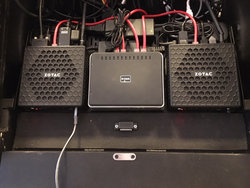
This is what the computer shelf looks like underneath the controller...

834023efba6d58c2a60629cc5ac1f09b.jpg

... Easy to see why I’m not interested in swapping the computers. What you can’t see very well is a USB hub behind the computer on the right (main DJ PC), and all the wires are zip tied down.
 
Last edited:
  • Like
Reactions: ittigger
You guys are funny, but the gear in that rack does NOT need to be rearranged. In fact, there’s probably not much rearranging one could do. Everything kinda fits where it fits.

I could reverse the computers and put the backup mixer on the right hand side, but that seems a little extreme just to avoid using a longer audio cable or moving the jacks on the patch panel.

If I swapped the computers, I’d have to move the monitor mount to the other side, which really would be a PITA. And even though I wouldn’t (technically) have to move the computers (swapping monitor cables would make it appear the computers were swapped), I’d probably do it anyway, because you know... it would be weird if the right monitor went with the left computer and vice versa.[emoji1]

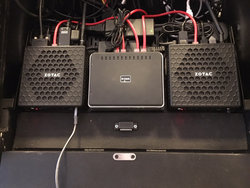
This is what the computer shelf looks like underneath the controller...

834023efba6d58c2a60629cc5ac1f09b.jpg

... Easy to see why I’m not interested in swapping the computers. What you can’t see very well is a USB hub behind the computer on the right (main DJ PC), and all the wires are zip tied down.
I see the problem .. the computer on the right should be swapped with the one on the left.