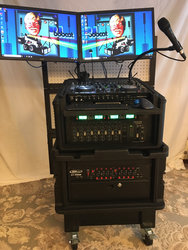
..., but ya gotta get the correct cable into the correct jack![emoji1]
Same with love ...
..., but ya gotta get the correct cable into the correct jack![emoji1]
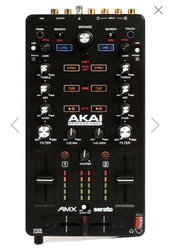


Good choice. I have an AMX. It used to be my primary device while I was in between mixers. Now it's my backup device. I also have recently begun using a Surface Pro as a secondary computer and so far it's been pretty reliable.

Could go even smaller with this one ... https://www.amazon.com/JUST-MIXER-A...la-347792540286&ref=&adgrpid=62521174699&th=1
View attachment 37694
Could go even smaller with this one ... Amazon.com: JUST MIXER Audio Mixer - Battery/USB Powered Portable Pocket Audio Mixer w/ 3 Stereo Channels (3.5mm) Plus On/Off Switch: Musical Instruments - (https://www.amazon.com/JUST-MIXER-Audio-Mixer-Portable/dp/B01LPT8JY8/ref=asc_df_B01LPT8KQA/?tag=&linkCode=df0&hvadid=312139358556&hvpos=1o2&hvnetw=g&hvrand=14267010790038149174&hvpone=&hvptwo=&hvqmt=&hvdev=c&hvdvcmdl=&hvlocint=&hvlocphy=9003394&hvtargid=pla-347792540286&ref=&adgrpid=62521174699&th=1)
View attachment 37694
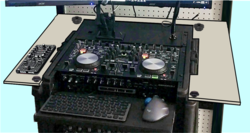

OK... I think I have my tabletop design...
View attachment 37704
... I'll cut a piece of plywood to fit around the rim of the case, and then I'll attach it with some small hand knobs of some sort. I'm not too worried about drilling holes in the rack because it has already been extensively cut and modified, and there's already wood reinforcements under the areas where the knobs will attach. I can make the sides even in size, or I can make one side larger than the other. Since I'm right handed, I'd like a little more space on the right. The left side only needs to be wide enough for the AKAI mixer. I'll think on that a bit.

Any thoughts?[emoji4]

Interesting, you think cat's dream.Ive always wondered.... Do Cat's dream in English...or some Cat language.
Interesting, you think cat's dream.
Of what, legless, obese mice that taste like tuna?
Of what, legless, obese mice that taste like tuna?
Are you talking about your cat or your wife?no...of killing me in my sleep
cc
Are you talking about your cat or your wife?

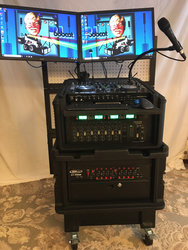
I'm still uncertain why you can't have 1 LARGE monitor and 1 much smaller (for the DMX) and have a switch to swap as necessary. Are you using both equally during a performance?With a preliminary design in hand, I started taking some measurements. Considering my Floating Facade is 36” wide and centered on the rack; if I stay within the confines of that width, I’d have about 7 inches of tabletop space on each side. I could go wider; like 8 or 9 inches, since the facade sits about 4 inches away from the rack (to allow wires to run behind and hide the patch panel). I don’t think it would look bad if the tabletop extended past the width of the facade a little; just not too far. Another thought I have is to round the corners of the tabletop closest to the facade. I think that would make it look more intentional, rather than appearing as if the facade was mistakenly cut too small.
I decided the sides need to be symmetrical, so I won’t be getting any extra space on the right-hand side. The OCD comes into play on this issue, but if one side WAS gonna be wider, it would probably be more logical for the left side, since the left monitor extends beyond the facade already. The way I installed the monitor stand, it has my main monitor almost directly in front of me, and the monitor for the backup/lighting-control PC off to the side...
If I go with 8 inches on both sides, the tabletop would be 36.75 inches wide. If I made the tabletop 40 inches wide, I’d gain a little more than an inch and a half to each side. That doesn’t sound like much extra space, but I think it might be about right. I might even be able to go wider than that without looking like it’s too much wider than the facade. Of course I’ll paint it black, so that will help hide it a little.
Any thoughts?[emoji4]
I'm still uncertain why you can't have 1 LARGE monitor and 1 much smaller (for the DMX) and have a switch to swap as necessary. Are you using both equally during a performance?
I meant keep 2 monitors .. just one on the less big side and swap it to the large monitor for setup or if the computer fails .. not just 2 computers feeding the same monitor.I could, of course (use one monitor and a switch), but keep in mind the secondary computer and monitor are backups. If my monitor fails, I have another right there ready to go. The monitors connect to the patch panel via RJ45 jack, so I can swap monitors in three seconds. But to answer your second question, the backup computer (on the left) controls my lights, so no, it is not used equally. However, I only connect to the Internet on the backup computer, so if I need to download a song or play a YouTube video, that’s the computer that does it. Switching back-and-forth on one monitor might be problematic on those occasions. If I buy an Ultrawide Monitor, it solves the dual monitor issue, but then creates its own issue with having no backup monitor.[emoji4]
I meant keep 2 monitors .. just one on the less big side and swap it to the large monitor for setup or if the computer fails .. not just 2 computers feeding the same monitor.