RE-Reworking My Small System... AGAIN

To many ads? Support ODJT and see no ads!
OK... PC is FIXED!!!... YAY!!!:djparty:... Everything now works as it should. The Dell Dude was here less than 45 minutes; installed a new motherboard, and checked everything out. I was a little surprised to find that what I THOUGHT was the original memory, was not. It had 4GB in it when I bought it last year (refurbished), but it actually was configured with 8 gig when first sold. I also discovered that the memory (4GB) that I added was a match for what should have been in the computer, but not a match for the slower RAM that was in it when I bought it. I think I’ll just buy another stick that matches the one I put in. Other than that, my PC woes appear to be OVER.[emoji4] The new one will be here on Monday according to the tracking info. I think I’ll likely get it set up, and it will be my NEW Small System computer. This old one will be relegated to backup/replacement duty. Cost for PC repair... $0... and a day of my time waiting for the Dell Dude to get here.:djsmug:

1534542746156.png
 
Last edited:
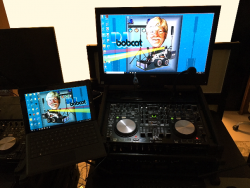
It’s great to have all the pieces of my Small System functioning again. Now I can get back to testing and tweaking. I discovered one little gotcha... The headphones for the backup computer (the Surface Pro) plug into a 1/4” jack on the (top) hinged rack panel (next to the Bogen microphone jack). That jack is connected to the external sound card (NI Audio 2 DJ), which is mounted on the internal rack-mounted shelf (on the back side of the rack). And there’s the gotcha... The only way to control the headphone volume is with the knob on the side of the sound card. The volume for the speaker output can be controlled by the Rolls mixer, so it’s not an issue. Since the hinged rack panel CAN be opened, I can adjust if I need to, but it’s certainly not elegant. It would preferable to have SOME other way to control the headphone volume. Any suggestions???

I think something like this is what I need...

Koss VC20 Volume Control

https://www.amazon.com/dp/B00001P4XH/ref=cm_sw_r_sms_c_api_AVcEBbBQ04PCA

... but I don’t think that’s quite what I’m looking for.

I do have one unused channel on the Rolls mixer, so I could route the headphone output from the sound card, to the mixer, and output to the headphone jack on the hinged rack panel. Then I could control the volume level with the level knob on the mixer. That eliminates my Auxiliary jack on the patch panel that I was going to reserve for my laptop, but that’s a secondary backup, so maybe that’s the way to go if there’s not a better option.

Still no Right Angle 1/4” TRS adapters, and Markertek hasn’t even shipped them yet, which tells me they were not in stock. I ordered some on eBay, and they’ve shipped, but still won’t be here until August 21.
 
Last edited:
  • Like
Reactions: ittigger
OK... You guys were NO help at all[emoji1], so I went ahead and ordered one of these...

PAC LC-1 Remote Amplifier Level Controller

https://www.amazon.com/dp/B0002J226O/ref=cm_sw_r_sms_c_api_87HEBbKX438SC

... I think I can mount it on the underside of the (top) hinged rack-mount panel (next to the Bluetooth receiver) and I’ll make a hole for the volume knob to poke through. I’m not willing, just yet, to give up that Auxiliary Port, and I think having the volume knob on the top (instead of the front) will be a better setup for the backup system’s headphones.

I’m in love with my Dell AIO PC again, now that the random shutdowns have ceased. The new one I bought is supposed to be here tomorrow... I’m skeptical... the tracking on it hasn’t had an update in two days, since it left the Bronx, NY. If it’s not in Oklahoma City tonight, it’s not gonna get delivered tomorrow.
 
  • Like
Reactions: ittigger
...I’m in love with my Dell AIO PC again, now that the random shutdowns have ceased. The new one I bought is supposed to be here tomorrow... I’m skeptical... the tracking on it hasn’t had an update in two days, since it left the Bronx, NY. If it’s not in Oklahoma City tonight, it’s not gonna get delivered tomorrow.

Interesting developments overnight... My package (new Dell computer) arrived in Oklahoma City, then it was transferred to my local Post Office five hours later (@ about 4:30AM). It seems pretty likely that it WILL be delivered today, but it doesn’t say “Out For Delivery” yet.
 
  • Like
Reactions: ittigger
Interesting developments overnight... My package (new Dell computer) arrived in Oklahoma City, then it was transferred to my local Post Office five hours later (@ about 4:30AM). It seems pretty likely that it WILL be delivered today, but it doesn’t say “Out For Delivery” yet.
The Post Office is pretty good about telling you it's out for delivery about 3 days after it's been delivered.
 
I went to the post office, talked to a manager there, he investigated it while I was waiting. Evidently he had the carrier stop at the house it was delivered to, and made a special stop to drop it off to me. Luckily they track things.

I always worry about my stuff gettin’ delivered to the wrong house, because it happens with my mail occasionally. So far, none of my packages have been delivered to a different house, but that’s one reason why I watch the important ones. I set up notifications on the USPS Web site so I get a notice every time they move. If it says “delivered”, it better be outside my door, or in my mail box. I also try to stay home on days I’m expecting an important delivery. Something small that fits in the box, I don’t get too concerned about.
 
  • Like
Reactions: ittigger
My new PC came... Overall I’m pretty pleased. It was supposed to be brand new, just missing the original packaging. Might be???... But it had a few light scratches on the glass, and Windows 7 Pro was already installed on it, as well as Symantec Security. It had a login account already setup on it too, but I didn’t know the username and password. No big deal. I was gonna load Windows 10 on it anyway. It was supposed to come with a recovery CD, but it didn’t. It came with a USB thumb drive, which contained three different recovery OS’s. I went ahead and loaded Windows 10 Pro, and got the basic setup done. Only took about an hour. This was just so I could test everything out, because I’ll be putting a different (larger) disk drive in it anyway. But that’s for another day. For now I’m gonna play with it. So far I think I got a pretty good deal. I only paid $500 for it... $200 less than the posted price, and $700 less than the retail price.
 
  • Like
Reactions: ittigger
A couple of items are “Out For Delivery” today. Most important though, are the Right Angle 1/4” adapters I need to hook the Booth Out jacks on the controller up to the XLR jacks on the patch panel. Straight 1/4” cables won’t allow the hinged rack panel on the top of the rack to close, so I really needed the adapters to complete the internal wiring. The LAST piece of the puzzle is the volume controller for the backup system’s headphone jack... It’s scheduled for Friday delivery, but hasn’t shipped yet.

So today I’ll continue working on the new computer. I got it all setup, but it only has a 1TB drive, and it’s nearly full with my music library installed. So today I’m cloning the drive to a 2TB drive. All I had was a standard drive. I’d rather use an SSHD, but I don’t have a spare 2TB SSHD. I have a 3TB SSHD, but I can’t see using a larger capacity drive for this computer since I’ll have an extra 1TB plus free space on a 2TB drive. Cloning to a 2TB drive, even over USB 3.0 is taking a LONG time. I have other projects I’m working on, so I’ll just let this cloning process run.

The other thing I’m expecting today is my chain saw. Has NOTHING to do with this project, but it SURE will help me get rid of what’s left of the fallen tree in my back yard. As much as I’d rather spend ALL my time on DJ projects, real life continues to get in the way.[emoji1] I have to go to the in-law’s new place tonight to finish hooking up their printer and take them some things they wanted from their previous home. Then I still have a few things to do to help my daughter, as she’s getting ready to move on Thursday. August has been a HECK of a month.[emoji1]
 
  • Like
Reactions: ittigger
Stuff came.[emoji1] ... AND... it worked. Got my Right Angle 1/4” adapters, and now the patch panel jacks for my monitors are hooked up. The hinged rack panel on the top of the rack closes... It just BARELY misses the cables, but it DOES close. Also got my Powercon cables and connectors. I’ll try those out tomorrow.

I got my 2TB disk drive cloned and installed in the new PC, but I’m not happy with it. It’s too DADGUM SLOW!... Guess I’ll need to buy an SSHD and start over. No hurry, fortunately, now that my old PC is working.
 
  • Like
Reactions: ittigger
"And the beat goes on....."....:monwink:

Yeah... but really there’s only one thing left to do directly related to this project, and that’s to install the volume control for the backup computer’s headphone jack. The volume control I bought is expected on Friday.

A replacement PC for my AIO Computer was never part of the plan, so having one (even a slow to boot one) is just a bonus. When I have it performing right, it only takes removing four screws to get the current AIO PC off of the VESA bracket and put the new one on. The two PC’s are essentially identical, except the new one has a touch screen. I’m not sure what I’ll put on there that would use a touch screen?[emoji1] Doesn’t matter... It has it.
 
Last edited:
You’re right... After I get the volume control installed and working (no guarantee the one I ordered will fit/work), I’ll post a synopsis and some pictures of the finished current, soon to be modified again, product.[emoji4]
Fixed that for you ...