RE-Reworking My Small System... AGAIN

To many ads? Support ODJT and see no ads!
Tested the microphones, and so far everything is working as it should... KINDA... After running a few tests, I started experiencing some problems with my computer. It powered itself off unexpectedly several times last evening. I went through the diagnostics/troubleshooting and Windows removed a snap-in that was apparently causing problems. I left it runnng all night and all morning in cruiser mode, and it appears to be OK. It has been running non-stop for about 10 hours. I hope the problem is resolved, but I’ll watch it for a while. I’m not really interested in replacing the computer after just one year. Not interested, but I’m looking around at what’s out there, just in case this one continues to crash and I’m unable to fix it myself.

More tests to run... Still need to test the last input on the Rolls mixer... the one to which I made and connected a 1/4” jack to the patch panel on the back of the rack. Wouldn’t be too difficult to test... IF there was a little space to set the laptop up. The last time I set it up on the table beside my rack, it fell off on the hardwood floor, and the drive caddy popped out and it knocked some silver paint off on one corner of the laptop by the keypad. The drive caddy popped right back in, and I bought a little jar of silver paint (actually it was called “Aluminum”) and touched up that corner. Ya can’t even tell it was damaged. This is what I do though with all my gear. If it get’s damaged in any way, I fix it right away. EVERYTHING MUST function and look like new, or it gets replaced. It’s that OCD thing.[emoji3]

Other than a few more tests, the only thing left to do on this system will be to replace the couple of cables with the shorter ones I ordered and the 1/4” 90 adapters to hook the booth monitor cables to... maybe a 5-10 minute job. Then I’ll just play around with it for a couple of weeks, just to test it for reliability. Gettin’ close to the end.
 
Last edited:
  • Like
Reactions: ittigger
A bit of a setback today. Nothing wrong with any of the changes I made. All that’s working fine. The problem is my computer... My Dell Optiplex 7440 AIO PC. It has continued to crash several more times today. So I got on a chat session with a Dell Support Tech, but after 2 hours and the Tech messing around in the registry, the operating system was FRIED!!!... was getting all kinds of weird hieroglyphics coming up on the screen, and it never got past the startup graphic... DOA!!!... So the Tech calls me on the phone when he realizes it’s NOT gonna reboot, and tells me I need to reload the Operating System... DUH!!!... I do NOW!!! So, I figure if I’m gonna reload the OS, I might as well go to Windows 10. My Large System computers are running Windows 10 with few problems, so I took the plunge.

The problem with the random powering off was not resolved, though. The list of possible causes... well, let’s just say they were numerous, so I decided to go with the simple ones first. I opened up the computer and reseated the memory sticks, and replaced the CMOS battery. Also, I changed the power cord and reset the power supply. One of those procedures seems to have worked, because I think the random shutdowns are fixed, and the computer restarts. It would just shut down when I tried to restart it rather than restarting, so I could never successfully update the BIOS. It would try to restart, but since it just powered down, the BIOS update program never got started. Now I was able to update the BIOS and the computer restarts the way it should, which gives me SOME confidence the problems are fixed.

Fine, but now I need to reload ALL my software , my music library, my playlists, and then I have to set everything up to work the way I like again. I have my work cut out for me. I guess the good news is, it looks like I may not have to buy another computer... YET.[emoji3]


Sent from my iPhone using Tapatalk
 
Last edited:
Made a little progress reloading my PC last night. Took some time, but I got the disk drive repartitioned the way it was before reloading the Operating System. This computer only holds one disk drive, so I had partitioned it into a system drive and a data drive, but the Dell Recovery Media never asked how I wanted the OS installed... It just used the ENTIRE disk drive, even though the OS doesn’t require much space. Using Windows tools to create a 240GB system drive after the OS is already installed is not only a PITA, I simply could not do it. The SHRINK VOLUME never would allow it to be shrunk to that size. So I downloaded a a good disk partition/utilities tool and was able to get the partition sizes set the way I wanted. Not easily, though, because the computer still does not always restart correctly. When I restart it, It just shuts down sometimes, and the utilities that are supposed to run before the OS reloads don’t always run after a shutdown. I guess I’ll have to get back on the (chat) line with Dell to resolve the problem, but reloading the OS was one of the recommended solutions... and THAT has been done. At least it’s not randomly shutting down by itself anymore... Not so far anyway. That’s an improvement.

It’s a good thing I’m such a stickler for backups, because the Dell Tech destroyed my registry before I had a chance to get my files copied off of the computer. I had EVERYTHING backed up to my Backup Server and simply copied everything down to the computer after getting it setup on my network... Saved a TON of time. Now I have the installations for all the apps I had on it in my Downloads folder, so it shouldn’t take long to get all the applications installed. All the Windows 7 drivers were there too, but I won’t need them now that I’m running Windows 10. Still have several hours of work to do, though. I have to copy my Music Library down... That’s gonna take several hours. And then there’s probably another hour or so of setup to get it looking like I want... with all my menus, shortcuts, icons, and desktop backgrounds, etcetera.[emoji4]
 
Last edited:
  • Like
Reactions: ittigger
Looks like the 90 degree 1/4 Inch adapters and the 1 foot long USB 3.0 cable might make it here today. They arrived at the local post office at 4:00AM, but it doesn’t show them as being “Out For Delivery” yet. Doesn’t matter so much now, since I’m dealing with bigger issues. I’m not even sure the 1 foot USB cable is even gonna be long enough. The 2 foot USB 3.0 cable is scheduled to arrive on Friday... one of the two is gonna work. That 4 footer (that came with the USB Hub and is currently connecting it) has GOT to go.[emoji1]


Sent from my iPhone using Tapatalk
 
  • Like
Reactions: ittigger
I think you should just trash everything and start all over ..
 
I think you should just trash everything and start all over ..

But... but... I’m just ALMOST finished with THIS version. I might even finish today, depending on the status of my computer (and how much time I spend outside chopping up my fallen tree). It also depends on when the USPS delivers the items I ordered (usually around 2-2:30 PM).

I might have to TRASH this computer, though... It’s really p155ing me off. I thought it had crashed several times this morning, but each time was a STUPID update, and Windows 10 just restarted without warning, and it doesn’t show you anything that says it’s doing updates, so it’s always a big surprise. And of course, the PC isn’t coming back up after a restart (most of the time) until I physically depress the power button. My latest hypothesis is that I have a bad power supply. There’s one good thing about those external power supplies (power blocks/bricks)... if your power supply fails, you just plug in a new one. This Dell AIO PC has a built-in power supply, and from the looks of it, it’s gonna be a BEAR to change out. Better than buying a new PC, though. Although I still might do it. It would NOT be a bad idea to have a backup/replacement computer, even if I get this one fixed.[emoji4]


Sent from my iPhone using Tapatalk
 
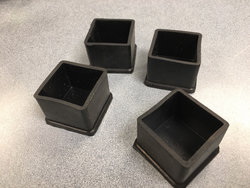
The mail came early today... Got my 90 degree 1/4” adapters and the 1 foot USB cable as expected, and I also got these...

05f82ea925f38c1ee8c51c89c293f7c6.jpg

... YEP... those are the little feet/cups I ordered, which I was gonna attach to the mobile platform I made for my DJ table... Guess it figures they’d get here FINALLY after I made my own...

30a02fb746d6505a7359c62123c77d54.jpg

... No clue what I’ll do with these???[emoji1]

Also, the 90 degree 1/4” adapters don’t work... they’re CR@P!!![emoji1]. There was one review on Amazon that simply said “Never Worked”... Too bad they didn’t explain why, because I could have avoided them had I known that the female end is defective... I opened one up to see why a male jack could not be inserted, and it was apparent that it lacked the proper depth and clips for a male jack to go in. Ordered some from Markertek moments ago, which I’m certain will work, because... because they’re from Markertek.[emoji4]

The one foot USB cable, on the other hand, WORKED GREAT![emoji4] So at least that’s ONE more task completed.[emoji4]

I found a good use for that 2 Port USB hub that I didn’t end up using with my Surface Pro. The Dell AIO PC only has two USB ports on the side. It has several in the back, but I have a panel covering them, and it’s not easy to take the panel off while the PC is attached to the VESA bracket. Right now I have a wired keyboard and a wired mouse plugged into the side ports (better to have them wired while setting up software), so I need ONE more to plug in the USB hard drive with the backup copy of my music library. The two port hub gives me that ONE extra port.

Got all my applications reinstalled on my Dell AIO PC. Traktor is working. Now I just need to copy my music library over.

UPDATE: My Music Library files are copying over now. Says it’s gonna take 14 hours, but I don’t think so. It didn’t take anywhere near that long to copy the files on the external hard drive I’m using to start with. The easiest way to do this, I decided, was to copy from the external drive attached to the new USB 3.0 Hub that’s attached to the Surface Pro. Since both PC’s are connected to the same gigabit switch, it should be pretty fast... maybe not as fast as if I connected the external USB drive to one of the USB Ports on the Dell AIO PC, but pretty fast.
 
Last edited:
  • Like
Reactions: ittigger
Cleaning up today... Not much more to do until my 1/4” Right Angle Adapters come, and I get this PC problem resolved. I have scores of pieces, parts, and cables that didn’t get used, so I need to sort them all out, put them in containers, and get them stored back out in the garage. My wife will be happy if I do that... She needed to make a copy last night, and couldn’t get close to the copier because all my cr@p was in the way.[emoji1]

Got back with Dell, and the Tech says he thinks I have a bad motherboard. That was always a possibility, but I was hoping that was not it. Fortunately, they will send it with a technician to replace it. I’m pretty competent at computer repairs, but not with these AIO computers. There are too many parts stacked and packed inside these things, and the motherboard is at the very bottom, underneath it all. I could probably do it, but would rather have someone do it who knows what they’re doing. Hopefully the technician will.

In the meantime, I made an offer on a new one on eBay. Hopefully I’ll hear back soon, as there’s another option, but the listing expires later today. Wouldn’t want to miss out on a good option if my offer is rejected.


Sent from my iPhone using Tapatalk
 
  • Like
Reactions: ittigger
Feelin’ pretty happy at the moment.[emoji4]... Just bought a brand new Dell Optiplex 7440 on eBay. So even though I expect to have my current AIO PC fixed on Friday, at least I’ll have a spare, just in case something else happens. Weird thing is, my computer hasn’t crashed even once today.

As for buying the new computer, I made an offer on a different one earlier this morning. It was a factory refurbished PC, but still a Dell Optiplex 7440. The seller countered, and I countered back with my best offer, and the seller declined. So I made the same best offer on the brand new one just before that listing expired. The seller originally countered at $50 more than my offer, then suddenly retracted the offer and sent me a message saying he would sell it for my price if I was still interested. I replied that I was, so he relisted it for my offer price and I quickly scooped it up.[emoji1]

The down side is; I bought ANOTHER computer. I did NOT wanna buy another computer. I’ve been trying to get rid of computers, not get more.[emoji1] But this is part of my OCD disease.[emoji1]... EVERYTHING has to function and look like new. I have a (new) rule though (to appease my wife); if I buy a computer, I have to get rid of one I already have. I have one stored out in the garage I’ll give away to somebody. It’s an old Dell Optiplex SX270 that I bought to host a MagicJack back when MagicJacks had to be plugged into a PC. It currently has the original Windows XP OS, but I could load Linux on it, and it would make a great (safe) browsing PC for somebody’s kid(s).[emoji4]

The computer I just bought is brand new and has a touch screen, which my current AIO PC does not have. Otherwise, the CPU and memory size are pretty much the same. Only 1TB of disk space, but no big deal. I have larger drives around here I can put in it. Frankly, I should really work on trimming my music library down anyway. There’s not a good reason for a having a music library (to DJ with) so large that it won’t fit on a 1TB hard drive.

Got all my pieces, parts, cables, and cr@p sorted out and staged for taking out in the garage to store. But THAT’S for tomorrow.[emoji4]
 
Last edited:
  • Like
Reactions: ittigger
GEEZ... It seems like there’s ALWAYS somethin’. If it was not for the three lights (positive, negative, and ground) on the CyberPower rack-mount power strip, I would NEVER have caught this problem... Everything is running in my Small System, but the ground light wasn’t lit. There were several possible points of failure, but through a process of elimination and switching cables from my Large System, I narrowed it down to the little Powercon cable...

Monoprice Stage Right Series 16 AWG NEMA 5-15p to powerCON Connector 1.5FT

https://www.amazon.com/dp/B01N6UM1QD/ref=cm_sw_r_sms_c_api_u2BDBbVG53XS7

... and I discovered if I jiggled it around a bit on the Powercon connector end, I can get the ground light to go off and on. That’s not good. These cables/connectors MUST be working perfectly. A bad cable would be BAD if it happened at a gig. I ordered some more, but NOT Monoprice this time. After I get the new cables, I’ll cut the Powercon connector off and put another one on that I wire MYSELF. It will be perfect, or it goes in the trash.


Sent from my iPhone using Tapatalk
 
  • Like
Reactions: ittigger
... through a process of elimination and switching cables from my Large System, I narrowed it (the unlit ground light on my CyberPower rack-mounted power strip) down to the little Powercon cable...

Upon further review... I took one of the Monoprice Powercon cables apart and the wires looked fine. I loosened the screw to the ground wire, pulled out the wire, then re-secured it and tried the cable again... Still no ground light. This time I jiggled the connector, and the ground light flashed on and off. That means my problem is in either the Powercon connector itself, or in the outlet it’s plugged into. Guess I’ll have a better idea when the new cables I ordered get here. I have other outlets, but don’t currently have replacement Powercon power in connectors. I ordered some of those too. I didn’t really get how all this Powercon stuff worked until I had to troubleshoot this problem. I got a quick education, and now I get it.[emoji1]


Sent from my iPhone using Tapatalk
 
  • Like
Reactions: ittigger
Upon further review... I took one of the Monoprice Powercon cables apart and the wires looked fine. I loosened the screw to the ground wire, pulled out the wire, then re-secured it and tried the cable again... Still no ground light. This time I jiggled the connector, and the ground light flashed on and off. That means my problem is in either the Powercon connector itself, or in the outlet it’s plugged into. Guess I’ll have a better idea when the new cables I ordered get here. I have other outlets, but don’t currently have replacement Powercon power in connectors. I ordered some of those too. I didn’t really get how all this Powercon stuff worked until I had to troubleshoot this problem. I got a quick education, and now I get it.[emoji1]


Sent from my iPhone using Tapatalk
Order PowerCon connectors, not PowerCon-like. I've given up on anything but Neutrik for power or XLR connectors .. they just always work.

**edit** SpeakOn too .. I've been burned by crappy Chinese clones ...
 
Last edited:
Order PowerCon connectors, not PowerCon-like. I've given up on anything but Neutrik for power or XLR connectors .. they just always work.

**edit** SpeakOn too .. I've been burned by crappy Chinese clones ...

Thanks... The ones I ordered this time are Neutrik. Had to order them on eBay, ‘cause Amazon ain’t got ‘em.[emoji4]


Sent from my iPhone using Tapatalk
 
  • Like
Reactions: ittigger
Does anyone else have problems searching Amazon vs searching eBay? The items are usually there - but they don't come up under what one would think is a key word (especially if it's in the title).

Amazon's prices also seem higher than eBay for the same item.
 
SOoooo... Today, I’m sittin’ around waiting for the DELL dude to come and fix my Small System main computer (Dell Optiplex 7440 AIO). Got a robo-call from Dell this morning to verify my appointment and said the tech would arrive between 9AM and 1PM. It’s just a couple of minutes before 1PM now... no technician yet. No matter... since I’m stuck waiting, I’ll work on my documentation. I document my systems (manuals for every piece of gear and components, wiring diagrams, important support documents and warranties, etcetera. I keep the documents in a binder, which I keep in my minivan. I also keep the digital versions of all the documents on my Server. It’s a little tedious, but it’s not difficult to do, and I can do it while watching TV... or waiting for the Dell Dude.
 
  • Like
Reactions: ittigger