


RE-Reworking My Small System... AGAIN

To many ads? Support ODJT and see no ads!
Didn't get the sound card or the shelf yesterday.:(... The sound card is "Out For Delivery", so it looks like I might get it today. The rack shelf is at the local Post Office, but it's not out for delivery, so maybe I'll get the shelf on Monday. I'm ready for those final pieces to arrive... the rack shelf is really the BIG hold-up. I need it in order to mount all these smaller internal components. I even figured out how I'll mount the USB hard drive. I pretty much have the wiring done other than connecting the sound card. There's a BUNCH of cables, cords and connections in this thing (48 connections counting audio, network, power, and USB). Here's what my wiring diagram for this thing looks like...
1533404077180.png
... I know... It looks REALLY busy, but I have the different wire types layered, so I can print a copy with JUST the power, or just the USB, etc.... or any combination of the four types.:djsmug:
 
Last edited:
Didn't get the sound card or the shelf yesterday.:(... The sound card is "Out For Delivery", so it looks like I might get it today. The rack shelf is at the local Post Office, but it's not out for delivery, so maybe I'll get the shelf on Monday. I'm ready for those final pieces to arrive... the rack shelf is really the BIG hold-up. I need it in order to mount all these smaller internal components. I even figured out how I'll mount the USB hard drive. I pretty much have the wiring done other than connecting the sound card. There's a BUNCH of cables, cords and connections in this thing (48 connections counting audio, network, power, and USB). Here's what my wiring diagram for this thing looks like...
View attachment 34958
... I know... It looks REALLY busy, but I have the different wire types layered, so I can print a copy with JUST the power, or just the USB, etc.... or any combination of the four types.:djsmug:
Just need to redo the diagram with the components to scale .. you know, OCD and everything .. :)
 
Just need to redo the diagram with the components to scale .. you know, OCD and everything .. :)
You don't think my wiring diagram is GEEKY enough already???:laugh:... Seriously, though, it took over an hour to get everything wired up, EVEN with the diagram. I have NO IDEA how some guys can do it live at a gig (and get everything working right) without a pre-wired rack????
 
Last edited:
  • Like
Reactions: steve149
HEY!!!... Look at what I just got!!![emoji1]... Now I need to open ‘em up and make sure everything is OK... Then PLAY TIME!!![emoji1]

UPDATE: Shelf is good, but not as many vent slots as I would have liked, so heavier than it would have been with more holes in it.

The NI Audio 2 DJ is just as described, BUT... the manual came with it. Wasn’t expecting that, so I found a PDF version (not available on Native Instrument’s site) and downloaded it. Haven’t printed it though. No software... was not expecting that either. Got two audio cables, but no USB. Again, the USB was not in the pictures or description, but that’s OK, because I will be using one of my one-footers anyway.

Overall... pretty happy.[emoji4]
 
Last edited:
OK... Looks like everything works. YAY!!! No problem loading the driver for the Traktor Audio 2 DJ sound card, and it works just fine. I haven’t loaded Traktor Pro on my Surface Pro yet, but I tried it with DJay Pro and it works great. I setup Channels 1-2 for the main device, and Channels 3-4 for the queuing device. Not sure yet if I like the queuing feature in DJay Pro... might take some getting used to, but it’s quite different from the way it works in Traktor. I’m still undecided about which application I’m gonna run on my Surface Pro (using it as my backup). Traktor is familiar and it would be consistent with my other computers. DJ Pro, however, has a MUCH better interface for a small screen, and it has touch-screen capability and Spotify integration, plus a few other features I like. It’s a hard decision.

I need to decide pretty soon though. I have a gig at the beginning of September, and this Small System would be perfect for that event. I won’t need to do too much testing, because the only big change I made was adding the Rolls mixer. The main computer and wireless microphone system are essentially unchanged, except that they now connect to the PA speakers through the Rolls. The Surface Pro needs to be tested, of course, as do all the contingencies.

I’ve been testing the Surface Pro with all the components (USB Hub, Sound Card, Hard Drive, and Ethernet Adapter) connected outside of the rack, and none have been mounted on the new rack shelf yet. I decided to switch the Laptop Stand/Robotic Arm to the left side (when facing the front) of the rack. It’s now consistent with my Large System (having the Monitor for the backup computer on the left). It’s gonna require some rearranging of the jacks on the patch panel, but swapping the mount for the robotic arm was as easy as flipping the 2U vented rack panel (on which the mount is attached) upside down. The mount pivots 180 degrees, so it was easy to loosen the knob and point the pole back up. I also think it will work better to mount the patch panel in the top 1U space on the back of the rack (above the vented rack panel) in order to mount the shelf underneath. A little more work, but I think I’ll have it done pretty soon now.[emoji4]
 
Last edited:
  • Like
Reactions: ittigger
I wish I wasn’t such a dadgum perfectionist![emoji1] It would be SO EASY if I could just dump all these little components inside the rack and just be done with it, but NOoooo... I have to attach them to a shelf, and it has to look nice and be easy to hookup and swap out when necessary. Takes time to do it that way. I learned some lessons when mounting the computers and components on a rack shelf in my Large System. I actually screwed the computers to the shelf... made removing them NOT very easy. I think I’m gonna go for something a little less permanent this time. However, it will involve fabricating some custom mounts for the Ethernet Switch, External Disk Drive, Sound Card, and USB Hub... maybe even for the USB Ethernet Adapter and Controller Power Block as well.[emoji4]
 
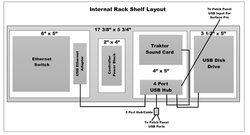
Today... perhaps I’ll get that rack-mount shelf done. Kinda got the SLOWS today... Monday morning blues... weekend hangover... whatever!![emoji1] I planned out my layout...
fd270c264de64ccee008f6050463f838.jpg
... so now I just need to cut the mounts. Not sure if I have stock that’s thin enough. Can’t make them too thick because it adds weight and the components mounted on them may interfere with other internal installations. Best to keep everything within height of the 1U space. Had to order a 1 foot USB extension cable because the permanent USB input cable of the USB Hub is too short to reach the patch panel. RATS!!!... I have plenty of long USB extension cables, but you know how I feel about having unnecessarily long runs of cables inside my racks??![emoji1]

UPDATE: I was right. I have 1/2” thick stock, but really would rather use 3/8’s inch. Guess I’ll hit Home Depot tomorrow. I need to get a couple of locking casters too.[emoji4]
 
Last edited:
  • Like
Reactions: ittigger
LOL... I said more or less because I haven’t added that table space I need. However, it wasn’t part of the scope. I completed everything in the plan (and more).[emoji1]


Sent from my iPhone using Tapatalk
 
  • Like
Reactions: Dan The Man
This is NEVER gonna end!:nod:

I must admit, however... You guys giving me a hard time about not completing a project DOES motivate me to get busy.[emoji1] Without the feedback, who knows how long it would take me to finish a project???[emoji1]... THANKS!


Sent from my iPhone using Tapatalk
 
I’ve been debating (in my head) about what DJ software to use on my backup computer. I think my biggest issue is there’s NO use of a controller with my backup PC unless I run Traktor. Would I be comfortable running DJay Pro for more than few minutes if my main PC had a power supply failure? If I run Traktor on my backup PC, I can swap the USB cable on the patch panel to connect my controller to my backup, but it generally requires a reboot of the PC. With DJay Pro, the touch-screen interface (and just the way it’s setup) works better with a small tablet screen, like the one I have with my Surface Pro. The Spotify support is a feature I don’t have at all with Traktor. However, trying to mix without a controller would be HARD![emoji1] It’s a tough decision, but I’ve decided to run BOTH. I’ll set up the system initially running DJay Pro on the backup PC so I can play a Spotify track during the event if necessary, but if I have a MAJOR main PC failure, I’ll play a playlist on my iPad for a few minutes until I can switch the backup PC over to Traktor, and connect it to my controller.

Now... I will no longer have a backup for my controller. I’ve never had a controller failure, and it’s a good thing, because even when I used to carry a spare controller, changing it out during the event would have been... difficult, because my backup controller was a different brand/model. Even when I had a spare Denon MC6000MK2 (before I reworked my Large System), it still would have taken some time to remove one from the rack and replace it with another one, and reconnect all the cables. But at least it would not have required software setup changes. I’m a little concerned about it. If I have a controller failure, it really puts my main DJ computer out of commission too. I would HAVE TO use the backup computer with DJay Pro. I would also have to use one of the two wireless mics, because my main mic is wired to the controller.

What if the Rolls mixer fails???... Got no backup for it either. I’d have to swap the XLR cables from the patch panel to connect directly to the controller. Not too difficult, but it does put the Surface Pro out of commission. AND NO wireless mics! My microphone (the Bogen gooseneck) is wired to the controller, and I have a second wired mic connection on the patch panel, so that would become my only option for guests. I have other mixers (not Rolls’), but swapping a rack-mounted mixer out during an event would be impractical. I just better pray (if the Rolls mixer fails) that I have no other equipment failures during the gig. Praying is good, but a BAD contingency plan.[emoji1]

Wireless microphone system... No backup for it either... well, not a good one. I have a couple of older wireless mics around here, but would not consider using them for a gig. However, I have a second wired mic, so that’s my current backup. Not a great backup option, but it’s workable. I also have one more input to the mixer on my patch panel that could be used for a small single or dual port wireless mic system. I think that’s the best option. I have this same contingency hole with my Large System, so a small wireless mic system would be a good acquisition.

Today I’ll work on the mounts for the components that need to be attached to the rack shelf. Cutting the mounting platforms is easy. They’ll need to be painted though. It’s raining outside today, so it may take a while for paint to dry. Depending on the drying time, there’s a good chance of completing the shelf today.
 
DADGUMMIT again!!![emoji1] I’m putting a USB hub in the rack (on the rack shelf) to provide the needed USB ports for the Sound Card, disk drive and Ethernet adapter for the Surface Pro, which only has one USB port. I have the 4 Port USB hub, but with only 4 ports, I’m 1 port short of the 2 I want (and already mounted) on the patch panel. Why do I need 2???... If I have to use the Surface Pro for a backup, I might need to hookup a keyboard, and may want to attach it to the controller. I could make the controller to USB hub connection inside the rack using the same port as the Sound Card, but I’d prefer NOT to be diggin’ around inside the rack during a gig unless it’s ABSOLUTELY necessary.

...SOoooo... I ordered a two port USB hub on Amazon.com., and that’s the DADGUMMIT. It shipped... from CHINA[emoji37], and may not be here until late September. That’s not gonna work. This happens to me pretty often when I buy stuff on Amazon. I should just cancel it, but I won’t. I did, however, order another one on eBay that will be here by Monday.[emoji4]


Sent from my iPhone using Tapatalk
 
Why not get a 6 port hub instead?
 
  • Like
Reactions: DJ Bobcat
Why not get a 6 port hub instead?

Considered it, but I like the size and shape of the four port, AND... I wanted to use what I had.[emoji4] The 2 Port was really a good idea... Well, except they don’t exist in AMERICA!!![emoji1]
 
  • Like
Reactions: DJ Bobcat