RE-Reworking My Small System... AGAIN

To many ads? Support ODJT and see no ads!
Fixed that for you ...

Not sayin’ there won’t be ANOTHER makeover of my Small System. I’ve learned never to say never, but I have OTHER ideas for what’s next.

My next project, I think, will be an ALL NEW Large System. I want it to be a little larger, and a little more up-scale than my current Large System (which will then become my Medium System).[emoji1]

I’m already thinking about the design. It won’t look anything like my rack systems, and I’ll start from scratch... using none of the components of my Small or Large (Medium) systems. I’m not ready to start on it yet, but when I am, I’ll start another thread.[emoji4]
 
  • Like
Reactions: ittigger
Not sayin’ there won’t be ANOTHER makeover of my Small System. I’ve learned never to say never, but I have OTHER ideas for what’s next.

My next project, I think, will be an ALL NEW Large System. I want it to be a little larger, and a little more up-scale than my current Large System (which will then become my Medium System).[emoji1]

I’m already thinking about the design. It won’t look anything like my rack systems, and I’ll start from scratch... using none of the components of my Small or Large (Medium) systems. I’m not ready to start on it yet, but when I am, I’ll start another thread.[emoji4]
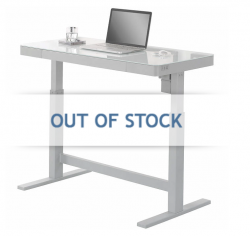
I saw a cool glass topped powered desk at Costco that could be the basis. Touch controls in front that raised/lowered it .. could be cool.

Apparently, it's out of stock, but you can get the gist .. add some wheels, a small facade ..

1535036855316.png
 
I saw a cool glass topped powered desk at Costco that could be the basis. Touch controls in front that raised/lowered it .. could be cool.

Apparently, it's out of stock, but you can get the gist .. add some wheels, a small facade ..

View attachment 35000

That is a pretty nice looking table... Any idea what the name of the manufacturer/brand is?


Sent from my iPhone using Tapatalk
 
  • Like
Reactions: ittigger
Very elegant, but once you try to hide any cables, that may take away much of the nice look.
You build the cabling into the "booth" .. plenty of room under the table for an electronics cubby and one could always put a small panel in front if desired.

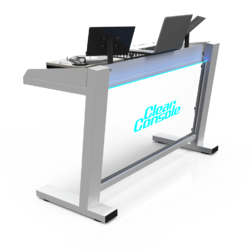
Some of the neater current booths are fully open ..

Stereo.T_Close_Up_DJ_2-1600x1000.jpg

dj-booth-clear-console-classic-2l.pngVS-80.jpg
 
Very elegant, but once you try to hide any cables, that may take away much of the nice look.

Mine will have a Floating Facade, similar to the one I made for my Large System, only the new one will be slightly larger.


Sent from my iPhone using Tapatalk
 
  • Like
Reactions: ittigger
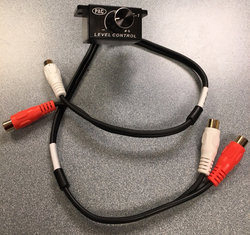
The Volume Control I ordered has reached my local post office. Tracking doesn’t say it’s “Out For Delivery” yet, but delivery today is looking very likely. That will be nice... nice to be able to work on one of MY projects and get somewhat back to normal. Got my daughter moved yesterday... What an ordeal!... Moving the in laws, daughter, and a tree, all in the span of 6 days... CRAZY. I’m ready for a rest.[emoji1] I still have to go hang pictures at the in-laws’s and at my daughter’s. Seem NOBODY is capable of hanging pictures, so I always get elected any time someone in the family moves. But not today. Today I’m just gonna work on my own projects... if I WORK at all.[emoji1]
 
  • Like
Reactions: ittigger
OK... the Volume Control came...

dafb0d3b1849f8e23393b2ceebf232f7.jpg

Looks like it’s gonna fit, but under-mounting it on the hinged rack panel is gonna take a little doing. The mounting screws are on the side instead of the top, so I need to turn that around a little bit. Not a big deal... I’ve faced more difficult obstacles.[emoji4]
 
  • Like
Reactions: ittigger
And there we go...
a89c73292f8d0f7ba589de29c2ad0a1f.jpg
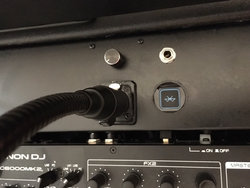
... DONE!!!... And it works beautifully![emoji4] The volume knob is mounted just to the left of the headphone jack, and just above the Bogen microphone. Maybe not the ideal location, but that’s where it fit the best. It’ll work. It looks pretty good; huh?[emoji3]

So that’s it... That was the last thing I was gonna do on this project... and it’s done... over.[emoji4]
 
Last edited:
  • Like
Reactions: ittigger
I've been playing around on my Small System all evening, and....... I LIKE IT!!!:djsmug:

1535161752929.png

... Everything is working GREAT, and it looks pretty good too. I have a gig coming up in September, and right now I'm thinkin' this system will be perfect. Still have to finish up my documentation, but I think I got a winner!:)

I decided that I’ll start up my main and backup computers before every event, and I’ll share the mouse and keyboard. Right now, I’ve got the Surface Pro keyboard hooked up too, but if my main system goes down, I also have a Bluetooth mouse for the Surface Pro. I could never use the touch-pad if I really had to use the Surface Pro for more than just a few songs. Having both systems up from the git-go means it’ll be pretty unlikely I’ll ever need to use the iPad or the laptop, but I’ll have them just in case.
 
Last edited:
  • Like
Reactions: ittigger
Gettin’ ready to wrap up this thread. I’ll take some pics of the finished System and post a synopsis later... not today. I’m gonna take a couple of days off from projects while preparing for my next event. I AM planning to use this Small System early next month.

So the primary components of this system are essentially unchanged... The Denon MC6000 MK2, the GTD Audio G-622HL, and the Dell Optiplex 7440 AIO computer; all still the same, unless you wanna consider the new motherboard in my computer.

So what’s different about this system from before this project???... Well, more electric outlets, but that was EASY. The BIGGEST difference is the Rolls RM-69 Mixer. Having the mixer allows me to have better control of my two wireless microphones, but it also gave me better connectivity for backup options.

The backup systems are the other BIG, important additions. I always had backup capability (laptop PC and mixer), but now everything is integrated into the rack system, not completely separate from it like it was with the previous iteration. I still have the separate backup if I absolutely have to use it. However, having my Surface Pro integrated into the rack system will make it MUCH easier to switch to the backup if my main computer or controller fail.

The little Bluetooth Receiver I added makes using my iPad Mini a lot easier. I have the same capability on my Large System, and really wanted it on my small one. It was simple (with the addition of the mixer) and inexpensive, and it works great.

And finally, I improved the appearance of my Small System setup with the addition of my Floating Facade. I built the Floating Facade for my Large System, because I could no longer use the table cloth, which allowed me to hide the cables on the back of large rack system (that rolled under the table). I can’t use my table with my new (split rack) Large System like I can with my Small System and the rear of the large rack is extremely busy (lots of unsightly cables) and needed to be covered. My Small System has a lot less going on (cable wise), but being able to use the Floating Facade is still a BIG improvement over the table cloth. I can still use the table cloth if I want to, but now I have the option to make my booth look a little more elegant.

Internally, there are quite a few changes. Wiring for the backup system (NI Audio 2 DJ Sound Card) to the Rolls mixer and the addition of an Ethernet switch (for connecting computers) added some complexity, but I think it’s worth it to have all the additional functionality.

I have been testing this system for a couple of days now, and I’m please with the results. It was well worth the time and money I put into it. Will there be an ROI on this project???[emoji1] NOPE!!!... Not likely. But you can’t put a value on peace of mind, and the improved contingencies and added features give me peace of mind.[emoji4]

 
Last edited:
  • Like
Reactions: ittigger
Today I got my new Dell Optiplex 7440 AIO Touch performing pretty good. I’m still thinkin’ about getting an SSHD drive to replace the conventional 2TB drive I put in there, but the performance is at least acceptable. SOooo... now the obvious question... Do I replace my old AIO computer (in which the new motherboard was installed) with this brand new touch screen computer, or do I just keep the new one for a backup?

It wouldn’t likely be a backup I’d carry to events, as changing out the computer, while not difficult, requires removing the screws that mount the computer to the VESA bracket and swapping out some cords, which takes a little time... Doable... just not what you’d want to have to do when you’re trying to keep the music playing.

The touch screen is shiny, where my older AIO (not a touch screen) has a non-reflective screen. When in operation, the glossy screen seems to be OK... not sure how it would work out in actual use, but I’ve tried it out in my office with the lights out, and it’s fine. As for touch-screen capability... don’t really have much use for it right now... Maybe in the future?

I’m leaning toward leaving the old computer in place. I’m vacillating.[emoji1]
 
Last edited:
  • Like
Reactions: ittigger
Bobcat...two quick questions... How much have you spent on these "re-work" projects? How many events have you received money on in the last 4 months?

It just seems to me you're spending a lot of money with little ROI potential....

I get that you enjoy the re-works and are REALLY good at it, so if it's only enjoyment for you, I get that...