A really dumb DMX question

To many ads? Support ODJT and see no ads!

rickryan.com

Mac Daddy DJ
ODJT Supporter
Dec 9, 2009
20,049
18,433
62
Hendersonville, TN
www.rickryan.com
I'm decently up on DMX. Been using it with various fixtures, but always turn on/turn off stuff. I have an Obey 40 controller as well as myDMX. I like myDMX but it's been a bit flakey. I'll turn on a scene and let it run and, no particular reason, the fixtures go off and I have to knock the program down and restart. Haven't worried about fixing it to this point.

I have a large church concert I'm doing, a week from Sunday (4/21) and I'll be providing uplighting. Nothing complicated. I'll have about 25 cans on 1 DMX address and 25 more on another address (have them setup for 3-channel operation) to let me do various scenes of either 1 or 2 color patterns. These will not be blinky, chase to the music stuff, just simple color scenes. I've already setup a handful of scenes on the obey 40 but the problem is the switch is an instant change and I'd rather have it fade from one color to the next.

Can any of you guys point me in the right direction? I'd really prefer to use the obey 40, for simplicity, if possible. BTW, I do have the open source software (can't remember the name at the moment) but not even sure where my USB dongle is for that one.
 
Have you played with the fade time slider?
 
RickRyan.com: If your dmx or main drive is a green one, and you don't have a "keep alive" feature or ancillary program activated, when the drive stops spinning, unless the program holds the settings during 0 activity, bye bye.

Invest in a program that doesn't drop settings, a hard drive that doesn't stop spinning, and if wireless, a wireless transmiiter that holds last setting until signal is restored.

Other than those items, nothing to worry about. LOL

For hardware controllers, not sure, but if there's any power issues, that would be my first guess.

BTW: FreeStyler I think is what you are looking for:
 
Last edited:
okay Cap, looks like softjock's MDS software keeps myDMX alive. Thank you Cap and Capt Rick. Now, I still can't figure out how to get either my obey 40 or mydmx to fade from one color scene to another. On the Obey, I can't get the speed or fade time to do anything. I've got an old NSI controller and will probably try that next. I hate the thought of manually doing color fades but that may be what ends up happening.
 
okay Cap, looks like softjock's MDS software keeps myDMX alive. Thank you Cap and Capt Rick. Now, I still can't figure out how to get either my obey 40 or mydmx to fade from one color scene to another. On the Obey, I can't get the speed or fade time to do anything. I've got an old NSI controller and will probably try that next. I hate the thought of manually doing color fades but that may be what ends up happening.
This is what usually happens with DJ Grade equipment. Get Tour Grade or at least upper level.
 
This is what usually happens with DJ Grade equipment. Get Tour Grade or at least upper level.

"Tour Grade" for a freebie gig. I'm shopping dedicated controllers now. I doubt I'll go with anything huge but there are some decent-sized DMX consoles for not a lot of scratch that I may pony up for. One other option, I do have an old NSI controller that I used with power packs. I've gotta pick up a 15 VDC power supply and it may serve the purpose. The main thing I'm missing is a master fader, which the NSI has. If I get any more of these production type gigs I'll need to bump up to something to control other fixtures but for this one the only thing I'm doing is controlling 40-50 LED pars.

I am tempted to add some traditional par cans, as the back few rows of the choir need some more ambient but I'm almost ashamed to show up with my little hodge-podge of cans, not to mention I'm skeptical that a half-dozen would even do the job. I may do better to just do the color stuff and see where it lands. I did find out the church is hosting a reception for the pastor's 60th birthday (he's the featured singer/songwriter for this event) so I'm tempted to take 10 of my cans and go do a static uplight job for his reception.

- - - Updated - - -

This is what usually happens with DJ Grade equipment. Get Tour Grade or at least upper level.

"Tour Grade" for a freebie gig. I'm shopping dedicated controllers now. I doubt I'll go with anything huge but there are some decent-sized DMX consoles for not a lot of scratch that I may pony up for. One other option, I do have an old NSI controller that I used with power packs. I've gotta pick up a 15 VDC power supply and it may serve the purpose. The main thing I'm missing is a master fader, which the NSI has. If I get any more of these production type gigs I'll need to bump up to something to control other fixtures but for this one the only thing I'm doing is controlling 40-50 LED pars.

I am tempted to add some traditional par cans, as the back few rows of the choir need some more ambient but I'm almost ashamed to show up with my little hodge-podge of cans, not to mention I'm skeptical that a half-dozen would even do the job. I may do better to just do the color stuff and see where it lands. I did find out the church is hosting a reception for the pastor's 60th birthday (he's the featured singer/songwriter for this event) so I'm tempted to take 10 of my cans and go do a static uplight job for his reception.
 
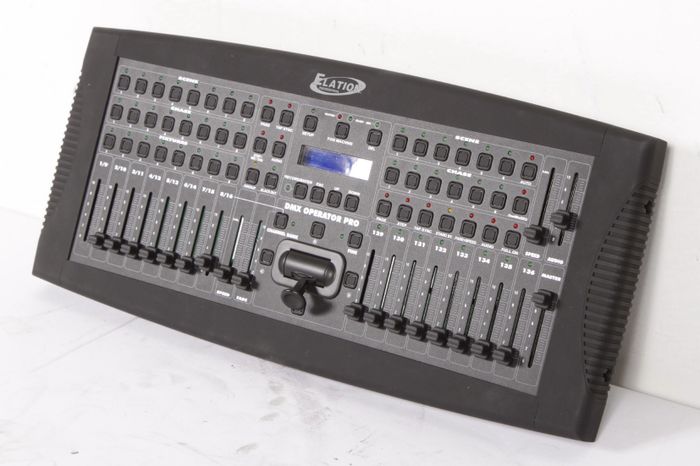
Update: I went to GC and bought an Elation DMX Operator Pro.
DV016_Jpg_Large_802223007000005_USD1.jpg

It's a tabletop model that, I assumed, would be a bit more advanced than an Obey 40. I haven't tried it using scenes or chases but when you grab the fixture, the master fader does nothing (like the Obey 40). After doing some googling, it's looking like it may be no better than the Obey, in terms of doing a crossfade. Seems pretty ridiculous to me to have ANY kind of equipment, DJ or "tour grade", that wouldn't have a master fade or crossfade function, built-in. I'll mess with it some more this week but my next option is an old, old NSI controller that generates DMX-512. Biggest hassle with it is it uses a dimmer pack to draw power for the console or I could go try to buy a 15 VDC power supply. Bet that one's a special order. This freebie gig is turning into a lot of hassle.
 
Hey Rick, please explain to me what you mean by 'crossfade' when discussing lights. Do you mean simply 'fade' from one scene to another? I do that using my 'Speed' and 'Fade Time' sliders on my Elation DMX Operator 192.

Edit: But you have to have scenes recorded in order to do that.
 
Last edited:
  • Like
Reactions: 1 person
A quick point of order for you Rick. The recommended number of fixtures on a DMX bus is 31. By my count you have 50. You should use a DMX distribution device to put them onto different runs and be certain to use a good quality DMX cable to avoid weird issues.

As for the fade issue, it looks like you're set with a controller... but this is REALLY, REALLY easy to do in ShowXpress with version 6.32 or newer.

Ben
 
  • Like
Reactions: 1 person
A quick point of order for you Rick. The recommended number of fixtures on a DMX bus is 31. By my count you have 50. You should use a DMX distribution device to put them onto different runs and be certain to use a good quality DMX cable to avoid weird issues.

As for the fade issue, it looks like you're set with a controller... but this is REALLY, REALLY easy to do in ShowXpress with version 6.32 or newer.

Ben

Thanks Ben, good to see you here. I'm probably only going to set 30 cans on the DMX chain. I'm thinking 10 static (amber) in front of the choir and use the back row (DMX) for colors. I'm using the other 10 cans in a different room to do a single color static presentation for the Pastor's birthday party. I also have several Chauvet d-fi plus wireless units (I think you sold me some of those in fact) that I can use to break up into multiple segments, should there be an issue with cable length. BTW, my cables are 8' and 10' that will be used between cans.

Regarding the fade issue (Wes), I have an old NSI system that has a fade speed and master fade on it. Those master busses override all the channel fades so if I want a slow transition to a different scene or black-out, just pull the master fade speed down. It appears the newer DMX controllers will also do that but I found a forum at "DoItYourselfChristmas.com" with a thread that talks about toggling the TAPSYNC mode from "Pan & Tilt Only" to "All Channels". Apparently, it's an issue of mixing cans with other intelligent fixtures (heads, scanners, etc.). The cans need fade ability while the intelligent stuff needs on/off. I think this new controller is just the newer version of what you have so I'm hoping that switching this mode will make the speed/fade sliders work like true master faders, like I've used before. Even if I don't get this figured out, worst case scenario is that I'll simply manual-mix colors on the fly, between songs. The people I might want to impress with my rig will be on stage and won't see me doing it manually. I figure I can stick a laptop with mydmx and that Elation on the table and it should look all "high tech and stuff".

BTW Ben, I'd dearly love to have Showxpress but just can't fork another 5 bills right now.
 
Last edited:
  • Like
Reactions: 2 people
My pleasure Rick. Sorry I haven't been around as much as I'd like to. I'll try to be more of a "regular" again.

If and when you are ready to make the leap to ShowXpress... you might be surprised how few bills it takes. :)

Ben
 
  • Like
Reactions: 1 person
Rick why is this a dumb question? Just because you've been doing this a long time doesn't mean everyone has. You asking your question could easily help someone that either is thinking about doing such lighting and don't know what to do or which way to go.
 
My pleasure Rick. Sorry I haven't been around as much as I'd like to. I'll try to be more of a "regular" again.

If and when you are ready to make the leap to ShowXpress... you might be surprised how few bills it takes. :)

Ben
That is the route I want to go too but with a Touch Screen for controls. I used an Old version of Show Express back in 2006 when I was doing a 4 year gig at a Club. It is awesome.
 
I'm decently up on DMX. Been using it with various fixtures, but always turn on/turn off stuff. I have an Obey 40 controller as well as myDMX. I like myDMX but it's been a bit flakey. I'll turn on a scene and let it run and, no particular reason, the fixtures go off and I have to knock the program down and restart. Haven't worried about fixing it to this point.

I have a large church concert I'm doing, a week from Sunday (4/21) and I'll be providing uplighting. Nothing complicated. I'll have about 25 cans on 1 DMX address and 25 more on another address (have them setup for 3-channel operation) to let me do various scenes of either 1 or 2 color patterns. These will not be blinky, chase to the music stuff, just simple color scenes. I've already setup a handful of scenes on the obey 40 but the problem is the switch is an instant change and I'd rather have it fade from one color to the next.

Can any of you guys point me in the right direction? I'd really prefer to use the obey 40, for simplicity, if possible. BTW, I do have the open source software (can't remember the name at the moment) but not even sure where my USB dongle is for that one.

On the manual controllers if you can run a program but then it stops - it may simply be that your controller is not set to loop or repeat the chase (assuming it has that ability.) Some controllers offer macros or a level beyond the chase - where you can create chases of chases and even embed scenes and nested macros. It allows for more complex loops that don't reveal the cyclical nature of the loop.

The rest state of the hard drive on a PC application is a good tip to know - you'd think a software manufacturer would know better than that. Apparently not.

The cross fade and color mix is as much a function of your fixtures as they are any controller. The fixture itself has to be cable of a color fade or color mix, such as RGB or CMYK. If it is not, then color fades are only possible using multiple fixtures - as one would do with conventional pars. Are there any RGB or tri-color LED fixtures that don't have color fade or color mix capability? I don't know. I think that would be a function of the logic circuits on their respective boards. I do know there is a lot of essentially disposable (cheap & inferior) product out there. Fixtures that use a color wheel will always "snap" to color at the end of a movement or program step.

Color changing is accomplished by a chase or macro - and you need to set both a chase speed and a cross fade time. Simple advancing through scenes by selection will usually "snap" from A to B without these other parameters applied. Chase speed is how long before a step is triggered - while cross fade time is how long the transition will take once triggered. The combination has to make logical sense or it won't work. You can't have a slow fade and a fast chase because the transitions won't have time to complete before the next event is triggered. For example, a 10 second dissolve but a 5 second chase isn't possible. The scenes will either snap to meet the next trigger or begin the next transition before the other one fully executes.

- - - Updated - - -

Update: I went to GC and bought an Elation DMX Operator Pro.

It's a tabletop model that, I assumed, would be a bit more advanced than an Obey 40. I haven't tried it using scenes or chases but when you grab the fixture, the master fader does nothing (like the Obey 40). After doing some googling, it's looking like it may be no better than the Obey, in terms of doing a crossfade. Seems pretty ridiculous to me to have ANY kind of equipment, DJ or "tour grade", that wouldn't have a master fade or crossfade function, built-in. I'll mess with it some more this week but my next option is an old, old NSI controller that generates DMX-512. Biggest hassle with it is it uses a dimmer pack to draw power for the console or I could go try to buy a 15 VDC power supply. Bet that one's a special order. This freebie gig is turning into a lot of hassle.

I'm familiar with both. They are both capable of color fades but, you are going to have to set your fixtures for the correct DMX operation mode (Number of channels operated) and make the appropriate fixture assignments to the controllers.
 
Last edited:
On the manual controllers if you can run a program but then it stops - it may simply be that your controller is not set to loop or repeat the chase (assuming it has that ability.) Some controllers offer macros or a level beyond the chase - where you can create chases of chases and even embed scenes and nested macros. It allows for more complex loops that don't reveal the cyclical nature of the loop.

The rest state of the hard drive on a PC application is a good tip to know - you'd think a software manufacturer would know better than that. Apparently not.

The cross fade and color mix is as much a function of your fixtures as they are any controller. The fixture itself has to be cable of a color fade or color mix, such as RGB or CMYK. If it is not, then color fades are only possible using multiple fixtures - as one would do with conventional pars. Are there any RGB or tri-color LED fixtures that don't have color fade or color mix capability? I don't know. I think that would be a function of the logic circuits on their respective boards. I do know there is a lot of essentially disposable (cheap & inferior) product out there. Fixtures that use a color wheel will always "snap" to color at the end of a movement or program step.

Color changing is accomplished by a chase or macro - and you need to set both a chase speed and a cross fade time. Simple advancing through scenes by selection will usually "snap" from A to B without these other parameters applied. Chase speed is how long before a step is triggered - while cross fade time is how long the transition will take once triggered. The combination has to make logical sense or it won't work. You can't have a slow fade and a fast chase because the transitions won't have time to complete before the next event is triggered. For example, a 10 second dissolve but a 5 second chase isn't possible. The scenes will either snap to meet the next trigger or begin the next transition before the other one fully executes.

Thanks for the input. Very helpful and not even condescending. ;)

I found some forum references yesterday that alluded the crossfade being more a function of the fixture than the controller. I've been trying to relate it back to my experience with that older NSI system (traditional par cans). On the new controllers, using scenes, all of the controllers stay on. I don't think (not sure) I need chases. All I'm after is a smooth transition from one scene to the other, no "snap" as you call it. From what I can see, it looks like you have to put the controller in a non-default mode to enable the fade and speed functions. As I'm reading, it appears all of the more modern controllers are setup to support intelligent fixtures where they need a simple on/off instead of fade/speed. I had a meeting last night so no chance to work with it but I'll bang on it again this evening.

On the rest state issue, that little utility that Softjock has is just the ticket. I do need to find out if he has a command line argument that lets it go straight into operation though. Currently, you have to crank the app then click a "Start" button. I'd rather set it and forget it. I think the thing that threw me is I really expect my player app would have kept the hard drive active but apparently it must be buffering the entire song, which allows the hard drive to go to sleep on longer selections. Thought my Live-Pic app would have kept the system awake as well (it polls every 5-8 seconds) but apparently not. Softjock's app is just the ticket and my myDmx ran for several hours the other night, no probs.
 
Rick, I think you do have to have chases to accomplish what you want with a hardware controller. When and if you find that not to be correct, please share. Thanks.

School me. I thought chases were sets of scenes. Are you saying you'd have to program multiple scenes to have the colors rolling from one to the other? If that were the case, it seems you'd have a presentation that "stutters" from one scene to the next, until the final scene was reached. If you've got easy access to your elation, and since you're obviously further along that I, I'd really appreciate any help.

I'm not (really) twisted up over this either way. It's a church concert setting so I don't need any light movement/changes during or "beat to the music", like we all do for dancing. I'm sure the video director will also remove my head if I'm giving him too much action. All I'm really after is just being able to change the look of the set's backdrop several times during the evening and without having it "pop" from one look to the other. If I can't get this sorted out I'm okay with just doing manual color changes.
 
Last edited:
Edited to read correctly. Again, my apologies....

Yes. A group of scenes makes a BANK.

I would record scene 1 as the first 'look' you want. The second scene would be the second 'look' you want. So on and so forth until you either have all the different scenes you want or until you reach 16 maximum scenes (my boards limit). It's not absolutely required you do it that way. It's just easier to keep everything straight that way. Once you are done recording this BANK of scenes, you can then cycle between the scenes by first selecting the BANK you just recorded and then manually triggering the scenes one scene at a time. You do this by selecting one of the eight scene buttons across the top of the board. You can then control the fade time using the slider I've mentioned before. I know it sounds confusing, but its really not once you do it.
 
Last edited:
Okay, I think I owe you an apology. I was just doing some review to make sure I didn't mis-speak. Well, I did. A recorded group of scenes makes a BANK, not a chase. So recording 8 scenes will make one full BANK. There is no need to record a chase for your effort, just record a group of scenes into a single bank or if you need more that 8 scenes, you will need to record those into 2nd bank. I'm sure I've really confused you now. So sorry.

I edited the previous post to read correctly.
 
Last edited: