Reworking My Large System

To many ads? Support ODJT and see no ads!
The DJ world is falling apart .. Alto speakers and stick computers ... :)
 
The DJ world is falling apart .. Alto speakers and stick computers ... :)
I'll be honest... I quite like the computer aspect of DJing. If it was all still turntables, mixers, amps, CDJ's and speakers, I might not have ever gotten into the DJ business. Digitizing my music and playing from my computer was the attraction.[emoji1]... The audio side is important, but not as exciting to me as the computer side. Music is still my first love. But yep, the DJ world may be falling apart.[emoji4]


Sent from my iPhone using Tapatalk
 
Last edited:
  • Like
Reactions: ittigger
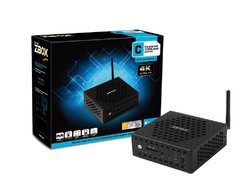
So if I can run Traktor effectively on a stick PC with 2GB of RAM and an Atom CPU, how well might it run on one of these???...
61rT2Pq5M3L._SL1024_.jpg
ZOTAC ZBOX-CI327NANO-U Series Fan-less Mini PC


FEATURES:

6th Gen Intel Skylake Processor
Native 4K support
802.11ac WiFi & Bluetooth 4.0 connectivity
Compact
Passively cooled (fan-less)
Silent Performance
VESA Mountable

SPECIFICATIONS:

Intel HD Graphics
Intel N3160 (quad-core, 1.6 GHz up to 2.24 GHz)

HARD DRIVE & MEMORY:

Support 2.5-inch SATA 6.0 Gbps HDD/SSD
Onboard 32GB M.2 SSD
4GB DDR3L-1600 (one slot occupied, up to 8GB capacity)

DISPLAY OUTPUTS:

HDMI 1.4b (3840x2160 @ 30Hz), HDCP compliant
DisplayPort 1.1a (3840x2160 @ 30Hz)
VGA (1920x1080 @ 60Hz)
HDCP compliant

AUDIO OUTPUTS:

Loss-less Bitstream (via HDMI)
Combo mini-optical S/PDIF / analog stereo output

FRONT PORTS:

Microphone input
Headphone / mini-SPDIF output
3-in-1 card reader (SD/SDHC/SDXC)
1 x USB 3.0 port, 1 x USB 3.0 Type-C port
WiFi LED
Hard drive LED
Power button

REAR PORTS:

Wi-Fi antenna connector
1 x USB 3.0 port
2 x USB 2.0 ports
2 x 10/100/1000 Ethernet (RJ45)
Power connector
Wi-Fi Antenna connector

SOFTWARE COMPATIBILITY:

Microsoft Windows 10 Home pre-installed 64-bit

INSIDE THE BOX:

ZOTAC ZBOX CI325 nano with Windows 10 Home
Power brick & cable
VESA monitor mount (w/4 screws)
Wi-Fi antenna
Mini-Optical S/PDIF adapter
Driver disc
OS Recovery DVD

... Looks like all the Windows 7 drivers are available to download from the ZOTAC download center, so I can install Windows 7 Pro on it. This unit would fit in 1/6th of the space of my one of my current 1U rack mounted computers, and weighs just 3 pounds. It's 5"x5"x1.8", and fanless, so very quiet.

Only way to really evaluate it is to buy one, so I did... $229 at Newegg.com.:djsmug:
 
Last edited:
If you could get by with a USB thumb drive for your music, or could get all the music you need for your gig on the stick PC, you would have no cables or extra components to deal with...Just the stick PC.

Wow....interesting concept! With 64gb tiny USB drives available, that is possible!
 
  • Like
Reactions: DJ Bobcat
Made a small correction for you.

Good point, but as small as it is, it could fit almost anywhere, and the case has holes for ventilation on all sides.

The little stick PC I was testing generates some heat too. I ran that playlist for more than two hours non-stop though, and it never overheated.
 
Last edited:
  • Like
Reactions: ittigger
Here's another issue to discuss, though it may not affect how I rework my large system...

ELECTRICAL... I carry no less than 8 long extension cords to every gig, ranging from 25 to 100 feet. I've never had to use the 100 footers, but I keep them in the minivan, just in case.

My large system has two electrical INLETS, for attaching extension cords. I try to connect two different circuits whenever possible, but sometimes it's not. These cords are HEAVY. I could reduce my weight if I carried fewer.

How do others deal with the electrical? Anybody using retractable extension cords? What length(s)? Wrapping up two 50' cords at the end of the gig adds time.


Sent from my iPhone using Tapatalk
 
  • Like
Reactions: ittigger
Here's another issue to discuss, though it may not affect how I rework my large system...

ELECTRICAL... I carry no less than 8 long extension cords to every gig, ranging from 25 to 100 feet. I've never had to use the 100 footers, but I keep them in the minivan, just in case.

My large system has two electrical INLETS, for attaching extension cords. I try to connect two different circuits whenever possible, but sometimes it's not. These cords are HEAVY. I could reduce my weight if I carried fewer.

How do others deal with the electrical? Anybody using retractable extension cords? What length(s)? Wrapping up two 50' cords at the end of the gig adds time.


Sent from my iPhone using Tapatalk
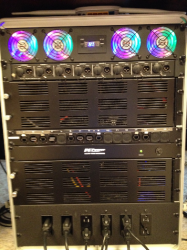
On electrical, I would NEVER connect to 2 separate circuits if at all possible .. too many chances for ground loops. With current technology, a set of tops, subs, and the entire front end should run fine on a single 15A circuit. I would only consider running video or lighting on a separate circuit. For speakers, I have Siamese cables (power and audio together) .. a set with 2 XLRs per cable and a set with 1 XLR. Makes it easier to get power to the speakers and keep them on the same circuit.
 
  • Like
Reactions: ittigger
On electrical, I would NEVER connect to 2 separate circuits if at all possible .. too many chances for ground loops. With current technology, a set of tops, subs, and the entire front end should run fine on a single 15A circuit. I would only consider running video or lighting on a separate circuit. For speakers, I have Siamese cables (power and audio together) .. a set with 2 XLRs per cable and a set with 1 XLR. Makes it easier to get power to the speakers and keep them on the same circuit.

I should have been clearer... the video/light controller PC runs on one circuit, and all the audio runs on another. I have 8 outlets on the back, 4 for each circuit... speakers plug into the left 4, lights into the right four. Internally... same thing; all audio components on one circuit, everything else on the other. If I have only one circuit, I only run one long cord to it, then have a short cord that goes from the inlet into one of the outlets.

I also have an ART 8 Isolator to which all my speakers attach. I've tested it... even when playing audio from my video computer (on a different circuit from the audio), which is also my backup music computer, I get NO noise at all.

upload_2018-1-12_8-22-20.png
 
Last edited:
I vote for the K.I.S.S. concept here. :sqwink:

I don't disagree, but define simple?[emoji1]... Define STUPID?[emoji1]

The two circuit decision came about after I attended an event where the DJ kept tripping the circuit breaker. It happened over and over again in the span of about 20 minutes. After each time, he would turn off another effect light, or something else, but continued to trip the breaker. He thought perhaps he had a short somewhere in his gear. He was getting pretty frantic, because he couldn't keep the PA up. Eventually, he figured out the caterers had plugged some of their equipment into a socket on the same circuit as he was on. Probably pretty much anything he had plugged in was going to trip the breaker, but if he had been on two circuits, he could have tried switching everything to the one that wasn't tripping.

I agree with Steve149 though, most of us can operate on one circuit with no problem. I do it all the time when I set everything up at home for testing... Never tripped a breaker... or set the house on fire.[emoji1]
 
Last edited:
I don't disagree, but define simple?[emoji1]... Define STUPID?[emoji1]

The two circuit decision came about after I attended an event where the DJ kept tripping the circuit breaker. It happened over and over again in the span of about 20 minutes. After each time, he would turn off another effect light, or something else, but continued to trip the breaker. He thought perhaps he had a short somewhere in his gear. He was getting pretty frantic, because he couldn't keep the PA up. Eventually, he figured out the caterers had plugged some of their equipment into a socket on the same circuit as he was on. Probably pretty much anything he had plugged in was going to trip the breaker, but if he had been on two circuits, he could have tried switching everything to the one that wasn't tripping.

I agree with Steve149 though, most of us can operate on one circuit with no problem. I do it all the time when I set everything up at home for testing... Never tripped a breaker... or set the house on fire.[emoji1]
I have not tripped a breaker since switching to powered speakers and led lighting even using subs I can easily run off one 15 amp circuit
 
Next topic... My table. Right now I have a 30" x 30" table. It fits in a 32" x 32" x 5" canvas bag when it's folded up. The dang table top is heavy... I could probably get a lighter (thinner) top, but it hasn't been a big enough issue, up until now.[emoji4] The table sets up and tears down pretty quickly. It's the perfect size for either of my controller cases (Pioneer or American Audio), with room in front for my wireless keyboard and mouse. I use the same table with my small system.

My large rack just barely rolls underneath my table with the adjustable legs fully extended. It sits at the perfect height for me to stand behind without bending over, or I can sit behind it in my director's chair, which I often do when playing dinner/cocktail music.

THE ISSUE: When I split the system into two separate racks with the controller mounted in the top, I won't be able to roll the entire unit under the table. I'll likely have to roll the bottom rack under the table, and set the upper rack on the table. Because the new upper rack (housing my controller) will have a 4U front section, it's gonna be taller than my controller cases by quite a few inches, and it will even be taller than my small system, which has a 2U front section. I can lower the table, but that means my keyboard, and more importantly my mouse, will be at a much lower level than it is now. This might not be a big issue. I'll just have to try it to see how it works for me.

I can't see eliminating the table though, because I NEED space for the mouse and keyboard. I have a keyboard drawer with a built-in trackball mouse, but that's another 1U device, and there's only 4 to work with. If I keep my Denon mixer (3U) and GTD Audio microphone system (1U), the space is gone. This is assuming the new Nano PC will work (replacing the current 1U rack-mounted PC), and I can find some space for it somewhere inside the rack. Also, the rack-mounted keyboard drawer is HEAVY, which is why I eliminated it from my small system.

Old rack configuration from 2014, but table and controller are still the same...
upload_2018-1-12_11-24-39.png

... Looking back through my pictures, it appears I've made at least one major change to this large system every year.:)
 
Last edited:
  • Like
Reactions: ittigger
I use a 4' Lifetime table with a fitted black cover .. gives me room for all my drinks and food ....
 
I use a 4' Lifetime table with a fitted black cover .. gives me room for all my drinks and food ....
I have a similar table, and have used it a couple of times, but it's more space than I need. If I have THAT much food and drink, I'd be spending more time eating and drinking, than DJing.:laugh: Here's a pic of me at the recent holiday party I did. Note there's plenty of room for drinks...
upload_2018-1-12_12-19-28.png
 
  • Like
Reactions: ittigger
I have a similar table, and have used it a couple of times, but it's more space than I need. If I have THAT much food and drink, I'd be spending more time eating and drinking, than DJing.:laugh: Here's a pic of me at the recent holiday party I did. Note there's plenty of room for drinks...
View attachment 33578
Actually, with the slant-top for my Rane/Denon and the laptop stand, the only room for food is under the laptop.
 
Actually, with the slant-top for my Rane/Denon and the laptop stand, the only room for food is under the laptop.

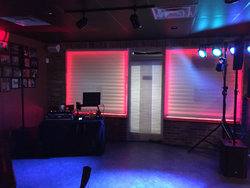
Yep... you're going horizontally, and I'm going vertically (with the rack under the table and controller on top). Not sure your way isn't better. Seems more the norm than the way I do it.[emoji4]... Figures.[emoji848]
 
  • Like
Reactions: ittigger
Yep... you're going horizontally, and I'm going vertically (with the rack under the table and controller on top). Not sure your way isn't better. Seems more the norm than the way I do it.[emoji4]... Figures.[emoji848]
I plan on going vertical too .. rack under and smaller slant top or glider case above. With the Denon MC6000 glider, the laptop shelf is built in. With the other rack (Denon/Rane), I need to use a stand-alone laptop stand (like the NYE picture below I posted). 4ft isn't as large as it seems ...

.com%2F20180101%2F88618d52f1dfa09a0f10f51cf80df1bd.jpg
 
  • Like
Reactions: ittigger
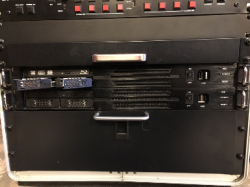
These two rack-mounted PC's (currently in my large rack system) won't go to waste...

upload_2018-1-12_13-17-26.png

... In fact, they're probably going to stay in the same rack. I'll reuse the rack to replace and downsize my home server rack, which is a 24U behemoth, that takes up too much space in my exercise room/art studio/computer room.

I'll pop out the 2TB SSHD data drives and reuse them in the new Nano computers (assuming that works out), then I'll pop out the SSD system drives, store them away for a while, and replace them with new drives on which I can install NAS4Free.
 
  • Like
Reactions: ittigger