LapTop To L1... Question

To many ads? Support ODJT and see no ads!
From the Manual:

Input ......Combination XLR (mic) or ¼-inch phone connector
unbalanced (line) input. Inserting a male XLR connector
sends the input signal to a balanced microphone
preamplifier. Inserting a ¼-inch phone plug sends the input
signal to an unbalanced high-impedance line-level circuit
which is suitable for most instruments such as active or
passive guitars or basses, keyboards, etc. Both inputs can
be adjusted with the Trim control.

Remote:

CH1/CH2 LEVEL 0 to 12...................Adjusts the channel’s volume level
MASTER 0 to 12................................Adjusts volume level of all channels

So, what I'm saying is correct... the 1/4" insert is most suitable to a Hi-Z or high impedence input such as a guitar or bass.... but since most mixers send signals via XLR the best input from a mixer or any other source that does not utilize a Hi-Z output would be the XLR on the power stand.

Also note that, yes the master does control all 4 inputs, but it doesn't have a way to control all 4 individually only CH1 and Ch2 can be.
 
since this is I would bet a 1 time deal and for 4 or maybe 5 songs, I'm not going to worry about it a whole lot...but mahalo for all they thoughts and ideas
 
From the Manual:

Input ......Combination XLR (mic) or ¼-inch phone connector
unbalanced (line) input. Inserting a male XLR connector
sends the input signal to a balanced microphone
preamplifier. Inserting a ¼-inch phone plug sends the input
signal to an unbalanced high-impedance line-level circuit
which is suitable for most instruments such as active or
passive guitars or basses, keyboards, etc. Both inputs can
be adjusted with the Trim control.

Remote:

CH1/CH2 LEVEL 0 to 12...................Adjusts the channel’s volume level
MASTER 0 to 12................................Adjusts volume level of all channels

So, what I'm saying is correct... the 1/4" insert is most suitable to a Hi-Z or high impedence input such as a guitar or bass.... but since most mixers send signals via XLR the best input from a mixer or any other source that does not utilize a Hi-Z output would be the XLR on the power stand.

Also note that, yes the master does control all 4 inputs, but it doesn't have a way to control all 4 individually only CH1 and Ch2 can be.

The 1/4inch inputs are for line level signals like a mixer, or cd player or ipod

The xlr inputs are for mics (this input adds 3db processing which means it is hotter than the 1/4inch which are best suited for recieving line level)

If you put a line level output to the xlr input on channels 1 and 2 they will clip sooner than the 1/4 inch option. You will get great sound if you send a unity or odb signal via 1/4inch. Inputs one and two can be controlled via the remote for eq and input gain.The remotes contols Inputs 1,2 and work well when sending a line level 1/4 signal without an external mixer.

Jokers wild if u like the the sound that your l1's are giving you I am happy for you.

Chuck i was just trying to help you get what i think is the best setup for running your laptop. Chuck you were a big help to me when i was on the fence about buying the L1. After reading all your post and checking out all those great photos I had to get them. I got them form the same guy you did and he is the one that explained the setup options to me.

I also tried the way that Jokerswild is explaining but it didnt work as well as the way that guy who sold it to us instructed me.
Thats it im done>
 
The 1/4inch inputs are for line level signals like a mixer, or cd player or ipod

The xlr inputs are for mics (this input adds 3db processing which means it is hotter than the 1/4inch which are best suited for recieving line level)

If you put a line level output to the xlr input on channels 1 and 2 they will clip sooner than the 1/4 inch option. You will get great sound if you send a unity or odb signal via 1/4inch. Inputs one and two can be controlled via the remote for eq and input gain.The remotes contols Inputs 1,2 and work well when sending a line level 1/4 signal without an external mixer.

Jokers wild if u like the the sound that your l1's are giving you I am happy for you.

Chuck i was just trying to help you get what i think is the best setup for running your laptop. Chuck you were a big help to me when i was on the fence about buying the L1. After reading all your post and checking out all those great photos I had to get them. I got them form the same guy you did and he is the one that explained the setup options to me.

I also tried the way that Jokerswild is explaining but it didnt work as well as the way that guy who sold it to us instructed me.
Thats it im done>

I don't know what to say here... you must be correct and all others wrong. I guess my 1 yr running a single L1 from a laptop to mixer setup was done completely wrong despite the explicit instructions I had recieved.

My bad.
 
I don't know what to say here... you must be correct and all others wrong. I guess my 1 yr running a single L1 from a laptop to mixer setup was done completely wrong despite the explicit instructions I had recieved.

My bad.

Check the bose forum under (dj/kj ) if u dont believe me. If I am right that means your system will sound even better than what u have now. Try it I dare you. I already tryed your way Jokerswild. What do u think?

They also have a wikki w/ all the info in there.
 
since this is I would bet a 1 time deal and for 4 or maybe 5 songs, I'm not going to worry about it a whole lot...but mahalo for all they thoughts and ideas

If you get a chance pleahttp://toonz.ca/bose/wiki/index.php?title=Connections_/_DJ_VJ_Computer_to_Model_Ise check this link from the bose site . It shows pic and instructions for cumputer dj.:sqbiggrin:
 
I too, use the XLR inputs, at line level, from my mixer. Based on this discussion, I may try 1/4", just to see if I hear a difference, but it will mean converting the XLR connector to a 1/4 inch (the Rane mixer's output is XLR).

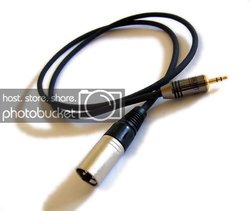
Just for simplicity and clarity, here's a picture of what I suggested for Chuck, if he can find one in time for tomorrow:

av_xlrm-3_5mm.jpg
 
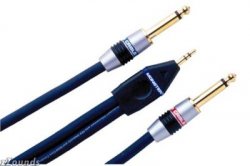
When I was using the model 1's, I used an 1/8 inch headphone jack(computer) into dual 1/4 inch into channels 1 and 2. I experienced no problems at all.

Very easy.
 
Thanks Scott Hanna for that pic

That monster cable looks great. Thanks for your input. Thanks Steve Sharp for your input also. Steve you are one of the reasons I got the hercules mk2 /w virtual dj. Thanks for the great videos.:sqbiggrin:
 

http://toonz.ca/bose/wiki/index.php?title=IPod hope this help explain Chuck and Jokerswild:sqbiggrin:

:sqbiggrin:http://toonz.ca/bose/wiki/index.php?title=IPod Thank me later for the link Jokerswild because if you follow this instructions your bose L1 will sound great and a lot more bass also.:sqlaugh:

What's with the spaming?

Look just because it's in a Wiki doesn't make it correct. Wiki's are user modifiable.... I could easily go in there and post something that tells ya if ya hold your butt just right any sound system will be just like the bose.... but doesn't make it correct now does it? (that's a rhetorical question)

I know you mean well... but look at some facts:

1. Read the manual it specfies that the 1/4" input is designed for Hi-Z (high impedence) inputs... [editorial]it is not generally recomended to use unbalanced Hi-Z cables due to the potential of interference induced noise especially in longer than 3 meter cable runs.

I know you mean well. But, I have to go with my years of electronics training on this one. XLR is the best because it is a grounded and balanced cable providing me with the most noise reduction possible in my signal chain. I follow one rule: Your sound is only as good as the weakest link. (typically that's a cable).

Now back to the OP

Chuck, I think steve has posted may be the most ideal way for you to get a mono signal to the L1.
 
you have not tried so why knock it

What's with the spaming?

Look just because it's in a Wiki doesn't make it correct. Wiki's are user modifiable.... I could easily go in there and post something that tells ya if ya hold your butt just right any sound system will be just like the bose.... but doesn't make it correct now does it? (that's a rhetorical question)

I know you mean well... but look at some facts:

1. Read the manual it specfies that the 1/4" input is designed for Hi-Z (high impedence) inputs... [editorial]it is not generally recomended to use unbalanced Hi-Z cables due to the potential of interference induced noise especially in longer than 3 meter cable runs.

I know you mean well. But, I have to go with my years of electronics training on this one. XLR is the best because it is a grounded and balanced cable providing me with the most noise reduction possible in my signal chain. I follow one rule: Your sound is only as good as the weakest link. (typically that's a cable).

Now back to the OP

Chuck, I think steve has posted may be the most ideal way for you to get a mono signal to the L1.


Good luck Jokerswild I did my best to communicate to what I believe to the best setup for the L1. If u were using very long cable runs then I could see your concers about noise.

The man the we all know and love hit me with a email about what we have been discussing and he broke it down the same way as I did here.:sqbiggrin:
 
Chuck, :sqerr: I mean, Homeboy

How far apart will the laptop be from the L1?

Is the distance between the laptop and the L1 over 10 feet(3 meters)? If it is you'll need a balanced connection like Jokerswild suggested. If it's less than 10 feet you can use an unbalanced connection but you could still have a problem with noise.

I'd forget about trying this on Sat but it's something you can work on when you have time. RS should have all the parts you need.
 
Good luck Jokerswild I did my best to communicate to what I believe to the best setup for the L1. If u were using very long cable runs then I could see your concers about noise.

The man the we all know and love hit me with a email about what we have been discussing and he broke it down the same way as I did here.:sqbiggrin:

Yes, I got that very same email from Cap too... I also pressed it a little further. And while I will agree for short runs where your laptop is less than 3 meters away this arrangement is fine....

But, how often are we able to setup that close to our speakers at a ceremony?

Further, when setting up the Bose it is ideal to have that 3db gain that using XLR gives over the line level. Reason being is you don't have to push your equipment as hard to get the same level of sound out of the L1... think about it.... your gains don't have to be nearly as high.... therefore you limit the possiblity of clipping completely by using XLR along with eliminating the possiblity of noise injected into the system from using un-balanced cables since the L1 1/4" inputs are unbalanced you don't even have the option of TRS.

While your sugestion works for you... which I'm glad... it's just not the option best suited for optimal operation of the L1. But, whatever makes you happy.
 
But, how often are we able to setup that close to our speakers at a ceremony?
Always for me. You can set the Stick boys up anywhere and they sound great. So why wouldn't you be next to them.
 
Yes, I got that very same email from Cap too... I also pressed it a little further. And while I will agree for short runs where your laptop is less than 3 meters away this arrangement is fine....

But, how often are we able to setup that close to our speakers at a ceremony?

Further, when setting up the Bose it is ideal to have that 3db gain that using XLR gives over the line level. Reason being is you don't have to push your equipment as hard to get the same level of sound out of the L1... think about it.... your gains don't have to be nearly as high.... therefore you limit the possiblity of clipping completely by using XLR along with eliminating the possiblity of noise injected into the system from using un-balanced cables since the L1 1/4" inputs are unbalanced you don't even have the option of TRS.

While your sugestion works for you... which I'm glad... it's just not the option best suited for optimal operation of the L1. But, whatever makes you happy.

The 3db gain is for mic w /xlr. Your audio signal from laptop , cd player, mixer, ipod should be 0db line level.