Hank's ROCKIT Skin Thread:

To many ads? Support ODJT and see no ads!
Good luck Hank... :sqlaugh: :sqwink:


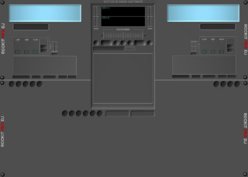
Honestly, that is a tough skin to work with -- it is the one I used while designing Rockit's skinning system, and has about 60 layers on it :sqerr:

It was not really meant to be anything more then a template, as it has most of the functions available on it.


Yer best working with a background that is the same color, and not gradiented in any way, as that requires quite a bit of overlay work for the button holders, knob backgrounds, etc...

Took me hours to get the round button underlays, and all that good stuff worked out.

I suppose that makes me the difficult one now...:sqwink:

I just like the idea of being able to have both programs up on screen at the same time and by extending the skin to match the height and width of my monitor I reduce the risk of me moving it around on my screen and ruining the x,y locations of things... if the deck locations and stuff moved with it I'd have no problem....

Really it don't need to be as fancy just so long as it has the main things...

the players, automix list, library tree, library, search window and request window... heck I don't really see the need for the deck lists at all... those could be scrubed...
 
Rob how many adjustments would you pay for?


Oh heck I think I have a handle on the XML stuff but it's the graphics I lack programs to edit with.... otherwise I'd do it myself... and will as soon as I can come up with the dough for photoshop elements...
 
I chopped up the Twilight Zone skin and made this. I just have to add the automix buttons
and pitch control. It took about 5 hours!

I haven't been this obsessed since the release of the Playstation.

rlp2.jpg
 
I chopped up the Twilight Zone skin and made this. I just have to add the automix buttons
and pitch control. It took about 5 hours!

I haven't been this obsessed since the release of the Playstation.

rlp2.jpg

For some odd reason none of the attachments or pictures you've posted of the skins are showing in any of your posts... very weird:sqconfused:
 
Man there's a lot of **** to move around in the DarkGray Skin.... it's gonna take me a couple of days just to move the rest of the buttons but I got all the fields moved and resized the way I want 'em

Yeah, the base is the easy part. I made a few new knobs/butons and tweaked the existing ones. I only squeezed the base in about 20 pixels, but I had to move everything to it's spot.

I think Rick did this to get us to drink more BEER! :sqwink:
 
Rick/Hank

I could use the background insert that the player controller buttons (play, stop, restart) sit in with no background. I like the looks of that piece! :) Could one of you supply that for me? I can cut it out, but lose the rounded corners.
 
Yeah, WTF?

Oh well.....

Rick inspired me to start on a Denon replica of my own. I will stay as true to form as the functions of Rockit will allow. I even put in a carpeted background!

I'm going to use the power button to close the program too.

DN-D4500skin.jpg
 
Is there a way to make a customized one and keep the autoplay mode? I'm using the 1024 x 768 on my desktop.... not sure what I'll use for my lappy.
 
Is there a way to make a customized one and keep the autoplay mode? I'm using the 1024 x 768 on my desktop.... not sure what I'll use for my lappy.

There's always a way.

It's tough to make skins with all the features present. They look too busy (IMO). All the stuff is just a click away anyway.
 
My next ones (after garbage and cleaning day), are gonna be actual photos of the different controllers as backgrounds. This should be fun... :sqerr: :sqeek:

After that, come the touchscreen ones, as Rockit fully supports them and overlays as well.


And yeah Hank, I agree. If you put too much stuff on it, it gets too busy and hard to work with when playing IMHO. I keep the skin browser showing on startup all the time, so I can pick what suits my need for that given session.
 
Yeah, WTF?

Oh well.....

Rick inspired me to start on a Denon replica of my own. I will stay as true to form as the functions of Rockit will allow. I even put in a carpeted background!

I'm going to use the power button to close the program too.

DN-D4500skin.jpg

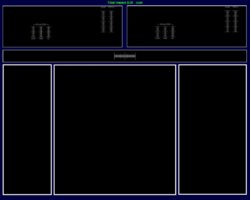
Dude, this one is sweeeeeeeet.... way better than what I'm working on... can ya do it in 1280x1024 & 1280x800? My **** is lame by comparison:

See??? The idea with this one is to have the controls obviously up at the top in the two decks.... then in the narrow window with the crossfader would be the buttons from the DarkGray skin... below that in the first box would be an extended MyLibrary with a simularly sized MyComputer window the size of the one from the Darkgray skin.... the middle would be the tracklist of course... the right box would be an extended Automix window with associated buttons and indicators from the darkgray skin and below that would be a request window with buttons that i could use in conjunction with highlighting a song then click a button for queing it into the automix que instead of drag and dropping it...

Well that's the idea and would translate well to the Denon Skin....

Thoughts?
 

Attachments

  • Test1280x1024.jpg
    Test1280x1024.jpg
    32.3 KB · Views: 5