Building A Podium Style DJ System

To many ads? Support ODJT and see no ads!
... I have my PreSonus StudioLive AR8 now... The power cord and USB cable were included, but not the documentation (manuals). That’s OK too. I downloaded the manual and I’ll spend some time reading it this afternoon before I hook it up and play with it...

I downloaded the manuals... multiple manuals. There were several other documents available, and I got them all. I also downloaded two pieces of software... “Universal Control” and “Capture”. It makes sense there would be software, but I didn’t really think about it before. It will be interesting to see how it all works. Initially, I’ll try it out with the Lenovo Thinkpad Laptop I recently refurbished. Should work fine for testing. The computers I bought for this (potential) system haven’t shipped yet.
 
Let’s see... So far I’ve spent about $700 on a mixer and computers for this system which I’m still not sure if I’m even gonna build.[emoji1] Today was the last day of the eBay auction on a Denon MC7000 I’ve been watching... I didn’t even bid on it. It sold for $650 with $82 shipping. That’s probably not a bad price, but I don’t want to spend more than $700 total. I still have microphone systems I would need to buy, and if I buy a couple of good dual mic wireless systems, I could easily be looking at $700 each. So I’d be looking at another $2,100 for the audio components, and then there’s the Podium itself... I have no clue what that would cost??? I have a really loose concept of the design, but I need to decide what material it would be clad with. I’m thinking leather... like a leather desk, only in white. If I have someone build the frame, I think I can do the cladding myself. I want some fancy stitching on it though, so I’ll need some help.
 
OK... Now I’m feeling REALLY good about my nano computer purchases. I had another one on my (eBay) watch list and the auction ended this morning. With 2 minutes remaining it was sitting at $204, and I thought; MAN![emoji1]... But in the last minute it climbed to over $300, and ended up selling for $350 plus $14 for shipping. I paid $100 less and got free shipping. Yoo hoo!!![emoji1]

Now... I already had a plan for how to use these computers. They have quad core i5’s and 8GB of RAM, but only 128GB SSD’s. It would be easy enough to clone the drives to larger disk drives, but I’m gonna do it differently this time. You can’t share a portable hard drive between two computers. It has to be dedicated to one, then it can be shared by another computer on a network. I always put an Ethernet switch in my systems because I share a mouse and keyboard, but I have never shared a music library disk between computers, as it requires the host computer to be running, which may not always be the case. So this time I’m gonna build a NAS, attach it to the switch, and share it with both computers. That way if one computer goes down, the other one can keep playing. It means just one copy of the music library.
I’ve literally been using the same 2 laptop2 for 7 years more music than I’ve ever needed on internal 500 gig hard drives I have them cloned and switch out every other gig simple easy always a back up at hand
 
  • Like
Reactions: sonic-vision
I’ve literally been using the same 2 laptop2 for 7 years more music than I’ve ever needed on internal 500 gig hard drives I have them cloned and switch out every other gig simple easy always a back up at hand

I replaced the laptop I used at my first gig before the next one. Then I had three rack-mounted computers (2 in my Large System, 1 in my Small System)... Those lasted two years before being replaced. Nothing wrong with those computers, other than I thought I could do better, and I did. The computers I have in my current two systems are good (for now), and I have no plans to replace them. The new ones I bought are for a completely new (third) system, in a more upscale podium style system. Now, I’m not claiming this isn’t CRAZY. It’s NOT illegal to be insane as long as you’re not hurting other people (or their pets).[emoji1] IMO, there are much crazier things happening in the world.[emoji1]
 
You never have to download it all - but who pays for a buffet and only eats the bread? Some pools only keep things up temporarily. If you don't download it, you're going to have to pay for it again later (when you need it).
 
Last edited:
Today It appears my new Intel NUC Nano PC’s will be delivered. FUN!!!... I’ve been playing with my new PreSonus StudioLive AR8 mixer, and there’s a lot to like. I think the size is perfect. I like the effects. It’s REALLY a well built mixer, recording to an SD card, and it sounds GREAT! Now... there’s a couple of issues. Not deal breakers, but maybe some things that could be better. First, not enough channels. The AR12 might have been a better choice for this podium style system (that I may or may not build) since it would have had more channels for mics. Of course the AR12 would have been larger too, so it’s a bit of a trade-off. If I keep the top of the podium at the size of the current design, the AR12 would not fit. Second... is the multifunction aspect of channels 7/8. It can play from the SD card, the USB input, or from the built-in Bluetooth. Again, not a BAD thing, but it makes setting the gains a little more complicated since each input will likely require unique settings. Is it better than my Allen & Heath ZED 10FX???... Yes... I think so, at least for me, but it would be nice to have those additional two channels.
 
Last edited:
Today It appears my new Intel NUC Nano PC’s will be delivered. FUN!!!...

OK... They came, BUT... not much fun. These machines have Mini Display Ports, but no cables, so I need to buy some before I can use these Nano computers. Other than that, I guess you get what you pay for. These were refurbished (used) computers. I knew that when I bought them, so you can never know how good the cosmetic condition will actually be. These little computers have glossy black plastic tops, and they’re both pretty scratched up. I can fix that pretty easily, but they certainly don’t look very attractive at the moment. If they’re gonna be placed inside my Podium, it probably doesn’t really matter because they won’t be visible. So will I repair these scratched up tops???... You know the answer to that... OCD!!!... Of course I’m gonna restore them to like new condition.[emoji1]
 
OK... They came, BUT... not much fun. These machines have Mini Display Ports, but no cables, so I need to buy some before I can use these Nano computers.

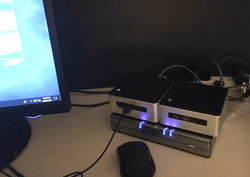
I ordered a couple of mini display port to VGA adapters from Amazon, but they won’t be delivered until tomorrow. Tomorrow is really fast (free with Prime membership), but not fast enough. They had an adapter at my local Best Buy, so I ran down there (in my Jeep) and picked it up. Only 3 miles away, so why not; right? It worked just fine and I got the first Nano PC set up. Here’s a pic of the two PC’s ...
0d03ed2c4d595f437e35ba763f08fd84.jpg
... sitting on top of an HP switch I picked up on sale at a ridiculous price several months ago, knowing I’d need a little Ethernet switch if I decided to build the Podium System.

The Intel NUC computers are only 4.5x4.5x2 inches, and they’re incredibly light weight. The tops may be a little scuffed up, but other than that they are exactly what I thought, and I think they’ll be perfect for this application. Time to set up the second one.
 
  • Like
Reactions: ittigger
Both Nano computers are setup now. Today I’ll setup the NAS and I’ll bring in a controller and setup Traktor. It’s dark and rainy outside today anyway, so I might as well play with my toys inside.

A small little issue has revealed itself with these computers... the power button is on the top, rather than the front. That would affect how they’re positioned inside the Podium. Maybe not a big deal. I can probably have a lid that will open to access the top of the computers.

I’m still debating which controller to use... my American Audio VMS 4.1 or Pioneer DDJ-T1??? Haven’t used either in a very long time. They’re just out in the garage occupying space, so it will be fun to play with one of them again. I think size-wise the T1 is more similar to the Denon MC7000 I want, but the VMS 4.1 would take up less space on the little 4 foot table I’ve setup in my office. Decisions, decisions![emoji1] Maybe I need to think about for a while... or maybe take a nap???[emoji1]
 
Last edited:
So, Bob, I need help understanding some of the tech here since my techie-wheels start to come off the truck fairly quickly on this stuff. Are you using the Switch to essentially connect these to nanos so that you can bring up your dj software (loaded on each nano) and while playing and operating a gig on one software program it will mirror in real time on the other one so that in the event one crashes you can immediately go to the next one? I see the value of the nanos (being a fully functioning computer with a small footprint) but I get lost in understanding how they relate to the switch and even internet at a gig.
 
So, Bob, I need help understanding some of the tech here since my techie-wheels start to come off the truck fairly quickly on this stuff. Are you using the Switch to essentially connect these to nanos so that you can bring up your dj software (loaded on each nano) and while playing and operating a gig on one software program it will mirror in real time on the other one so that in the event one crashes you can immediately go to the next one? I see the value of the nanos (being a fully functioning computer with a small footprint) but I get lost in understanding how they relate to the switch and even internet at a gig.

Yes... You got it exactly right. The switch also allows the computers to talk to each other, and with my current two systems (each having dual computers), they share a single keyboard and mouse, but they each have their own copy of the music library. With this new system, I’m going to plug a NAS into the switch so both computers will share ONE music library.

My current systems can obviously play music simultaneously from their own libraries, having one library on the NAS that they share simplifies things some, and the NAS is similar in size to an 3.5” external hard drive.

The way I actually use the dual computers is; the main is music only, and the second (backup) is DMX and other video, plus Internet access. But the backup is also setup to play music. In my Large System though, it’s a little tricky, because swapping the USB cable from the controller to the backup computer requires a bit of a reconfig (and sometimes a reboot). I can play tracks from my iPad while transitioning. The backup in my Small System has it’s own controller, so switching over is instantaneous. This is why I’d like a dual USB controller like the Denon MC7000 in this new system... instantaneous switch-over, but only one controller.
 
Last edited:
  • Like
Reactions: ittigger
That explanation really helps. So in using the NAS, you're not playing music from the internal hard drives of the nanos but, rather, from the library sitting on the NAS drive, correct? Is this much different than hooking up an external hard drive and playing from the music stored on there versus the internal hard drive on your computer? Would there be any 'lag time' doing it this way since you're not using your internal hard drive but, rather, the NAS?
 
... So in using the NAS, you're not playing music from the internal hard drives of the nanos but, rather, from the library sitting on the NAS drive, correct?

Correct.

Is this much different than hooking up an external hard drive and playing from the music stored on there versus the internal hard drive on your computer?

It’s only different in the way it’s attached. An external USB hard drive can NOT be hooked up to two computers at the same time. It must be attached to ONE of the two computers, and then the second computer can share it across the network. If the computer hosting the USB drives goes down, then NEITHER computer can access it. With the NAS; if one computer goes down, the other one carries on unhindered.

... Would there be any 'lag time' doing it this way since you're not using your internal hard drive but, rather, the NAS?

It remains to be seen about lag time, but it’s highly doubtful I’ll experience any. I use these NAS’s on my home network already, and they are QUICK and extremely reliable. I’ve had 6 of these NAS’s running 24x7 for a couple of years now, and never had even one crash.

If you think about lag though, I’ll be running at 1GB speeds between the computers and switch, with little else on the network. That’s MUCH faster than you could possibly get across USB 2, which many have successfully used with their external hard drives for years. I’ll be testing this theory out (and monitoring it) for a while before I’d ever use it live at a gig.

I haven’t mentioned how the Internet plays into this. I rarely need the Internet at the gigs I do. I can sometimes have one computer attached to the venue’s WiFi, or I have my own 4K router I can plug into my switch, which (in addition to Internet access) also provides WiFi access to the network I’m creating.
 
Last edited:
  • Like
Reactions: ittigger
... I’ll be testing this theory out (and monitoring it) for a while before I’d ever use it live at a gig...

One more thing to mention... These Intel NUC computers have the system installed on 128GB M2 SSD’s, so there’s still an internal space for a 2.5 inch hard drive. If need be, I can put a large hard drive in them with full copies of my music library. Essentially this would be doing exactly what I’m doing with my other two systems. I’m just trying to see if there’s a better way.
 
Last edited:
  • Like
Reactions: ittigger
Computers are WEIRD!!!... and sometimes frustrating. I was using a single LG monitor for testing, with one computer attached to the VGA port, and the second computer connected to the DVI port. It has worked fine for 2 days, then POP!!!... Dead monitor. So I set up two identical monitors and hooked one to each computer, but something was WEIRD with sharing the mouse and keyboard (using Mouse Without Borders). The pointer was MUCH larger on the machine to which the keyboard and mouse were NOT physically connected. The host PC had a normal size pointer. The settings on both computers are identical. Also, the pointer on the second PC does not sit on top of the start menu, so you can’t see it, even though menu choices are highlighted and clicking still works. It’s like the mouse pointer is BEHIND the menu.

Keep in mind, I’m using this exact same software on both my Large and Small systems with NONE of these issues, and I copied the software from my server to both PC’s, so the versions installed were identical to each other, as well as to my other systems.

After searching on the Internet, there was a post describing the same problem, but the solutions offered were pretty useless, and the thread ended without the OP ever posting what he ended up doing. There was some discussion about problems when sharing between Windows 7 and Windows 10 computers, but all of mine are Windows 10.

So how did I resolve it???... I downloaded the current version of Mouse Without Borders from the Microsoft Web Site, and compared it to the one I had (and have been using for almost 2 years). It WAS different, so I uninstalled the software from both PC’s and installed the newer version, and VOILA!!!... It worked!!!... It works just like the OLD version has been working on my other two systems for almost two years. WEIRD!!!
 
  • Like
Reactions: TJS