DMX Questions

To many ads? Support ODJT and see no ads!

DJ J Mac

Bork Bork Bork!
Mar 24, 2008
3,875
1,228
West Lafayette, IN
Ok, so I'm going to flat out say I know next to nothing about DMX lighting and controllers and the likes. The extent of my knowledge really is about DMX is a control language for lighting. Where we're looking to begin adding some new led color wash lights in the near future (possibly something like a Chauvet 4Bar) I need to start learning about this. So here's my question, does anyone know of some good references that I could get ahold of to begin learning about DMX, lights and controllers?

Here is a bit more specific on what I would like to figure out.
- how to assign light fixtures to a board
- how to assign different DMX channels of the same light to a board
- color mixing, etc

One of the big things is I want to learn this for an actual lighting controller, not a computer program. At some point I may move to a computer program, but not before I understand the manual way of doing everything.

Any help you guys can throw out woud be very appreciated.
 
Check your PMs

As for the 4 Bar I believe unless you are wanting to tie in other dmx fixtures the optional controller will allow you to access the builtin programs on the fly. I mean it was designed to be practically plug and play right out of the box.

I know many on this board can guide you but if you want non-geek speak I'd be happy to help.
 
J-Mac - I have a little DMX primer I can have Kat send you (I'm out on a jobsite this week). There is also a LOT of info about DMX on my DVD, but the primer should give you the essential basics. :)

Ben
 
J-Mac - I have a little DMX primer I can have Kat send you (I'm out on a jobsite this week). There is also a LOT of info about DMX on my DVD, but the primer should give you the essential basics. :)

Ben

Speaking of that DVD I keep forgeting to order one.... and wouldn't you know it you remind me when all I have is pocket lint... :triconfused:
 
and I will raise you, oh nerver mind. I can't afford that!!!!!

If you would like so free on the phone help let me know. I will be more then happy to help. Just send me a PM.
 
Ben, Could you send me the dmx primer also? Another question, I have 20 slim par 56 lights, do I need a dmx terminator at the end? Was told by someone that with the newer lights terminators are no longer necessary. I also want to purchase you lighting dvd.
 
Ben, Could you send me the dmx primer also? Another question, I have 20 slim par 56 lights, do I need a dmx terminator at the end? Was told by someone that with the newer lights terminators are no longer necessary. I also want to purchase you lighting dvd.

Give me a call here at the office I will get you taken care of :tricool: 888-660-6696

Kat
 
One of the big things is I want to learn this for an actual lighting controller, not a computer program. At some point I may move to a computer program, but not before I understand the manual way of doing everything.

Any help you guys can throw out woud be very appreciated.

When I first jumped into DMX lighting, I bought a board and learned how to use it as you describe. I got the hang of it, but man was it so time consuming to program scenes. Not only was it time consuming, but YOU have to remember alot of things like what lights are on fixture 1 thru 12 (labels are a must), what each channel of each light does (or have that info handy all the time, another must ), the list goes on.

Then I bought a Enttec Pro dongle ($140 on ebay new) and downloaded Freestyler DMX (free). DMX is sooo easy now. I highly recommend this route. There is a Freestyler forum and lots of help there to get you fixed up if you have questions.

I think the dmx board helped me learn the basics (which is not hard to understand), but the pain of programming it really hurts compared to dmx software. If you still decide to buy a board first to learn on, I wouldn't spend much money. Possibly even buy a used one. You don't need nothing fancy to learn on. I wouldn't invest much here. Save your money on good lights. If you move up to programming moving heads or scanners, you will want to move to software for sure.

The DMX primers mentioned earlier should get you started to understanding how DMX works. If you have questions, just ask. I'll help ya!

SD
 
For me personally I like to learn the basics before I move onto tools to make life easier.

Think of this analogy, when I was in school before we could use a calculator we had to prove that we could do the work by hand first (even in calculus). I'm not saying that I'm gonna program moving heads with a board because after reading some of the stuff I've been sent to that would get nuts quick. But I at least want to know what the program is telling the lights to do.
 
I don't regret using the board first at all. It was all new to me and it was fun. I think it will help you down the road just as it did for me.

To tell you the truth, when I first jumped into DMX, I wasn't aware of all the software options that was available (especially free). It was probably a good thing the way it happened, because I would of probably went straight for that.

Understanding why the light reacts the way it does and knowing what you just did with the fader to cause that, goes a long ways. If you jump right into the software, you may find yourself struggling because you can't figure why the lights won't even turn on.

I probably jump the gun to push the software option. I get a lil excited talking about this stuff, haha! When your hungry for more info just ask.

Something else you may not know about DMX, midi devices can be used to control the programmed scenes in the software. If you don't like using a mouse and would rather have knobs or faders, that can be done to. I DJ and I play drums in a band. I use my DMX lights for both applications. While DJing, I use the mouse. While playing drums, I midi out of my Roland SPD-S to trigger the the software to change the lights. It pretty neat. We don't have to pay someone to run our light show because I do and it's always in perfect timing with whatever song we are playing. Ok, I'm rambling again.

Let me know when I can help!

SD
 
For me personally I like to learn the basics before I move onto tools to make life easier.

Think of this analogy, when I was in school before we could use a calculator we had to prove that we could do the work by hand first (even in calculus). I'm not saying that I'm gonna program moving heads with a board because after reading some of the stuff I've been sent to that would get nuts quick. But I at least want to know what the program is telling the lights to do.

I agree with this to a point.... but at some point you have to come to the realization that sometimes the easier and maybe more technical way to do things might be the best way....

That said, I don't see anything wrong with learning on an old style board but, by time you've spent the money on a decent controller and the time to learn it you could have been a programing genius on a PC version and saved a ton of money and time.

Sometimes you need to run first before you walk.
 
I agree with this to a point.... but at some point you have to come to the realization that sometimes the easier and maybe more technical way to do things might be the best way....

That said, I don't see anything wrong with learning on an old style board but, by time you've spent the money on a decent controller and the time to learn it you could have been a programing genius on a PC version and saved a ton of money and time.

Sometimes you need to run first before you walk.

True, but in order to run a person must apply the skills learned from walking.

As for the money and time spent, here's a bit of a Zennish question for you.
How much of a genius is the person who is ignorant of how something works?

Wrestle with that one for a bit :tritongue:

I'm just messing with you Rob. I hear what you're saying, but that's just not the way I roll; I like to understand what the computer is doing.
 
I have an old board (Chauvet DMX-6) you could learn at the spring get together.
 
I agree with this to a point.... but at some point you have to come to the realization that sometimes the easier and maybe more technical way to do things might be the best way....

That said, I don't see anything wrong with learning on an old style board but, by time you've spent the money on a decent controller and the time to learn it you could have been a programing genius on a PC version and saved a ton of money and time.

Sometimes you need to run first before you walk.

Rob - I'm gonna disagree. I don't know that PC based is the easiest way or the better way....at least for what we need or do as mobile jocks.

For simple wash, you don't really need a pc; it's not that complex..With color strips and megapixel; they run find on stand alone/sound active.

I have a Tri Phase and a Chauvey Vue 3....You could never duplicate the patterns and built in chases with a controller or pc; it would take forever to do that...

The only way I see a pc as practical is if you're running a big show, with scanners, heads and multiple fixtures.....I run a sair size show with my DMX50A and co pilot.

In some respects ..to me...using a pc to control lights is like using a sledgehammer to pound a nail....when a hammer will do the trick. For most of us, the controller will do the trick.

Interesting: I've still never gotten a clear answer as to whether a pc solution will let you run sound to lights...
 
Rob - I'm gonna disagree. I don't know that PC based is the easiest way or the better way....at least for what we need or do as mobile jocks.

For simple wash, you don't really need a pc; it's not that complex..With color strips and megapixel; they run find on stand alone/sound active.

I have a Tri Phase and a Chauvey Vue 3....You could never duplicate the patterns and built in chases with a controller or pc; it would take forever to do that...

The only way I see a pc as practical is if you're running a big show, with scanners, heads and multiple fixtures.....I run a sair size show with my DMX50A and co pilot.

In some respects ..to me...using a pc to control lights is like using a sledgehammer to pound a nail....when a hammer will do the trick. For most of us, the controller will do the trick.

Interesting: I've still never gotten a clear answer as to whether a pc solution will let you run sound to lights...

It is not that complex to run simple wash colors from a dmx board, I agree. But, you have to remember so many things for each fixture to go from one specific color to another specific color or one specific built in program to another specific program. You quickly find yourself with having to remember way to much or always have your cheat sheets handy. Sure you can just keep moving the faders until you find what your really looking for, but again, time consuming and not professional during a gig.

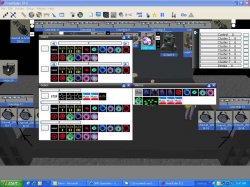
You mentioned the colorstrip, do you really know how many different functions the fixture actually has to offer? Just that light alone is an over load of info to remember and access specific functions straight from a dmx board. Below is a screen shot of my set-up in Freestyler. The two windows open are for the colorstrip. Theses two windows give a clear picture of each function. One click and the light does exactly what I want it to do. Using a board, you have 4 faders to move to achieve the same as one click. Not to mention you have to know exactly where each of the four faders go.

attachment.php


You can duplicate the automatic programs easily and even create new ones with pc software. Its all around how creative you are at building sequences.

The software WILL let you run sound to lights. Again, one click and my lights follow the beat of the music. So if you have an upbeat booty shakin song playin and the lights are following the beat, then the next song is a slow one, one click and I now have moving heads on the mirror ball (open white light) and all other lights blue. Instant change in atmosphere with one click. Can you do that with a dmx board, sure, but how long will it take to program that?

I think its the other way around. The DMX board is the sledge hammer because its more work.

I'm simply trying to express the ease of software in this post. Understanding and knowing how the board works first is a good foundation to start with. I'm here to help, not start a fuss.

SD

 

Attachments

  • Freestyler Scrn shot 1.JPG
    Freestyler Scrn shot 1.JPG
    112.5 KB · Views: 27
Here's a screen shot of the Vue 3 selected in Freestyler. The 3 windows open are all just for that light. Try and remember all the functions of that light and where all 9 faders have to go on a DMX board. With software, one click and the light is there.:tribiggrin:


attachment.php
 

Attachments

  • Freestyler Scrn shot vue3 windows.JPG
    Freestyler Scrn shot vue3 windows.JPG
    111.5 KB · Views: 27
Shannon,
Thanks for that post. A question for you. How do you like controlling the moving heads with the program versus say a joystick on a dmx board?