


Need help with something. Actually a test really.

To many ads? Support ODJT and see no ads!
Apr 22, 2007
3,210
6
59
Rockland County, NY
This just happened today, I seem to be having a problem with the script that runs the music on my websites, but I'm not sure if it is something that is happening only on my computer. It seems to work fine on Safari and Firefox, but the player is not loading in IE6. At least on my computer.

If you could please go to any page on my website (www.yourweddingentertainment.com) and tell me if the little silver "Play" button appears in the Header just to the right of the page title. Follow the red arrow in this screenshot to see what it should look like.
View attachment 10644

Either way, could you tell me if you see the button and what browser you are using. Thank you very much!

UPDATE...this issue has been resolved. The button is working on all pages, on all browsers. Thanks.
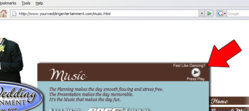
 

Attachments

  • button-help.jpg
    button-help.jpg
    32.9 KB · Views: 1
  • button-help.jpg
    button-help.jpg
    32.9 KB · Views: 1
Thanks for your help so far.
It may be an upgrade issue, waiting on a response from them. Just wierd that it would stop working like that, both online and offline.
 
It did work the last time I visited.

They worked last night! I am coding my new site for Your Party Entertainment and was playing with the buttons not even 12 hours ago. WTF?
 
Interesting update to this issue. I didn't see the forest for the trees. It appears that none of the javascripts are working in my website when viewed in IE. The photos do not change, the menu does not float down the screen and (as we've already established) the music player does not even show.

So now the question is...why? Is this a server issue? I guess I should contact GoDaddy and see what they have to say.
 
Might want to take a look at this piece of code...

Code:
// ----------------------------------------
// Detectind user browser
// ----------------------------------------
var Nav = navigator, Ag = Nav.userAgent;
var bIE = (Ag.indexOf('MSIE') >= 0), bMacIE = false;
var bNC = (navigator.appName == "Netscape");
var bOpera = (Ag.indexOf('Opera') >= 0);
var nVer = 0, sTmp = "";
if (bIE) {
	sTmp = Ag.substring(Ag.indexOf("MSIE") + 5, Ag.length);
	nVer = Math.floor (sTmp.substring(0, sTmp.indexOf(";")));
	if (nVer >= 4 && !document.all)
		nVer = 0;
	if (Ag.indexOf("Mac") >= 0)
		bMacIE = true;
}
if (bNC)
	nVer = Math.floor (Nav.appVersion.substring (0, Nav.appVersion.indexOf (" ") ) );

bDynamic = (document.all || document.layers) ? true : false;
 
Might want to take a look at this piece of code...

Code:
// ----------------------------------------
// Detectind user browser
// ----------------------------------------
var Nav = navigator, Ag = Nav.userAgent;
var bIE = (Ag.indexOf('MSIE') >= 0), bMacIE = false;
var bNC = (navigator.appName == "Netscape");
var bOpera = (Ag.indexOf('Opera') >= 0);
var nVer = 0, sTmp = "";
if (bIE) {
	sTmp = Ag.substring(Ag.indexOf("MSIE") + 5, Ag.length);
	nVer = Math.floor (sTmp.substring(0, sTmp.indexOf(";")));
	if (nVer >= 4 && !document.all)
		nVer = 0;
	if (Ag.indexOf("Mac") >= 0)
		bMacIE = true;
}
if (bNC)
	nVer = Math.floor (Nav.appVersion.substring (0, Nav.appVersion.indexOf (" ") ) );

bDynamic = (document.all || document.layers) ? true : false;


Looks the same as most code to me...........chinese! :sqlaugh: :sqwink:
 
Might want to take a look at this piece of code...

Sure...pick the code that was cut & paste that I know very little about.

Curiouser and curiouser however, just got off the phone with GoDaddy (my hosting service) and there are no issues on their end, in fact the site worked perfectly for him in both IE6 & IE7 and from two different servers (Texas and Arizona). I have made no recent changes to this site and these scripts have been running for about a year now. So why are they suddenly not working for some? WTF?
 
Is the class id still valid for yer wimpy thingy...?

Maybe try redoing that...

Maybe, I'll look into that.

I did upgrade Flash this morning, that must be the issue as the Wimpy Button is flash. I waiting to get the upgrade code from them. The other two scripts don't run until the entire page is loaded, but the page is still trying to load the player, hence the freeze up. But why did it work on the GoDaddy reps computer, unless he is running an older version of Flash.

The code you questioned earlier is for the floating menu, which works when I remove the Button.
 
Stop writing scripts and visit SproutBuilder.com

You can place a visible or invisible music player on your site plus other media.
My DJ and Myspace pages are made with it.

I plan on using SproutBuilder for another project attached to the website (sort of...actually more like using a Sprout for what it was intended for). But that is still a few weeks away. First gotta finish coding the new Party DJ website, then finish some tweaks on the Wedding DJ site, then a complete rebuild of the Bubble Party site, then...my Sprout idea.

I far as I can tell, I am using an older version of the Wimpy Button that is not compatible with the latest version of Flash (which I reluctantly upgraded to this morning). Just waiting on access to the Button upgrade. I may temporarily remove the player so the javascripts will run.
 
It worked fine before he upgraded and I appreciate the fact he actually gave people the option to opt in to music. However I was thinking if you could put a lineup of songs that related to each page and were then opened to benefit the page it would be kind of cool. Of course If I were to put music on mine it likely would just be the single Big Pimpin!!!!LOL
 
UPDATE...
The issue has been resolved. Thanks to those that helped. As I mentioned earlier, apparently my older version of that music player had an issue with the latest version of Flash. Finally upgraded my player and reinserted it into each page (pain in my arse).

Jon...I specifically choose each song for each page, trying to set a certain mood if they happened to listen.