Traktor DJ 2 Released

To many ads? Support ODJT and see no ads!
Playlists aren't strict lists .. they're like crates, just another way to organize music.

^^^^ Exactly!!![emoji4]... Traktor doesn’t have “Crates”, but you can make playlists and import playlists. I don’t play them; I choose tracks from multiple playlists as I create a unique collection as I perform. While playing a track, I kinda get an idea for what kind of music needs to go next, then I go to one of the playlists a pull a track that fits based on Key, BPM and just a general feeling. I’m self taught, but this is the way I mix.
 
  • Like
Reactions: DJ Bobcat
The abject failure of Windows Store and so-called Universal Apps (that only run on Windows 10) has taken the arrogant bluster off Windows 10, making it appear more like a reconciliation with Windows 7 (especially since we can conveniently blame it all on Windows 8). Once you bannish the klutzy tiles and consign the mandatory updates to 4AM, Windows 10 feels enough like 7 that you can move on to more pressing matters. The real issue wasn't Windows 7 anyway, it was on-going legacy support for Win32 apps, and that has been settled with Microsoft's capitulation to popular demand.
 
The abject failure of Windows Store and so-called Universal Apps (that only run on Windows 10) has taken the arrogant bluster off Windows 10, making it appear more like a reconciliation with Windows 7 (especially since we can conveniently blame it all on Windows 8). Once you bannish the klutzy tiles and consign the mandatory updates to 4AM, Windows 10 feels enough like 7 that you can move on to more pressing matters. The real issue wasn't Windows 7 anyway, it was on-going legacy support for Win32 apps, and that has been settled with Microsoft's capitulation to popular demand.

Before there were “apps” there was “software”. Some of it was not so good, and some software was very good and was constantly getting better. THEN... a dozen years ago or so, POOF. Some software companies went out of business and some sold to other companies who integrated them or discontinued them. In any case, software options for Windows have diminished. IMO, new software is generally not as good and feature rich as it was 10 years ago, unless you buy the most expensive stuff available. Some of my favorite applications are OLD, and several won’t even install on a Windows 10 machine. I keep one laptop and one desktop computer running Windows 7, but all my other Windows computers run Windows 10. All my DJ computers (8 of them) are running Windows 10. I’m not thrilled with it by any means, but I make it work.[emoji4]
 
Last edited:
I agree with the Bobcat 100%.

Right now my DJ rig is 64 bit Windows 7, and it doesn't go on the Internet - I feed new songs to it from another computer - so in theory it should keep running fine long after Microsoft stops supporting it. The fly in the ointment is my gigging software which is Mixvibes Cross DJ version 3.4.3, circa 3 years ago.

My wish came true and Mixvibes finally released a new version of Cross DJ, V4.0. Unfortunately, it is currently a POS I wouldn't wish on my worst enemy - change solely for the sake of change, and in many ways worse than the older version. Eventually they'll probably sort it out, and eventually it probably won't work with Windows 7, but I fully expect I won't be in this game by then.
 
  • Like
Reactions: DJ Bobcat
Why am I not surprised??:sqwink:

Actually, I guess there are 9 counting the Dell Optiplex 3030 AIO I bought to test for a possible Podium System computer, but have no plans to ever use (as a DJ Computer). That also includes the two Intel NUC computers I’m testing now as well as the Dell Optiplex 7440 AIO that I keep as a spare for my main Small System PC.[emoji1]


Sent from my iPhone using Tapatalk
 
  • Like
Reactions: dunlopj
Well, re-re-re-works need spare-spare-spares.

The POINT is that they’re ALL on Windows 10.[emoji1] NONE of them are running Traktor DJ 2 though, which is THE TOPIC of this thread.[emoji1]

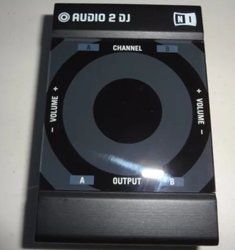
I AM planning to try Traktor DJ 2 though very soon. I’m gonna load it on the Lenovo Laptop I recently did a complete Windows 10 reset on, and I want to see if it works with my Traktor Audio 2 DJ. The Native Instruments Site says it works with the newer Traktor Audio 2 MK2, but I’m hoping it works with the older version because I have two of them; the one installed inside my Small System rack, and a backup (spare).[emoji1]
 
... I AM planning to try Traktor DJ 2 though very soon. I’m gonna load it on the Lenovo Laptop I recently did a complete Windows 10 reset on, and I want to see if it works with my Traktor Audio 2 DJ. The Native Instruments Site says it works with the newer Traktor Audio 2 MK2, but I’m hoping it works with the older version because I have two of them; the one installed inside my Small System rack, and a backup (spare).[emoji1]

Well that DIDN’T go well. I attached my spare Audio 2 DJ and installed the drivers. Then I installed Traktor DJ 2 on my Lenovo Laptop, but when I tried to run it, it kept crashing. I was never able to get it running.

Perhaps something went wrong with the install, but I checked to see what the hardware requirements were and the NI Web Site said; “Intel Core i5 or equivalent CPU, 4GB RAM, and Graphics hardware support for OpenGL 3.3 or higher”. My laptop meets all the specs EXCEPT the CPU. It only has an i3. I reinstall Traktor DJ 2... same result. I gotta say, this is VERY surprising. I’ve had applications run sluggishly on computers that didn’t meet the minimum requirements, but have never had an application that wouldn’t even run at all. But obviously, this computer is NOT gonna work with Traktor DJ 2. Too bad.[emoji3525] So I guess we try installing it on my Dell laptop, which easily meets the minimum requirements.

UPDATE: I installed Traktor Pro 2 on my Lenovo Laptop and it runs perfectly.
 
Last edited:
  • Like
Reactions: ittigger
I know from personal experience that Traktor Pro 2 runs fine on Windows 7 using i3 or i5 cpu's. According to Traktor's website, Traktor Pro 3 (their flagship product) should also run on Windows 7, but with a mininum cpu spec of i5.

Traktor DJ 2 (their introductory app) only runs on Windows 10? What kind of boneheaded stupidity is this? In addition, I know that some of these third party apps are (now) only available from the Windows Store. Is Microsoft getting a kick-back on this??
 
I know from personal experience that Traktor Pro 2 runs fine on Windows 7 using i3 or i5 cpu's. According to Traktor's website, Traktor Pro 3 (their flagship product) should also run on Windows 7, but with a mininum cpu spec of i5.

Traktor DJ 2 (their introductory app) only runs on Windows 10? What kind of boneheaded stupidity is this? In addition, I know that some of these third party apps are (now) only available from the Windows Store. Is Microsoft getting a kick-back on this??

Didn’t get Traktor DJ 2 from the App Store, I installed it through Native Access.

I have not tried running Traktor Pro 3 on anything less than an i5, so I have no idea how well (or if) it would run on something like this Lenovo laptop. I know I’ve had no problems running Traktor Pro 2 on a quad core Atom.

I’m not too concerned about anything running on Windows 7, as I have no plans to run ANY DJ software on anything other than Windows 10. Maybe if I get a Linux machine working well, I might do that.
 
I agree with the Bobcat 100%.

Right now my DJ rig is 64 bit Windows 7, and it doesn't go on the Internet

My main machine still runs Vista and it's solid as a rock. I can run VDJ on it too and I do for video with no problems. My backup machines are all Win 10 so eventually I will switch when the Vista box dies

Actually, I guess there are 9 counting the Dell Optiplex 3030 AIO I bought to test for a possible Podium System computer, but have no plans to ever use (as a DJ Computer). That also includes the two Intel NUC computers I’m testing now as well as the Dell Optiplex 7440 AIO that I keep as a spare for my main Small System PC.[emoji1]


Sent from my iPhone using Tapatalk

I thought I was bad I have 4 laptops total all ready to roll and my studio machine can be on the road in the event of a catastrophe. I do plan to get this machine (office PC) and my wife's ready for the road too just because I can LOL.

I also have 2 server cases I'm thinking about rigging up as streamers just in case I ever need it
 
  • Like
Reactions: DJ Bobcat
There are no practical performance differences between Windows 7 and Windows 10. They differ only in features and update options.

There are few practical performance differences running a single app on Core i3, i5, and i7 chips. They differ primarily in multi-tasking capabilities.
 
  • Like
Reactions: Jeff Romard
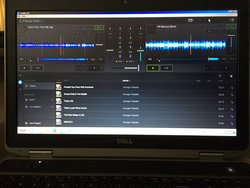
OK... Traktor DJ 2 runs fine on my Dell laptop. It takes quite a while to start up, which makes me wonder if it would have run on my Lenovo laptop if I hadn’t become impatient and clicked on the icon multiple times???[emoji1] It works with my Traktor Audio DJ 2 with not much of a problem, but it didn’t automatically configure it like Traktor Pro does.
f041e3bac9a01889eedec1742e5f578d.jpg

Now... What do I think of it???... Not much. The interface is just OK... very minimal. Can’t reposition or change/add column headings in the music list. Setup options are few. You have three appearance options, but only one that’s worth a damn as far as I’m concerned. The only way to load a track is to drag it to a deck. No ANALYZE option, so tracks don’t get analyzed until you load ‘em in a deck the first time you play them. They analyze pretty quickly though, so I guess that’s good. No End-Of-Track warning and no place to set it up. Actually, there are only three settings/preferences; Output Audio Device, Routing Master Output and Monitor Output. The File option (on the menu bar) is only for importing music, and the View option is only for toggling into Fullscreen mode, but when you do, you’re screwed... no menu bar; no minimize, no exit button, and no way to toggle out of Fullscreen Mode. F11 toggles you out of Fullscreen Mode, but if you forget that’s how to toggle out then the only option is to use the Windows key so you can stop the program from the Task Bar.

Looks like most everything else you need for playing/mixing your tracks is there except for Cruise Mode (Auto Mix). I use Cruise Mode to test with so I don’t have to load tracks one at a time for an extended period of time, but Traktor DJ 2 does not appear to have it. It DOES have place where the application suggests what to play next. Pretty cool, but not sure how useful that is.
e8604356ca06fb67e43b58006dcc72d8.jpg

So... could I use this app (Traktor DJ 2) for mixing at a REAL gig???... Maybe.... As a backup... perhaps, but not for very long. It IS free, so there’s that, but I think Mixxx is MUCH better and also free.

 
I also have two of the exact same sound cards, proving once again that great minds think alike, I think?

The upgrade to Traktor Pro 3 went on sale today - $24.50 until June 30th.
TRAKTOR PRO 3 - (https://www.native-instruments.com/en/products/traktor/dj-software/traktor-pro-3/)

I think I bought my first Traktor Audio 2 DJ (the original version) at YOUR suggestion, and I bought the second one because... well... I’m a compulsive contingency planner.[emoji1]


Sent from my iPhone using Tapatalk

