Rockit 4

To many ads? Support ODJT and see no ads!
Status
Not open for further replies.
Not to make this a OTS or Rockit thread Rob but you need to look at the ability to talk to your software people and get satisfaction as well as look at the potential for timely updates. Rick has demonstrated his devotion here to update assist and even sponsor the forum. These are things I would consider first.
 
Not to make this a OTS or Rockit thread Rob but you need to look at the ability to talk to your software people and get satisfaction as well as look at the potential for timely updates. Rick has demonstrated his devotion here to update assist and even sponsor the forum. These are things I would consider first.

Agree which is why I started a different thread.... to hash out my decision.

I believe Rick has done a wonderful job here and I'm gaining more and more confidence in the product as I play with the demo... I wish the demo would run longer than 40 minutes though so that I could use it in a live show to help make my decision... I did that with VDJ and have almost ruled that one out on price alone... since I can get simular features in a less expensive yet equally as good of a product such as Rockit...

I did manage to modify an existing skin to my likeing, well sortof anyway.... I'm not a programer or graphics artist so these things come hard for me... not impossible but they take me longer considering I don't have the proper tools to do it right.... nor the experience like Hank... his Sam Adams skin is awesome...

Back to topic

Rockit 4 is starting to edge to the top of the heap for me too. But, alas I wont have the money until the end of February or when I get booked next whichever comes first before I can buy.... so topics like this are helping me hash out my needs and my wants...
 
I did manage to modify an existing skin to my likeing, well sortof anyway.... I'm not a programer or graphics artist so these things come hard for me...


Have Faith Rob... I do ;)


I live the old way...

Give a man a fish, and he eats once -- teach him how to fish, and he eats
forever -- that is Rockit in a nutshell :)


As it progresses, I give it more and more options and functionality (and personality), and the user becomes the developer... ;)


How'd Bruce say it...

"From small things Mama, big things one day come"
 
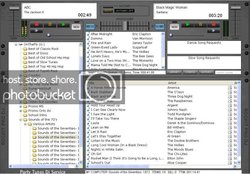
Pretty well completed the tweaks to my new skin. I may add a few more things, but this is for me. Not any information cluttering the screen for me. I may move the remaining time over to the left and place the album art back up in the right hand corner, just to add some eye-candy.

I actually use the two deck que's as holding tanks for requests, but you could easily take them off and place the search list in that area. I don't mind having the search list pop up when I use it.

I can view the next 9 songs in the auto que, but I could shrink the main tracklist down and lengthen the automix que even further.

rockitptskin2.jpg
 
New skin available :)

This is now my new favorite. It's sorta modeled after the Denon HC4500 controller (which Rockit supports, of course :)).

It's called -- Rockit4500 (original, huh)...

I actually took a high-res picture of my 4500, and grabbed the buttons off it to make it look more authentic, then modified the heck outta 'em.

This is a fairly easy one to modify, as it has a solid black background, and the lines and text on it are hex code A0A0A0. It's 1024 x 768, as most of mine are. Have fun... :sqbiggrin:

Link: Rockit Skins Page

Rockit4500700.gif
 
Rick,

Some things I would like to see:

1. Index to 100ths of a second

2. Drag, scroll, click cue points on "wav" view (like VDJ)

3. Scroll wheel function in all windows

4. Sample effects buttons like BPM studio. (for drops and soundbites)
 
Randy,

Those are pretty simple Randy...

Any graphics program (including Windows Paint), will show you the mouse coordinates as you move it over an image.

So, for this example, load the skin background file into MS Paint, and find the top left area where you want say Deck A's drop zone to be. The coords will display on the bottom, and that becomes the x and y values (x=left, y=top).

Move to the bottom right of the area you want, and those become the r and b values, respectively.

Remember not to have those values go over a list control, such as a deck queue, otherwise when you drop a file, they will compete, and you will get what we in the programmer business call, "Undefined Results"... :sqerr:

What that means, is I have no idea who will get the drop, if anybody :sqbiggrin:
 
Rick,

Some things I would like to see:

1. Index to 100ths of a second

2. Drag, scroll, click cue points on "wav" view (like VDJ)

3. Scroll wheel function in all windows

4. Sample effects buttons like BPM studio. (for drops and soundbites)


Lots of things I'd like to see as well, but my contacts are dirty from too much partying last night... :sqlaugh:

1. Maybe... The ability is in the code, I removed it before release, as it eats CPU.

2. Possibly... Rockit has a couple different modes of operation that allow that, but again, I removed prior to release for the same reasons.

3. Capability is already there, just not as a knob. I set it up for shortcuts and controllers, but not as a control on the screen.

4. See # 3. The first six effects in the effects sampler, have commands to play them.


Wooo, now I'm tired after all that typing -- is it beer time yet... :sqbiggrin:
 
Is there something in MSPaint that I need to turn on? I have a background in there right now and don't see any coordinates.

Make sure that the Status bar is checked in the View menu, and you should see the coords on the bottom right. :)
 
Status
Not open for further replies.