



Rockit 4
- Thread starter SoftJock Rick
- Start date
You are using an out of date browser. It may not display this or other websites correctly.
You should upgrade or use an alternative browser.
You should upgrade or use an alternative browser.
- Status
- Not open for further replies.
K
Kirby Ball
Guest
You know it's funny that a couple of years ago when I first started looking at software, Rockit was the first one that I picked as the one I should go with.
Later, after may others offering their recommendations and advice on what they thought I should use (and after trying them all out) I found myself right back where I started from.....Rockit!
This is not some "butt-kissing" but a true and honest opinion.
Stability, ease of use, awesome price is what made me finally come back home to the "mother-ship"..
Later, after may others offering their recommendations and advice on what they thought I should use (and after trying them all out) I found myself right back where I started from.....Rockit!
This is not some "butt-kissing" but a true and honest opinion.
Stability, ease of use, awesome price is what made me finally come back home to the "mother-ship"..

I have created a new masterpiece... 
This is called the Twilight Zone skin. Why, I have no idea, but I needed to call it something This is my favorite so far, and it works well for what I do, which is fairly basic drag and drop to the decks, no AutoMix, no queues showing, and lots of space for the main list. Buttons are color coded in groups, and the remaining time is real big (for those with eyes like mine).
You can find it on the Rockit Skins Page

This is called the Twilight Zone skin. Why, I have no idea, but I needed to call it something
This is my favorite so far, and it works well for what I do, which is fairly basic drag and drop to the decks, no AutoMix, no queues showing, and lots of space for the main list. Buttons are color coded in groups, and the remaining time is real big (for those with eyes like mine).You can find it on the Rockit Skins Page
Rick, I can't wait to actually show my first creation. It's just now in the design phase, but I think it will turn out pretty cool. Although, this one isn't for me, it does give me some additional ideas. lol
Looking forward to it Randy
Once you get it all done and set, I can give it an install and put it on the website, if you want...
I'm getting ready to get into working on 4.1. Since Rockit has a lot more commands available then you see in the skins, I'll be adding those in, so they can be put on the skins as buttons or menu items.
Also, I'll probably be skinning the various players, such as the Jukebox, Video, Effects and CD player, so you can make those the way you want as well.
Plus, some new surprises...?
Once you get it all done and set, I can give it an install and put it on the website, if you want...
I'm getting ready to get into working on 4.1. Since Rockit has a lot more commands available then you see in the skins, I'll be adding those in, so they can be put on the skins as buttons or menu items.
Also, I'll probably be skinning the various players, such as the Jukebox, Video, Effects and CD player, so you can make those the way you want as well.
Plus, some new surprises...?
I couldn't help myself, after getting some flack on another board from a certain "software" company, soooo...
I bring you Ol' Red
Actually, it's just a red version of TwilightZone.
It's available on the skins page here: Rockit Pro DJ Skins Page

I bring you Ol' Red
Actually, it's just a red version of TwilightZone.
It's available on the skins page here: Rockit Pro DJ Skins Page

I like those two new skins... hell I might even consider getting Rockit... now that otsav has screwed me on price for the product I wanted... but those two skins would be tight if they had the autodj screen.... but it would need to be a bigger than what the standard skin had.... meaning it needs to display at least the next 10 to 20 songs... makes it easier to build a playlist if ya can see what's in it without having to scroll down a bunch... that's one thing i liked about ots av you had your music library on one side and a playlist on the other... maybe divide your new skins in thirds put the ML tree to the left the music library in the middle and the autoplaylist on the right... and make them scaleable so that if ya wanted to collapse one and expand another you could... know what i mean?
Thoughts?
If you can do that and come up with a midnight blue with oh... green LED style readouts... at 1280 x 1024 or maybe something scaleable between that and something smaller... a toggleable size that way if I want the skin to take over the screen it can and if I want to see my desktop for other purposes I could also... without much delay in changing skins...
If ya can do that I'm buyin'... at the end of February, maybe sooner just depends on funds.
I know since I'm not a Rockit owner... yet my thoughts probably mean squat... but just think about it and let me know.
Thoughts?
If you can do that and come up with a midnight blue with oh... green LED style readouts... at 1280 x 1024 or maybe something scaleable between that and something smaller... a toggleable size that way if I want the skin to take over the screen it can and if I want to see my desktop for other purposes I could also... without much delay in changing skins...
If ya can do that I'm buyin'... at the end of February, maybe sooner just depends on funds.
I know since I'm not a Rockit owner... yet my thoughts probably mean squat... but just think about it and let me know.
Joker - customization is so simple. It's based off X & Y axis points on the screen and you just change the coordinates to put everything where you want it. The time consumer for me is creating the actual background, because that's where some of the skin wording/labeling takes place.
You can place your playlists anywhere and at any size you wish.
In fact, I'm working on tweaking the Bright Silver skin right now to increase the size of the autoque holding tank. I hope to have it done early this week.
Papa - he labeled it as such.
You can place your playlists anywhere and at any size you wish.
In fact, I'm working on tweaking the Bright Silver skin right now to increase the size of the autoque holding tank. I hope to have it done early this week.
Papa - he labeled it as such.
OK, I didn't read the manual - - but how did you get an amazon downloads playlist?
That was yer first mistake
Anyway, I downloaded some songs to a folder called Amazon Downloads. I then opened that folder under My Computer, right-clicked, and selected Create Playlist from Folder
Now that it is a playlist, I can right-click on it, AutoMix it, Edit it, play it in the jukebox, etc., all with a click...
Use yer interface Son...
See, I would actually print out the manual and read it, but my printer is giving me a hard time...
Joker - customization is so simple. It's based off X & Y axis points on the screen and you just change the coordinates to put everything where you want it. The time consumer for me is creating the actual background, because that's where some of the skin wording/labeling takes place.
You can place your playlists anywhere and at any size you wish.
In fact, I'm working on tweaking the Bright Silver skin right now to increase the size of the autoque holding tank. I hope to have it done early this week.
Papa - he labeled it as such.
Sound simple enough but I suck at computer graphic and programing...
I wouldn't even know what to use to do all that in...
And if I did it would take me forever and a day to do...
I'll ask again once I'm an owner.
I know since I'm not a Rockit owner... yet my thoughts probably mean squat... but just think about it and let me know.
Not at all Rob. Just like you treat a potential client, so do I -- I charge less though
As Randy mentioned, you can modify Rockit 4 to your hearts content. Some things you mentioned, are not feasible with a fully user skinnable design though...
For example, making windows scalable, is virtually impossible, when the user has full control over the interface design. It's doable, but the overhead of keeping track of the users choices would be way too much, and mess up Rockit's stability.
The whole reason I made it totally user customizable, was so that I wouldn't have to do all these skins, and that other people would use their imaginations to develop them to fit their needs.
You can take any skin I've already done, and tweak it the way you want. All that is required is a knowledge of English, as the skin files are just XML text files.
Every function in Rockit is still available, even if not shown on the skin, so you can hide things, make them visible, etc.
Try it -- it's a lot of fun doing a skin, or just modifying one...
I wouldn't even consider it programming....you open up a file, change some numbers and see where you moved the parts and pieces. Trial and error is how I'm doing it. I save a good copy and start tweaking. Mess it up, save the good copy back over the top of my goofs and try it again.
Rick has done a good job of labeling things so you easily identify them and his instructions within the XML file is pretty self-explanitory.
Rick has done a good job of labeling things so you easily identify them and his instructions within the XML file is pretty self-explanitory.
Not at all Rob. Just like you treat a potential client, so do I -- I charge less though
As Randy mentioned, you can modify Rockit 4 to your hearts content. Some things you mentioned, are not feasible with a fully user skinnable design though...
For example, making windows scalable, is virtually impossible, when the user has full control over the interface design. It's doable, but the overhead of keeping track of the users choices would be way too much, and mess up Rockit's stability.
The whole reason I made it totally user customizable, was so that I wouldn't have to do all these skins, and that other people would use their imaginations to develop them to fit their needs.
You can take any skin I've already done, and tweak it the way you want. All that is required is a knowledge of English, as the skin files are just XML text files.
Every function in Rockit is still available, even if not shown on the skin, so you can hide things, make them visible, etc.
Try it -- it's a lot of fun doing a skin, or just modifying one...
are there any graphical xml editor's that can take that text file and turn it more into a drag and drop type setup... like building a web page?
I've screwed around with xml before and css too.... just curious.
Did ya notice I did the VU meters in Red, White and Blue
"When I get to New Orleans someone gonna treat me right.
Yeah in a town like New Orleans someone gonna treat me right.
And I'm gonna party like the devil if the Neville brothers play tonight..."
"When I get to New Orleans someone gonna treat me right.
Yeah in a town like New Orleans someone gonna treat me right.
And I'm gonna party like the devil if the Neville brothers play tonight..."
I wouldn't even consider it programming....you open up a file, change some numbers and see where you moved the parts and pieces. Trial and error is how I'm doing it. I save a good copy and start tweaking. Mess it up, save the good copy back over the top of my goofs and try it again.
Rick has done a good job of labeling things so you easily identify them and his instructions within the XML file is pretty self-explanitory.
I'll have to look at that... later right now I'm at work so I can't jump into it... so to speak.
If it's labled good then I might be ok to setup things.... the way i'd like em'
hmmm... another project that will take my time and piss my wife off.... o well sounds like fun!
K
Kirby Ball
Guest
Ooohhh! I'm getting all giddy, like a little school girl! :sqerr:
Doing my "Rockit 4.0" upgrade tonight!
Doing my "Rockit 4.0" upgrade tonight!
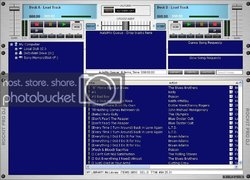
I spent the past hour tweaking the Bright Silver skin. I still have some final options to add and move around, but thought I'd share it with everyone before I called it a night.
- Status
- Not open for further replies.