Rockit 4

To many ads? Support ODJT and see no ads!
Status
Not open for further replies.
I can use explorer in Rockit to do this, however, undesirable side effects....

What would be the undesirable side effects?

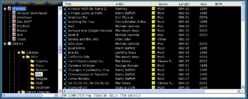
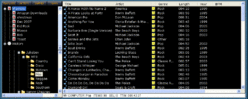
For example, I'm using the Twilight Zone skin here, and I have a folder on one of my drives called Jukebox, and under that, you can see it is broken down much like yours -- works fine :)


You can also make those folders playlists as well, just right click the folder in Rockit's Explorer, and click Create Playlist from Folder :)

Undoubtedly, you'd still want to add all your tracks to the library, for searching purposes as well.
 

Attachments

  • rilib.gif
    rilib.gif
    37.3 KB · Views: 6
  • rilib.gif
    rilib.gif
    37.3 KB · Views: 6
Rick - I had mentioned this before...On my home PC, if I use the Explorer tree; Say I am playing a song from "current". I can go to 80's and browse with no issues. If I ever go back to the folder where a song is palying; in this case current, as the colum recurses (populates), right near the end I get an audio hiccup...every time. I've never encountered this previously; it's ony when I try to recurse the folder from where a song is playing.

You're right; the tracks need to be in the library for surching puposes; the downside of using the "explorer" Tree. Even if you could have multiple libraries accessible, you are still faced with a searching issue.

I hadn't thought of the palylist route; that might be the ticket.....

Thanks
 
Another note:

As Rob mentioned, this is the way I normally do it as well, as it's much faster. In this case, I just clicked the Genres button, and the entire library is immediately displayed as genres.

rilib2.gif


If your tags aren't in that great shape genre wise in those folders of yours, don't forget the Multi-File tag editor built into Rockit. Just right click a folder under My Computer, choose Multi-File Tag Editor, and you can re-tag the Genre field of everthing in the folder, in one quick, easy shot :)


Also, just noticed yer post above whilest typing this one:

The reason you are probably getting an audio hiccup, is because the Explorer part of Rockit, has to read the tags of each file, as it displays them (that's why it is fairly slow compared to the library). The library has already done that when it imported the tracks.

When it hits the song you are currently playing, it will rewind the file pointer to the beginning to read the tag, hence burping the playback. Rockit streams, which means it doesn't keep the entire track in memory -- it is reading from the drive as it plays the song.
 
Steve,

I've got my library set up similiar to yours. I use my music tree, but have my library loaded up into the RockIt library because the RockIt search is much faster. I have tested numerous times, trying to recreate your audio hiccup and haven't been able too. Do you have other processed going on in the background that may be causing a conflict? On my laptop, the only thing I have running is RockIt -- clean and lean in an effort to eliminate any problems.
 
Rick - Thanks for the tip on the multi tag editor. I don't use genres at all..I guess I should start. That makes the most sense of all..

As far as the hiccup...I'm guessing VDJ, like others loads the track to memory?

Randy...This is a newly formatted PC...the usual processes are running. No issues when I try to browse another sub folder, only when I recurse the folder that contains ther track that is playing...The hiccup occurs right at the very end...without fail. I will try it on another machine.....to see if I can reproduce it. I use the onboard sound on this PC; that may be the culprit as well....
 
Rick - Thanks for the tip on the multi tag editor. I don't use genres at all..I guess I should start. That makes the most sense of all..

As far as the hiccup...I'm guessing VDJ, like others loads the track to memory?

Randy...This is a newly formatted PC...the usual processes are running. No issues when I try to browse another sub folder, only when I recurse the folder that contains ther track that is playing...The hiccup occurs right at the very end...without fail. I will try it on another machine.....to see if I can reproduce it. I use the onboard sound on this PC; that may be the culprit as well....


VDJ and others, usually load the whole track by default, or have an option as to how much to keep in memory.

Rockit is streaming by nature (more on that later), so it reads chunks of the file at a time. That means that if you happen to browse through My Computer, to the same file that is playing, and Rockit happens to be reading a chunk at the same exact time, you can get a burp.

Hence, why we use the library :)

There are reasons I keep the decoder working that way, and if you look in Task Manager, you will see that playing audio, Rockit uses almost no CPU time, and very little memory. Take a look at some of the others, and see how much resources they use. The worst I've seen to date, is the newly released DEX thingy from my "buds" in Florida (repackaged DJDecks). It uses memory sooo fast, I can't keep up with tracking it :sqerr:


Rockit does have the ability to pre-load the entire track, and also do all that wiki-wiki, scratch type stuff and tempo, but it is disabled in V4.0, because it didn't meet my release stability requirements for this version.

I usually cannot duplicate what Steve is running into, but it could also be due to something caching things differently on his system. For example, if you have the option for fast indexing turned on, system restore, things like that, your cache is constantly being refreshed in Windows, hence a lot more chance of something like that occurring...

 
The worst I've seen to date, is the newly released DEX thingy from my "buds" in Florida (repackaged DJDecks). It uses memory sooo fast, I can't keep up with tracking it :sqerr:

Agreed...I remember demo-ing that a while ago and even my little PC-enabled brain was able to figure that out! Woo-hoo!

Booch
 
I have an older laptop that exhibits bad behavior with the PC tree in Rockit. (512/pent II) It can't run VDJ either, but my old PCDJ Red runs flawlessly. I keep the PC tree to the side and drag and drop everything. I don't load tracks (too time consuming to do it everytime I add new songs) into the library or use built in search. To seach, I just right click on a folder.

Old school, but when I get a better laptop (need a good reason), I will run Rockit all the time. Right now I can't risk any mishaps at a gig.
 
What!?!?!? Are my eyes deceiving me?

Booch

Nah, the code is in there, just disabled ;)

Since whenever I enable that stuff, I get into the same sort of issues other software has with memory, resources, etc., I decided to take a step by step approach to putting things in...

Over the next few upgrades, I will gradually add stuff in, so as to insure the integrity, instead of just dumping it out there all at once, and having support nightmares :sqerr:

I'd rather add one feature at a time, and have it work right, then just throw a bunch of junk at you, just to say it's there :)
 
Here's a link to the Beta of the new website:

http://rockitprodj.softjock.com

There's a couple new tutorials up there, but it's pretty much what the new site is going to look and feel like.

It will be moving to a new domain, once I get all the rest of the content up, and figure out which domain I'm going to move it to... :sqbiggrin:


I have sooo many domains now, I'm not really sure where to put it (waiting for the wisecracks) :sqerr:

But, since the name is really Rockit Pro DJ, and no longer Rockit 2000, I think it's about time it slowly migrated to a new home. Have to do that slow, since the search engines are real fond of Rockit2000.Com. :)


Booch gets his basic skinning tutorial, but you'll have to wait a bit more on the advanced tutorial, and the skin viewer program...

And now, it's beer time :sqbiggrin:
 
OK...I'm feeling like the left-handed stepsister here...when's the pitch bend and keylock feature I need coming? :sqwink:

Just kidding...couldn't resist...:sqlaugh:
 
Oh no -- Bern and Booch are tag-teaming me here on the tempo thingy :sqerr: :sqeek:


C'mon, what can I tell Kanye, when you play his songs too fast or slow? Shoot, the guy goes ballistic when he doesn't win a video award -- he'll come after me in one of his Lincoln's with a gun :sqeek:


Think about the children folks...


:sqlaugh:
 
Status
Not open for further replies.