Reworking My Large System

To many ads? Support ODJT and see no ads!
How do transport your gear? Trailer w/ramp? Lift Gate? You do have a plethora of equipment...

I have a Chrysler Town & Country minivan. I do have a folding 7' long ramp. My current rack is too heavy to lift into and out of the minivan by myself, so the ramp is a necessity. With this new configuration (split rack), I'm hoping I can lift and set the top on one side and then lift the bottom into the rear hatch. I'll have slightly less gear in the rack, plus I won't have the controller and case. I haven't figured out about the table yet. Plethora of equipment???... I suppose that's possibly true, but it's all relative... I don't have as much as DJ Taso.[emoji23] I essentially have one Large Rack System and one Small Rack System, with the small system serving as backup for the large one. If I intend to use the small system, I take a laptop computer and Allen & Heath ZED-10 mixer as my backup. I only have three speaker systems; all RCF EVOX-8's, of which I can use one for very small events; two or all three if necessary for larger events. I take all three, even if only using two, so I have a backup. I have only one light tree with an ADJ Dotz TPar bar and two Mini Kinta's mounted on top, plus I can mount a couple of Chauvet DJ Colorbanks on my speaker poles if I need additional lights. I also carry a 4 foot table, but rarely need it, because I use the 30" square table most of the time. But like I said; that table won't really work with the new rack, so I need another solution.

Edit: I forgot to mention; I have a pair of Alto TX-8's I use for monitors if my main speakers are going to be more than 15 feet on either side of my booth. And I have a folding director's style chair that works nicely for me.
 
Last edited:
I've got slant rack custom made road case (wood covered by carpet) when loaded is 92 lbs. There is an immediate need to convert it into a 2-piece case w/laptop slide back on top case. Problem will be "how to connect power from one case to the other without using visible cords and cables". Need to make so each case is under 50 lbs. Each of my Evox 8 speakers is heavy to lift (single handle on top) because "Arthur-itis" in my right wrist and finger joints. That's what happens to many people when they reach 70 yr.--some young people too. Left knee can't withstand much weight by itself, but that may be fixed this Spring when I have a total knee replacement. Maybe my golfing and bowling will improve, too.
 
Last edited:
I still say your smaller system would be fine for most events.

So... would you think it wiser to duplicate the Small System as a backup? With this new Large System, pretty much everything will be in the top rack. The only component in the bottom rack is my ET PRO8 light controller... the rest is drawers. I could use the top without the bottom rolling rack. I thought about putting the DMX/Video Nano PC in the bottom rack too, but it would require more external patch cables to connect the two racks, and I really prefer that any external cables are for external gear only... speakers, lights, etc.
 
  • Like
Reactions: ittigger
I am still having a hard time with you’re large system / small system concept I have two duplicate systems DMX controlled by a laptop, MC6000, eq, dual wireless mics and a custom patch panel. Either system can be plugged into any thing I have from 12 in altos to my Bass Boss gear if I need more inputs I can run an external mixer in the mix with either system simple uncomplicated and efficient I know don’t have over $3500 total in both systems including the 4 laptops
 
  • Like
Reactions: ittigger
Today is the last day of January... time flies.[emoji1] I'd say I'm a little behind on the timeline, but ahead on the budget.[emoji1]... Catching a Cold was not in the plan, and certainly slowed me down.

Interesting happenings surrounding the Nano PC I bought on eBay. It was listed as "New, Other" for $199. The unit I received was not new, and was missing several parts. The missing items were:
S/PDIF Mini Adapter, VESA Mount, Mounting Screws, WiFi Antenna, and European Power Cord.

The power brick and a power cord were NOT the ones that would have come with this model. They work, but are not the same as the ones I got in the unopened ZBOX I bought on Amazon.com.

Windows had already been installed and activated, but the installation was done poorly. Many of the menu items were apparently deleted, but not done so correctly, so the menu was corrupted. I was able to reinstall the default menu, but it took time that really should not have been necessary.

If not for the fact that I needed this computer urgently, I would have returned it and requested a refund. I bought a replacement antenna and don't need the European power cord. The VESA mount, screws, and S/PDIF Mini Adapter would be nice to have. Had I known the missing items were not going to be included, I NEVER would have paid $199 for it. You can buy a REAL new ZBOX-CI325NANO for $229, and get ALL the parts.

I gave it NEGATIVE review on eBay and was soon contacted by the seller. Though his explanation for the discrepancies was a little LAME, he did offer an apology and a partial refund of $60. I accepted both. The missing parts, except for the VESA mount were easily replaced for less than the $60. I don't plan to replace the European power cord, 'cause I have no plans to go to Europe.[emoji1] The VESA mount, which is a custom bracket for this specific case can't be replaced, unless I see one on eBay at some point. I would have probably used it if I had it, but I can live without it. I'm pleased that this PC only ended up costing me around $150 with the replacement antenna. The computer runs fine and looks no different cosmetically than the NEW one. Seems like I ended up with a pretty good deal.[emoji4]


Sent from my iPhone using Tapatalk

 
  • Like
Reactions: ittigger
You should .. cuz it's AWESOME ... ALL OF IT ...

Well... I refuse to fly ever again, and you can't drive or take a train to get there.[emoji1] So a cruise (on a ship) is pretty much my only option, huh?... That might be fun to do at some point, but it's pretty low on the bucket list at the moment.[emoji1]


Sent from my iPhone using Tapatalk
 
  • Like
Reactions: ittigger
OK .. if you rule out flying .. not a whole lot of options. I flew almost 50,000 miles last year ... had a few 100K years in the 90s. I'm looking to get back to Europe this year or next .. Italy is high on the list, as is Scandanavia (I found out I'm 20% Scandanavian from a DNA test).

Also plan to go back to the UK and to take a swing through Germany/Switzerland/Austria again.
 
  • Like
Reactions: SEDJ and ittigger
I'm a fan of the K.I.S.S. philosophy. So yes, I do. How often do you use the light show?

Plus we ain't gettin' any younger...especially our backs and legs.
Well, some of us are getting younger legs .. or maybe newer leg parts .. :)
 
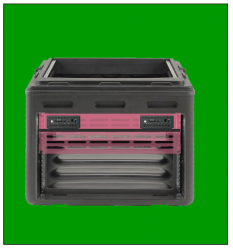
I've been spending a LOT of time measuring and thinking about this top rack. I'm pretty certain I'm going to mount BOTH Nano PC's in the top. It eliminates SO many extra external cables to connect the two racks and computers. So my plan, originally, was to mount the computers in the rear of the rack, with an access door so I could push the power buttons to turn them on. That surely would have worked. Looking at an image of the rear, the Nano PC's would have been mounted on a 1U rack shelf, and covered with a vented rack door (highlighted in pink).
upload_2018-1-31_12-54-29.png
I could probably do a little less surgery on the rear, and mount them a little higher, just opening up the oblong indentations in the case to provide access to the front panels of the Nano PC's, kinda like this...
upload_2018-1-31_12-58-2.png
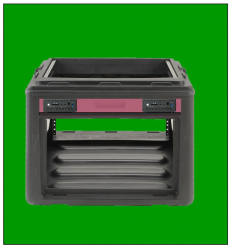
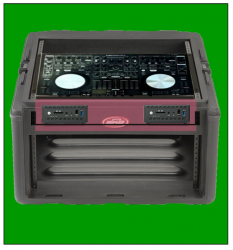
Then I discovered the computers would actually fit in the front, under the controller. If I opened up the area highlighted in pick on the image below...
upload_2018-1-31_13-2-37.png
... by creating a drop-down door, I could access the front panels of the PC's and use the drop-down door as a keyboard/mouse platform. I think this is going to be my plan... Any feedback before I start?
 
Or just mount the PCs in the back of the drawer or on the back of the drawer if it's shallow enough ... pull out the drawer and make a tray that fits over it to use as a keyboard tray.
 
Or just mount the PCs in the back of the drawer or on the back of the drawer if it's shallow enough ... pull out the drawer and make a tray that fits over it to use as a keyboard tray.

Interesting idea???[emoji848]... Only issue I can think of is the movement. Cables plugged into the back (primarily the USB cables) can easily be pulled out if the computers are moving around. VGA and RJ-45 cables are much more secure. Even when the computers are firmly mounted, connectors can come loose. With my previous 1U rack-mounted computers, I used the HDMI connection for video, but had to use an adapter to convert it to DVI. Those adapters fell out pretty easily. I zip-tied them to another cable, but I never felt they were secure.

The reason I like the idea of a shelf, is that it will be screwed securely to the rack, and I can secure the computers with screws to the shelf.


Sent from my iPhone using Tapatalk
 
  • Like
Reactions: ittigger
Whew....that's a lot of work.

What's "a lot"?[emoji1]... I don't think this will be too much more (work) than my Small System... however much that was.[emoji4] I don't know because I didn't keep track. This time I'll keep better records of the time expended. I have the advantage of experience, having modified one of these molded plastic racks previously. When I modified my Small System rack, I put the rails on the back a couple of years before modifying the front to fit the Denon controller. Hopefully these mods won't be years apart.[emoji1]


Sent from my iPhone using Tapatalk
 
  • Like
Reactions: ittigger
Another issue resolved, and this was an easy one; I needed the DMX/Video PC to run two video outputs (monitor and projector). I like running video over CAT5 because it makes hookups quick and easy, plus it's secure. The computer has HDMI, VGA, and Display Port. I decided to buy a Display Port to VGA adapter, then I'll run VGA over CAT5 to the projector. I don't know if or when I'll use the projector, but I want to have it working so I can.


Sent from my iPhone using Tapatalk
 
  • Like
Reactions: ittigger