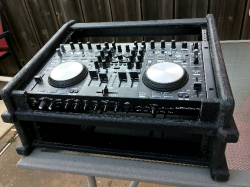
Reworking My Large System

To many ads? Support ODJT and see no ads!
So here I am... 4:00 in the morning, posting to a DIY thread on a DJ forum.[emoji1] Feeling a little down... dealing with a chest cold I just came down with on Thursday. I don't get many colds, so I'm not dealing with it well.[emoji1] I've been up since 3:00 AM... couldn't sleep. Can't really do much without waking the wife and the girls (my dogs), so I just sit here and think about stuff... in my misery.[emoji4]

And so I'm thinkin'; this Large System Rework project is a LOT of work![emoji1] And for what?... So I can have the PERFECT DJ rack system???... Well it's not gonna be perfect.[emoji1] I already know that. It's not even gonna be perfect for ME!... I already have an idea for a better DJ system, so how long will I use this new rack???... A year???... Probably. [emoji1] I'm sure I'll be doing another one of these threads next year about this time, if the Wife doesn't kill me first. And when I'm gone; what of it all then???... Will it be sold... given away... thrown on the junk pile???[emoji1] My wife sure won't keep all this DJ gear... nor all my other junk either... What would she do with 32 computers and all the crap I have stored out in the garage?... What will I do with it if I live a few more years?... I'm old. I won't be DJing much longer. What will they say when I'm gone??? That Bob... he built some cool DJ racks.[emoji1] Nope... nobody will know. Nobody will CARE!... Sorry... I think I'm delirious.[emoji1]

Got my computers upgraded last night... Put the 2TB FireCuda drive in the DMX/Video PC; no big deal. Took several hours to copy all the data from the old drive to it, even across USB3. The memory was a little more problematic. I added a second 4GB stick to one of the computers and it wouldn't even turn on. Switched it to the other PC... same problem. Bad memory stick???... So I took the original stick out and just ran with the new one... Worked fine... Added the second new stick to the same PC... voila... worked fine. Added the original stick from the first PC to the second PC, and it works fine too. The part number of the new memory is not the same, but the specs are. For some reason these computers want matching memory... OK.[emoji4] Both are now showing 8GB, so all is well that ends well... I hope I end well![emoji1]
 
Last edited:
  • Like
Reactions: ittigger
So here I am... 4:00 in the morning, posting to a DIY thread on a DJ forum.[emoji1] Feeling a little down... dealing with a chest cold I just came down with on Thursday. I don't get many colds, so I'm not dealing with it well.[emoji1] I've been up since 3:00 AM... couldn't sleep. Can't really do much without waking the wife and the girls (my dogs), so I just sit here and think about stuff... in my misery.[emoji4]

And so I'm thinkin'; this Large System Rework project is a LOT of work![emoji1] And for what?... So I can have the PERFECT DJ rack system???... Well it's not gonna be perfect.[emoji1] I already know that. It's not even gonna be perfect for ME!... I already have an idea for a better DJ system, so how long will I use this new rack???... A year???... Probably. [emoji1] I'm sure I'll be doing another one of these threads next year about this time, if the Wife doesn't kill me first. And when I'm gone; what of it all then???... Will it be sold... given away... thrown on the junk pile???[emoji1] My wife sure won't keep all this DJ gear... nor all my other junk either... What would she do with 32 computers and all the crap I have stored out in the garage?... What will I do with it if I live a few more years?... I'm old. I won't be DJing much longer. What will they say when I'm gone??? That Bob... he built some cool DJ racks.[emoji1] Nope... nobody will know. Nobody will CARE!... Sorry... I think I'm delirious.[emoji1]

Got my computers upgraded last night... Put the 2TB FireCuda drive in the DMX/Video PC; no big deal. Took several hours to copy all the data from the old drive to it, even across USB3. The memory was a little more problematic. I added a second 4GB stick to one of the computers and it wouldn't even turn on. Switched it to the other PC... same problem. Bad memory stick???... So I took the original stick out and just ran with the new one... Worked fine... Added the second new stick to the same PC... voila... worked fine. Added the original stick from the first PC to the second PC, and it works fine too. The part number of the new memory is not the same, but the specs are. For some reason these computers want matching memory... OK.[emoji4] Both are now showing 8GB, so all is well that ends well... I hope I end well![emoji1]
I'm thinking you like the projects, my main system has stayed the same for the last 6 years, except for speakers, MC6000, driverack, line 6 mics, and a custom front facing patch panel all contained in a 10x2 odyessy slant rack
 
I'm thinking you like the projects...

Yes... True. I always have several projects going and more in the pipeline. Funny thing is; I'm not really very good at multi-tasking. It's just that I forced myself to do it when I was working. In IT, technology changed so frequently, you HAD to deal with the constant change. I thought when I retired I would slow down and enjoy a little stability. But I guess that mindset is SO ingrained in me now, that I can't turn it off.[emoji1]
 
  • Like
Reactions: ittigger
I think that if this was a "job", I would be more inclined to keep things status quo. Since it's more (dare I say) like a hobby, I enjoy tinkering with it, buying new gear (sometimes too much) and constantly re-working it.
 
I think that if this was a "job", I would be more inclined to keep things status quo. Since it's more (dare I say) like a hobby, I enjoy tinkering with it, buying new gear (sometimes too much) and constantly re-working it.

I don't know???... For me, I try to treat it like a business, but it's NOT, by any means, a major source of my income. I just keep trying to improve it... make it better; more efficient. It means I'm not making as much of a profit though, because I keep reinvesting my proceeds into new gear.[emoji1]
 
  • Like
Reactions: ittigger
I don't know???... For me, I try to treat it like a business, but it's NOT, by any means, a major source of my income. I just keep trying to improve it... make it better; more efficient. It means I'm not making as much of a profit though, because I keep reinvesting my proceeds into new gear.[emoji1]
On the periphery, I treat it like a business ... I have a sales tax license, I comport myself professionally, I have liability insurance and I have a "legal" music pool. But I do more free or bartered events than paid ones and I'm OK with that.
 
Let me give y'all an update on these two nano computers (Zotac Desktop PC ZBOX-CI325NANO-U-W2B). The first one I bought on Newegg for $229. It included all the standard fare; 32GB SSD, 4GB RAM, Windows 10 Home, a VESA mounting bracket and screws, power brick and cord, and S/PDIF mini adapter. This PC was brand new and still in the sealed container. I knew I would need another one if this first one worked as expected, but when I noticed Newegg sold out, I hastened to find another identical PC to purchase. I found one on eBay for $199, but it was an open box, though supposedly NEW and complete, and only 2GB of RAM. No big deal. I've bought open box items before, and generally with good results. This computer, though, was not new and not complete. The WiFi antenna was missing, as was the VESA mount and screws, and S/PDIF mini adapter. The WiFi antenna was easy to replace, and I don't need the mini adapter, but the VESA mounting bracket was specific to this computer box, and not easily replaced. The power brick included was larger in size than the one that came with the unopened PC I bought from Newegg. It works, but is larger in physical size and has a straight connector, rather than a 90 degree connector. Windows had already been installed and activated, and whomever did the setup botched the menus, requiring extra time to reset it to the default menu. I could have, and probably should have simply returned the computer, but that would have been an unwanted delay. I did give the seller a negative review. The next day, I received a message from the seller, with an apology and an offer to discount the price by $60. So I accepted both the apology and the discount. I can deal with the missing and incorrect parts.

As it turns out, Newegg received additional stock a couple of days later, and still sells these computers for $229. I probably should have waited.[emoji4] There was one good thing, though. The open box PC really had 4GB of RAM, not the 2GB as described. I've added an additional 4 gig to both computers as well as an additional 2TB FireCuda SSHD. Both computers are now set up and functioning very well. Time to work on getting them mounted inside the rack[emoji4]


Sent from my iPhone using Tapatalk
 
  • Like
Reactions: ittigger
Let me give y'all an update on these two nano computers (Zotac Desktop PC ZBOX-CI325NANO-U-W2B). The first one I bought on Newegg for $229. It included all the standard fare; 32GB SSD, 4GB RAM, Windows 10 Home, a VESA mounting bracket and screws, power brick and cord, and S/PDIF mini adapter. This PC was brand new and still in the sealed container. I knew I would need another one if this first one worked as expected, but when I noticed Newegg sold out, I hastened to find another identical PC to purchase. I found one on eBay for $199, but it was an open box, though supposedly NEW and complete, and only 2GB of RAM. No big deal. I've bought open box items before, and generally with good results. This computer, though, was not new and not complete. The WiFi antenna was missing, as was the VESA mount and screws, and S/PDIF mini adapter. The WiFi antenna was easy to replace, and I don't need the mini adapter, but the VESA mounting bracket was specific to this computer box, and not easily replaced. The power brick included was larger in size than the one that came with the unopened PC I bought from Newegg. It works, but is larger in physical size and has a straight connector, rather than a 90 degree connector. Windows had already been installed and activated, and whomever did the setup botched the menus, requiring extra time to reset it to the default menu. I could have, and probably should have simply returned the computer, but that would have been an unwanted delay. I did give the seller a negative review. The next day, I received a message from the seller, with an apology and an offer to discount the price by $60. So I accepted both the apology and the discount. I can deal with the missing and incorrect parts.

As it turns out, Newegg received additional stock a couple of days later, and still sells these computers for $229. I probably should have waited.[emoji4] There was one good thing, though. The open box PC really had 4GB of RAM, not the 2GB as described. I've added an additional 4 gig to both computers as well as an additional 2TB FireCuda SSHD. Both computers are now set up and functioning very well. Time to work on getting them mounted inside the rack[emoji4]


Sent from my iPhone using Tapatalk
It’s a far cry from the days of my shortwave radio infatuation and a Commodore Vic20
 
It’s a far cry from the days of my shortwave radio infatuation and a Commodore Vic20
The price/performance ratio of these computers is pretty incredible. And when you consider the size (5"x5"X1.8"), they're very cool. I have absolutely NO idea how long they'll last. That's the REAL unknown. We'll keep y'all posted, though.[emoji1]


Sent from my iPhone using Tapatalk
 
  • Like
Reactions: ittigger
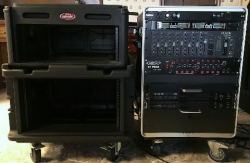
Feelin' a little better today, so it's time to get back to the project. Thought I'd take a couple of quick before-and-after iPhone pics before we start taking stuff out of the old rack and making any mods to the new rack. So here's a pic of the new SKB rack sitting next to my old rack (front view)...

upload_2018-1-30_11-45-14.png

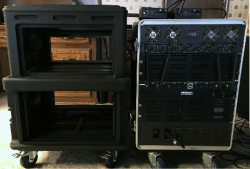
... and here's the rear view...

upload_2018-1-30_11-46-30.png

As you can see, the new SKB rack is a little wider, and it's deeper as well. The height is very close to the Gator Case height.

The BIG difference though will be having the controller mounted in the top of the rack. With my old Large System, the rack rolled under a table, and a separate controller case sat on top of the table. That elevated the controller by at least 6 inches. I think I'll be OK with the new height when using the controller, but it might also lower the height of my monitors. I also need to figure out how we'll mount a mouse and keyboard.
 
Last edited:
  • Like
Reactions: ittigger
The rack-mount kit for the Denon MC6000MK2 came late yesterday afternoon, so I put that on and mounted the controller in the SKB slant-top rack...

upload_2018-1-30_11-50-10.png

Unlike my small system, there's enough room in this rack to mount it a little further back from the front of the rack, in order to provide access to the controls and headphone jack on the front of the controller. Maybe not ideal, but workable. There's still 3U of space above the controller. I could even move it up another space to make more room for plugging in the headphones, otherwise, I probably need to get a 90 degree adapter.

The other choice is to modify the rack similarly to the way I modified my small system (below)...

upload_2018-1-30_12-2-38.png

... I'm not sure what I'm going to do just yet. I like the idea of EASY, but I'll make the mod if I think I can do it without risking destroying the rack.[emoji23]
 
Last edited:
  • Like
Reactions: ittigger
You could always mount a 1/4" jack into the left circular rectangular indent on the front with a small jumper cable to plug into the MC6000 .. then the headphones would plug into the front of the rack .. and I believe those 2 indents are fully covered by the top. The other controls are used very infrequently.
 
You could always mount a 1/4" jack into the left circular rectangular indent on the front with a small jumper cable to plug into the MC6000 .. then the headphones would plug into the front of the rack .. and I believe those 2 indents are fully covered by the top. The other controls are used very infrequently.

That's a pretty good idea. In fact, I could use a slightly longer jumper cable and mount the headphone jack on the right side, which is my preferred side.[emoji4]


Sent from my iPhone using Tapatalk
 
That's a pretty good idea. In fact, I could use a slightly longer jumper cable and mount the headphone jack on the right side, which is my preferred side.[emoji4]


Sent from my iPhone using Tapatalk

I occasionally have one or two ...
 
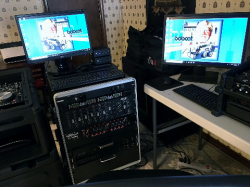
Had an easy task to complete today. Had to get the new Nano computers linked together and sharing a mouse and keyboard. I also set up new screen backgrounds using the same picture I used for my 2018 trading card. Not much left to do to get the computers set up; just a couple more applications to install and test on the DMX/Video computer.

upload_2018-1-30_15-11-1.png

I used Mouse Without Borders again on this pair of computers, since it worked so well on the old pair. This time, I'll have no keyboard drawer or keyboard for the DMX/Video computer. No room available in the rack for a 1U keyboard drawer. I carry a USB keyboard and mouse in my tool bag anyway, so I can pull those out if necessary. Sharing the wireless keyboard and mouse attached to the Music PC seems to work flawlessly so far, though. I never had a problem with this arrangement with the computers in my old Large System. I'm still using Windows 10, and having NO problems so far.

Hard to get good pics using an iPhone, so this is what the two screens actually look like...
upload_2018-1-30_15-19-1.png
 
  • Like
Reactions: ittigger
Had an easy task to complete today. Had to get the new Nano computers linked together and sharing a mouse and keyboard. I also set up new screen backgrounds using the same picture I used for my 2018 trading card. Not much left to do to get the computers set up; just a couple more applications to install and test on the DMX/Video computer.

View attachment 33634

I used Mouse Without Borders again on this pair of computers, since it worked so well on the old pair. This time, I'll have no keyboard drawer or keyboard for the DMX/Video computer. No room available in the rack for a 1U keyboard drawer. I carry a USB keyboard and mouse in my tool bag anyway, so I can pull those out if necessary. Sharing the wireless keyboard and mouse attached to the Music PC seems to work flawlessly so far, though. I never had a problem with this arrangement with the computers in my old Large System. I'm still using Windows 10, and having NO problems so far.

Hard to get good pics using an iPhone, so this is what the two screens actually look like...
View attachment 33635

Got to get the red and yellow beams to mate up .. :)
 
Got to get the red and yellow beams to mate up .. :)

Yeah... Looks like the bobcat (tractor) is a little lower on the right side, but not likely it's gonna get fixed unless my OCDness gets the better of me.[emoji1] Reversing a picture like that takes more than just flipping it. The face is actually turned a little, and any lettering and numbering has to be readable. Even the Pioneer jog wheel wheel covers had to be redone so they can still be read, rather than looking like a mirror image.[emoji4]
 
  • Like
Reactions: ittigger
How do transport your gear? Trailer w/ramp? Lift Gate? You do have a plethora of equipment. Need a photo of your setup once completed...at an event...please. Lot's of work as indicated in your posts. Enjoy.
Plus, it's nice that others (Steve) have forged ahead with suggested avenues to help resolve perceived issues in fabrication. Steve's a good egg. Have found you and he and Tigger willing to help.