Mini PCs anyone?

To many ads? Support ODJT and see no ads!

sawdust123

Moderator
Staff member
Nov 10, 2006
2,286
5,191
63
Ventura County, CA
I just got a new laptop that is very nice but unfortunately, I could not get it with a 5 year, next-day in-home repairs warranty (which has paid for itself numerous times in the past). Therefore, I am thinking about what I may want as a backup solution. My choices are a cheaper laptop in the $600 ballpark or a mini-PC at around the same price point. I know several DJs use mini-PCs but I am not sure I appreciate their appeal for a mobile application. I was hoping some of you that use this approach will shed additional light on the advantages and disadvantages.

I see the following advantages of a mini-PC approach. I am probably missing a few:
  • Could fit inside a controller case. A unit like the Geekom A8 is only about 4.5" x 4.5" x 1.5" high.
  • There are more placement options with a separate keyboard and monitor. Perhaps this has aesthetic value for a custom booth.
  • A mini-PC can be hidden from view (and often screwed down) thus making it less of a theft target.
  • Easy to swap componnents.
I see the following disadvantages too. Again, this list may not be complete.
  • Adding a separate keyboard and mouse raises the cost above that of an equivalent laptop.
  • Adding a separate keyboard and mouse raises the weight above that of an equivalent laptop.
  • There are more cables running around inside your booth/case.
  • Less convenient to work the PC while it is in the case.
  • A PC mounted in a case may get jostled more than a laptop carried in a separate bag.
 
I just got a new laptop that is very nice but unfortunately, I could not get it with a 5 year, next-day in-home repairs warranty (which has paid for itself numerous times in the past). Therefore, I am thinking about what I may want as a backup solution. My choices are a cheaper laptop in the $600 ballpark or a mini-PC at around the same price point. I know several DJs use mini-PCs but I am not sure I appreciate their appeal for a mobile application. I was hoping some of you that use this approach will shed additional light on the advantages and disadvantages.

I see the following advantages of a mini-PC approach. I am probably missing a few:
  • Could fit inside a controller case. A unit like the Geekom A8 is only about 4.5" x 4.5" x 1.5" high.
  • There are more placement options with a separate keyboard and monitor. Perhaps this has aesthetic value for a custom booth.
  • A mini-PC can be hidden from view (and often screwed down) thus making it less of a theft target.
  • Easy to swap componnents.
I see the following disadvantages too. Again, this list may not be complete.
  • Adding a separate keyboard and mouse raises the cost above that of an equivalent laptop.
  • Adding a separate keyboard and mouse raises the weight above that of an equivalent laptop.
  • There are more cables running around inside your booth/case.
  • Less convenient to work the PC while it is in the case.
  • A PC mounted in a case may get jostled more than a laptop carried in a separate bag.
A mini pc is not designed to be transported on a regular basis not built to the same standards as a laptop
 
As you might recall… I don’t care for laptop computer as a DJ platform. The screens are too small, and placement of the laptop is awkward at best, when used with a controller, and you want to access the keyboard. I realize I am NOT in the mainstream on this subject.

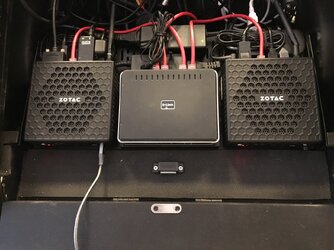
So, with that said, my systems did not rely on a laptop computer. One of them used DUAL Mini-PC’s. One Mini-PC was my DJ PC, running Traktor, and the other was my lighting controller, and backup DJ PC. I used dual 22” monitors, and I ran a single wireless rollerball mouse and mini keyboard, which was shared between the two computers via Mouse Without Borders. Both computers were plugged into a small Ethernet switch, comprising a little network.

The down side of using Mini-PC’s is that they don’t run on a battery. I was fully aware of the risk, however, all the rest of my gear requires electricity, so an electrical outage would mean nothing else would work except the laptop. However, if all you had was a quick blip, the Mini-PC would reset, but the laptop continues on. While that’s preferable, of course, the Mini-PC’s boot up in just seconds, so it’s not as bad as in the old days, when computers took several minutes to boot up.
1778776556458.jpeg
This is a photo of the shelf in my rack that sat directly beneath my Denon MC6000MK2 controller. I might add that the Mini-PC’s worked flawlessly.

I know it’s no longer in vogue, but I liked having everything prewired inside the rack, because it made setup and tear down much quicker and easier.
 
Last edited:
I did this with my Mac mini. It works but I've moved onto using my iPad with djay Pro now. The Mac mini fit in my case under my controller with plenty of room for ventilation. I have a travel monitor that connects via USB-C cable and the keyboard and track pad are one wireless unit. These days the Mac mini stays at home and is my main library that my iPad syncs to.
 
I don't think the comparison to a laptop is valid because a Mini PC is not designed to be a mobile workstation. It's a dedicated piece pf hardware. They are best suited to specific applications. The vesa mounting standard makes them ideal for dedicated applications involving other hardware like video displays, electronic signage, video streaming, production, digital audio, etc.

Laptops on the other hand are designed to be completely transitional - which speaks to things well beyond portability. Typically - if you are changing locations you are also changing functionality - presenting, creating, corresponding, transacting, teaching, or doing something recreational. That kind of mobility is not why Mini PCs were made 'mini." Portabiliy involves a lot moe than just size,
 
…“a Mini PC is not designed to be a mobile workstation. It's a dedicated piece pf hardware. They are best suited to specific applications.” …

…”That kind of mobility is not why Mini PCs were made 'mini." Portabiliy involves a lot moe than just size.”
Well… I dunno, but my Mini PC’s were pretty darn portable. They were inside my rack, which also contained a controller and a mixer, neither of which would be considered portable by your definition, yet the rack was rolled in on wheels, which made everything in it PORTABLE!😉😊 I never had to touch the Mini PC’s except to press the power button to turn them on. I bet a laptop isn’t as portable as that!😂

I don’t much care what things are “made for”. I find it FUN to ADAPT things for my own use, regardless their original intended purpose.😊
 
  • Like
Reactions: ittigger
Well… I dunno, but my Mini PC’s were pretty darn portable. They were inside my rack, which also contained a controller and a mixer, neither of which would be considered portable by your definition, yet the rack was rolled in on wheels, which made everything in it PORTABLE!😉😊 I never had to touch the Mini PC’s except to press the power button to turn them on. I bet a laptop isn’t as portable as that!😂

I don’t much care what things are “made for”. I find it FUN to ADAPT things for my own use, regardless their original intended purpose.😊
I think his point was the are designed to be portable, different build specs to less stringent standards, because laptops have a greater likelihood of being handled in a less than perfect manner. My gear lives on a trailer in an unheated garage, I would hate the thought of bringing my gear inside after every show
 
I think his point was the are designed to be portable, different build specs to less stringent standards, because laptops have a greater likelihood of being handled in a less than perfect manner. My gear lives on a trailer in an unheated garage, I would hate the thought of bringing my gear inside after every show
Well… I was mostly just trying to be contrary!😂 Bob can be a little stuffy sometime, and needs to lighten up sometimes.😉 However, in response to your post, most mini computers are built to withstand temperatures in excess of 212°F. If it ever gets that hot inside the trailer in your garage, you’re already got serious problems.😂 Also, my Mini-PC’s were NEVER handled after being screwed to a shelf, installed under my controller, which was screwed to the top of the rack. Under the PC shelf, my Denon Mixer was screwed in. Everything was wired, with a patch panel in the rear, so the only things that were ever touched were the knobs on the controller, and mixer, and the power buttons on the two computers.😊 It would be really hard for ANYBODY to break anything in that rack, and nearly impossible to steal anything, unless you took the entire rack!😂
 
  • Like
Reactions: ittigger
Well… I was mostly just trying to be contrary!😂 Bob can be a little stuffy sometime, and needs to lighten up sometimes.😉 However, in response to your post, most mini computers are built to withstand temperatures in excess of 212°F. If it ever gets that hot inside the trailer in your garage, you’re already got serious problems.😂 Also, my Mini-PC’s were NEVER handled after being screwed to a shelf, installed under my controller, which was screwed to the top of the rack. Under the PC shelf, my Denon Mixer was screwed in. Everything was wired, with a patch panel in the rear, so the only things that were ever touched were the knobs on the controller, and mixer, and the power buttons on the two computers.😊 It would be really hard for ANYBODY to break anything in that rack, and nearly impossible to steal anything, unless you took the entire rack!😂
I guess I would be more concerned about vibration while transporting
 
I guess I would be more concerned about vibration while transporting
Vibration was a problem when we had spinning hard disks or CD drives. Yes, severe drops can dislodge circuit boards but given how small and light PC boards are in mini PCs, there isn't going to be much force on the connectors. Still, you don't have the built-in UPS that a laptop provides.
 
  • Like
Reactions: ittigger
My Mini PC’s . . . were inside my rack, which also contained a controller and a mixer, neither of which would be considered portable by your definition, yet the rack was rolled in on wheels, which made everything in it PORTABLE!
That is what they are intended for - installation. Whether it's the back of a TV for digital signage, an equipment rack, touring case, etc. - the application is pretty much the same: a ready to go PC already connected. Home users do pretty much the same thing. They mount it out of the way, saving desktop space, hiding wires, and even using wireless peripherals.
 
  • Like
Reactions: DJ Bobcat
Small System For Sale.jpeg
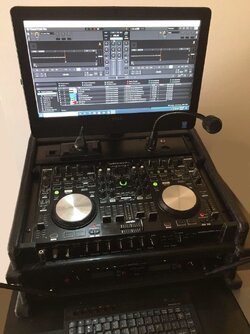
Before I used Mini-PC’s, my small system utilized an All-In-One computer. The advantage to the AIO PC is that the monitor was built in, and it occupied the same space a monitor was going to occupy anyway. AIO computers are essentially overgrown tablets, if you get one that incorporates touchscreen capability, as mine did. The downside is; unlike a tablet, NO battery. And mine was built like a tank, and was very heavy… much heavier than a laptop computer. Today, the AIO computers are lighter, but they’ve all gone to including builtin stands. That’s exactly why I never used my iMac, because it too had a stupid stand you couldn’t remove. I needed a computer with standard VESA mounting capability, and I made my own stand so I could fold the computer down flat over my controller, which then acted as a lid to my rack.

That system is the one I kept, but I’ve replaced the AIO computer with a much lighter BENQ monitor, and a Kamrui Mini-PC. I have a bracket to attach the PC to the back of the monitor, which makes the function very similar to the AIO PC. It’s not as attractive as my old AIO PC, but I’m not so concerned with aesthetics since I retired. If I use my system at a neighborhood event these days, I don’t try to make everything as attractive as I did when clients paid for my services.😊
 
I was just looking for ways I might be able to use my MeeGo Stick PC. I bought this little computer back in 2016. It came with 8GB of RAM, 64GB of storage, and Windows 10 Pro. I ran Traktor on it, and didn’t have any problems when I tested it, but I never had enough confidence in it to actually use it for DJing. However, with a smaller OS, like Linux Lite, and Mixxx, I think a stick PC might actually be a viable computing platform for DJing. I’m gonna give it a try when I have a little time. If it works on this old stick PC, it would surely work with one of the newer ones, which come with more RAM, and more powerful processors. The Windows operating system is a HOG! It’s BLOATED, and sucks up resources, memory, CPU, and disk space. If you’re thinking about using a mini or a micro PC, get one you can run Linux on.😊

The problem with this MeeGo is, there wasn’t enough space to run Windows updates, so it’s still running a 10 years old version of Windows 10. Converting it to Linux is about the only thing I could do to make it a useful device.😊
 
The laptops I have come with 4 USB ports. So if using a mini laptop you can't have 4 USB ports. So if you need to plug in a flash drive you will need to use a USB hub because there's not enough USB ports to do what you want with mini PC.
 
The laptops I have come with 4 USB ports. So if using a mini laptop you can't have 4 USB ports. So if you need to plug in a flash drive you will need to use a USB hub because there's not enough USB ports to do what you want with mini PC.
The mini PC I use has 4 USB ports! How many do ya need? I have a wireless keyboard/mouse transceiver in one, but I could use a Bluetooth combo instead. One port is used to connect to my controller, which leaves two unused.
 
The mini PC I use has 4 USB ports! How many do ya need? I have a wireless keyboard/mouse transceiver in one, but I could use a Bluetooth combo instead. One port is used to connect to my controller, which leaves two unused.
one port is to connect to the controller. Another one is to hookup HD to use with VDJ and the other 2 can be used when someone comes up with a flash drive. That way I don't have to unplug the HD to put a flash drive in that USB port.