I'd like to share one of my playlists with an ODJT member but don't want to type out a couple hundred titles and artists. Anyway to copy my list directly to a word document?
How to cut and paste from virtual DJ?
- Thread starter knardini
- Start date
You are using an out of date browser. It may not display this or other websites correctly.
You should upgrade or use an alternative browser.
You should upgrade or use an alternative browser.


Go to the playlist folder and copy the list and paste it on a word processor or txt on the notepad.
Go to the playlist folder and copy the list and paste it on a word processor or txt on the notepad.
Are you talking about simply highlighting, right clicking, and copy-paste?
I can't get that to work?

I'd like to share one of my playlists with an ODJT member but don't want to type out a couple hundred titles and artists. Anyway to copy my list directly to a word document?
Can't it be exported out from either history or a playlist... I dunno never tried... would be good to know.
Kris,
I think you right click on the playlist, and choose this option


Kris,
I think you right click on the playlist, and choose this option
smart ass....
G
Guest
Guest
You're looking for an .m3u playlist, which can be opened as a text file. In the Windows versions of VDJ, the default location is - my documents: VirtualDJ: playlist.
Select a playlist (highlight it). Right click on your chosen playlist, and select "open with" and select notepad or wordpad or MS word, or wordperfect, or whatever word processor you like. If it's not in the choices listed at first, select the bottom "choose program", and you should have more options. When I convert playlists to text, I clean up the text file to excude things like location of the file (how many times do you need to see "D:\music"?), and the suffix .mp3. You can resave it, and I'd recommend doing it elsewhere, with a different name, so as not clutter VDJ up with text documents.
I also go to - my documents: VirtualDJ: history, and use those .m3u files when I post a gig report, from time to time, using the same method. I then cut and paste out of wordpad and into the forums here, so you can scratch your head and go "what the hell did he play that for?!".
Select a playlist (highlight it). Right click on your chosen playlist, and select "open with" and select notepad or wordpad or MS word, or wordperfect, or whatever word processor you like. If it's not in the choices listed at first, select the bottom "choose program", and you should have more options. When I convert playlists to text, I clean up the text file to excude things like location of the file (how many times do you need to see "D:\music"?), and the suffix .mp3. You can resave it, and I'd recommend doing it elsewhere, with a different name, so as not clutter VDJ up with text documents.
I also go to - my documents: VirtualDJ: history, and use those .m3u files when I post a gig report, from time to time, using the same method. I then cut and paste out of wordpad and into the forums here, so you can scratch your head and go "what the hell did he play that for?!".
My Documents/ Virtual DJ/ Tracklisting. You'll see a tracklist.txt file. Open it.....Everything you played is sorted by date, just copy an paste what you want to a word doc....no need to export or convert an .m3u file

Dude, I'm in a serious depression after being at Disney. Having a hard time getting back into this teaching thing when just a few days ago I was drinking rum and cokes in the hot-tub all day long
Well, if your using VDJ i'd suggest the following
1) Save ur playlist in VDJ
2) Open up your winamp and Go to manage playlists and open up the playlist you had earlier saved in VDJ
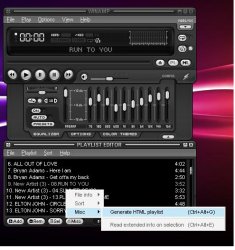
3) Then Go to the Misc -> Misc -> Generate HTML Playlist
4) Highlight what all you need from that and copy it onto a text file.
This is the most simple and easy way i follow. Of course there would be a little bit of formatting in the text file
Just attached a pic to help you out.
Hope this helps you friend
Cheers!
1) Save ur playlist in VDJ
2) Open up your winamp and Go to manage playlists and open up the playlist you had earlier saved in VDJ
3) Then Go to the Misc -> Misc -> Generate HTML Playlist
4) Highlight what all you need from that and copy it onto a text file.
This is the most simple and easy way i follow. Of course there would be a little bit of formatting in the text file
Just attached a pic to help you out.
Hope this helps you friend
Cheers!