Help!!!! Clean up my Mess!

To many ads? Support ODJT and see no ads!
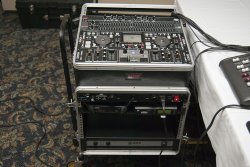
so is the rack even got anything in it other than your mixer? I cant tell with all the wires. Please list the components.

On the top:
HD2500
DN-X050 mixer
31 Band EQ
2/3 way crossover

Below:
Furman
Two wireless systems
Power Amp
 

Attachments

  • _DSC0002.jpg
    _DSC0002.jpg
    129.2 KB · Views: 6
I'd cut it into 2 or three racks.

Console with the mixer, HD2500 and the mics
Processing with the EQ & X-Over
Then the amp either in the processing rack or on its own.
 
Consolidate the gear into different racks, so that the least amount of cables possible will connect those racks. For example, put all your mixing gear in one rack, then you will have 2 XLRs going to your amp rack, then 2 speaker cables and a power cable coming out of that rack.

Also, get back covers for the racks, and run the cables you need to out the front, that way people don't see them.

Seriously though, couldn't you take a piece of 1/4 " plywood - cit a piece that would fit in the back; leave an inch at the bottom for outgoing cables?

I wouldn't worry about shorter or custom-length cables.
having a little room to play with is good if you need to remove the equipment but still have it plugged in (repair, etc)
I have two racks:
one with the mp3 player and mixer. the back cover slips into a slot at the bottom and attaches with a latch at the top. When I use it, I latch the top and let the bottom hang free, and pull my connecting cable out the back and around the sides of the rack, so they hang on MY side of the DJ table.
the second rack is for my amp and EQ. this one has a back cover that never comes off. I have attached a connector panel for ac, audio in, and speaker out plugs...which again is on MY side of the table, out of view from the crowd.
If you find a way to pull your cables thru YOUR side of that rack, rather than out the back, you can simply leave the back rack cover on during the event.

The reason why racks are designed with open door/ removable door backs is for ventilation. The cooler the gear the less likelihood of overheating. A Facade will hide all.
Why do you guys feel the need to lock up, shut up and hide everything is beyone me!
 
The reason why racks are designed with open door/ removable door backs is for ventilation. The cooler the gear the less likelihood of overheating. A Facade will hide all.
Why do you guys feel the need to lock up, shut up and hide everything is beyone me!

Actually even with the amp in the box there is no reason to keep the back open unless the rack is completely full of gear! The rack that Rob is using has a least 6 inches between the back of the amp and the back cover, so the amp fans are going to pull air in from the front through the amp and back out front. The other gear he is using produces minimal heat! The jumble of wires he has in the box is going to reduce air flow more than putting the cover back on the back of the rack!

Rob,

Just a suggestion but you can put Speakon connectors and a power plug on the side of your rack and not even have to remove the back cover at all! It is pretty simple to do!
 
Rob,

Just a suggestion but you can put Speakon connectors and a power plug on the side of your rack and not even have to remove the back cover at all! It is pretty simple to do!

I was thinking of doing just that... one thing to note is this rack's back cover has a whole already in it designed for running such things as a power cord and speaker wire out of.... plus Tom had modified the back to include fans.

If you look at the pic of the front you'll note I ran all the wireing needed to connect to my mixer and computers up and out through the top of the rack. Without moding the case this is probably the way I should do it under normal circumstances weather visible or behind my facade.

It was so hot and humid out I feared the amp might over heat.... I know I was near overheating just setting up my tent... LOL :triwink:
 
I was thinking of doing just that... one thing to note is this rack's back cover has a whole already in it designed for running such things as a power cord and speaker wire out of.... plus Tom had modified the back to include fans.

If you look at the pic of the front you'll note I ran all the wireing needed to connect to my mixer and computers up and out through the top of the rack. Without moding the case this is probably the way I should do it under normal circumstances weather visible or behind my facade.

It was so hot and humid out I feared the amp might over heat.... I know I was near overheating just setting up my tent... LOL :triwink:

I know I have the same case!:triwink:
 
Making Harnessing.

Rob,
Here is some info on making a harness.
http://www.cirris.com/harness/tester/harness-guided-assembly-demo.html
http://www.cirris.com/harness/tester/harness_drawing_video.html
I will look for more sources for you but as promised when I get back to Houston I will post pics of the back of one of my Racks. You have to also use labels on each end of the cables/wires to identify them since they will all be tied in. I use different colors of electrical tape about one inch behind the connectors. You also need red and white/black to identify the channels left and right.
So for instance if you have cables coming out of your EQ into your crossover you may have a yellow strip of tape on each end of that pair of cables and then add white tape to each end of the cable going from left side out to left side in. Then a red tape to each end of the cable going from right side out to left side in.

Velcro strips, tie wraps, twisty ties will come in handy when bundling and doing breakouts.
 
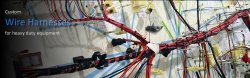
Harness Example

Here is a pic of a harness with different breakouts. This one was made for a circuit board or panel assembly. For a rack it may look like a vertical bundle with the "arms" extending out at a right angle.


Attachments

  • 2.jpg
    2.jpg
    72.9 KB · Views: 6
Two More Pics.

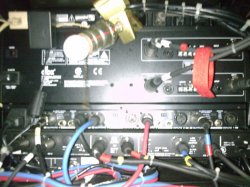
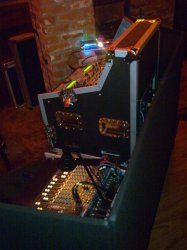
These are not the very best and have since cleaned up the look but I found these two pics in my Cell Phone. Take a look at the breakouts, strips of tape for identifying and the tie wrap on one end (Denotes left side of that pair.) The pic with the back of the components was taken through the door opening so you really are only seeing a part of the connections.
The Red Velcro strap hanging is used to secure the output cables from the DJ Station when I unhook those from the Mackie Inputs. Its hung there temporarily. See the 2nd pic of the two going into the Board.


View attachment 18992

View attachment 18993
 

Attachments

  • Image018.jpg
    Image018.jpg
    147.7 KB · Views: 4
  • Image032.jpg
    Image032.jpg
    77.4 KB · Views: 4
A Facade will hide all.
Why do you guys feel the need to lock up, shut up and hide everything is beyone me!

because my rack is close to 30" tall...
and it sits on a 30" table

and even though I like facades,
I wouldn't want to use one that is about 7" shorter than me!
View attachment 18994
 

Attachments

  • kilroy.jpg
    kilroy.jpg
    4.3 KB · Views: 48
All you really need to do is organize it & use zip ties. It's better to have that mess of wires inside out of view.

I am amazed at DJs that pile up components on a table & have cords, wires & other crap strewn all over the place...and then try to hide it with a facade.

Rack mount it. It looks more professional.
 
All you really need to do is organize it & use zip ties. It's better to have that mess of wires inside out of view.

I am amazed at DJs that pile up components on a table & have cords, wires & other crap strewn all over the place...and then try to hide it with a facade.

Rack mount it. It looks more professional.

You mean wires running all over the place like this without a facade!
 

Attachments

  • P8022343.jpg
    P8022343.jpg
    145.6 KB · Views: 9
You mean wires running all over the place like this without a facade!

[step up to soapbox]
There is NO WAY I would ever gig anywhere with that setup (the pic Thunder attached) regardless of how nice it looks. And you guys wonder why there are so many iTunes DJ's popping up all over and why people think they don't need DJ's? I'm not saying I'll over-complicate JUST for looks, just that the setup pictured could easily give an impression that you might not want to give.

This kind of goes hand-in-hand with my other pet peeve: Just because you might have software that will crossfade automatically for you doesn't mean that it's a good idea to leave your post and be out mingling while your computer does everything for you! When it looks like a computer is doing everything, people can easily get the impression that the DJ is just an added unnecessary expense.
[step down from soapbox]
 
It looks good when nothing's plugged in.

LOL there are 3 wireless mics 2 RCF powered speakers and three TVs all plugged in, the system was running at the time the pic was taken!

Posted by awdj

[step up to soapbox]
There is NO WAY I would ever gig anywhere with that setup (the pic Thunder attached) regardless of how nice it looks. And you guys wonder why there are so many iTunes DJ's popping up all over and why people think they don't need DJ's? I'm not saying I'll over-complicate JUST for looks, just that the setup pictured could easily give an impression that you might not want to give.

I stopped carrying a pile of unneeded gear to gigs years ago!

And just what system do you use for karaoke?

Do you use compression and effects, wireless mics, have recording capability?

Can you drop into a two hour long premixed DJ set at the touch of a button, if your player took a powder or your computer crashed?

It really isn't about the gear you bring it is about your ability and knowledge to run what you have!

Oh yes one more thing can you walk into a building and be set up and playing in under 10 minutes? I also have shows where I have installed my amps and speakers it takes me three minutes to setup this system (takes longer for windows and karma to load than the setup takes!