



What media player are you using? I found that some of the cheaper models don't display color the best. I see it's a darker floor as well. I always have a few options for that, with different (more bold) fonts or fudge with the fonts by making them smaller and leaving the background image larger; it allows you to throw it further without pixelation of the font. Sometimes, it can't be helped and I would have went to the wall before displaying that nasty box. Like this past Saturday, they had an awful wood dance floor and I couldn't get the POP I wanted for the gobo to show, so I opted to do above the head table.
Your shots look fantastic (as always). I admit I'm still working with this concept. I'm using a dedicated SD card reader that "plays" the image over the composite video (RCA) adapter. That projector is also my oldest (4 yrs) and is an Epson 2500 lumen. I would've liked to hit a wall but the config of the room just didn't work. The nearest wall was 35 feet away and it didn't face the entrance (which is what the client wanted). While I don't care for the box either it wasn't a deal-breaker for me.
I've got another lighting job this weekend and will probably try hitting the wall behind the head table, assuming they configure the room like they did before:
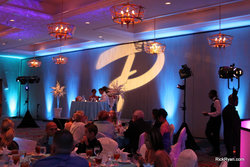
That's a SF Jr Zoom at the far-right of the shot. Probably a 30-ft throw. I may not have time to tweak it though. They're going to turn the room and I'm not convinced they won't re-config the walls, like they've done in the past. We may be in a crunch trying to setup lighting during the cocktail hour (they move everyone out into the hallway).
Thanks for the input.


