Cassette to mp3 or cd?

To many ads? Support ODJT and see no ads!

ou812

DJ
Sep 26, 2006
1,046
6
51
Klamath Falls, Oregon
Hey all,
What would be the easiest way to convert an old cassette to mp3 or cd, via my existing equipment (pc, alesis usb mixer, tape player)? A coworker has an old cassette (Chipmunks, Chipmunks in Low Places, of all things...lol) and wants a cd copy of it. I told her I would try to figure it out for her....
Any advice?


thanks,
Jeff
 
Or for an easy tech solution, simply connect a line level cassette player to the input of your sound card, then use your recording program to create an MP3 or WAV, then you have the ability to use a editing program to track it and clear it up if necessary...use this same technique for turntables or any line level input. For a free editing program, try Audacity.
 
Or for an easy tech solution, simply connect a line level cassette player to the input of your sound card, then use your recording program to create an MP3 or WAV, then you have the ability to use a editing program to track it and clear it up if necessary...use this same technique for turntables or any line level input. For a free editing program, try Audacity.

Harry, so if I have a cassette player and one of those $30 Behringer sound cards, all I'd need to do is attach the RCA outs on the deck to the RCA ins on the sound card, Then hook the sound card up using the USB input to the desltop, then record using maybe Windows media player?
 
Harry, so if I have a cassette player and one of those $30 Behringer sound cards, all I'd need to do is attach the RCA outs on the deck to the RCA ins on the sound card, Then hook the sound card up using the USB input to the desltop, then record using maybe Windows media player?
If you don't already own a Behringer UCA202, then run out and buy two. They are great. Yes, hook up your turntable, cassette or any RCA player to the sound card and record using a number of software options. I recommend Audacity (free). With it, you can then remove hiss an pops and edit your tracks.


.
 
I've been doing old LP's, singles and cassettes that are not available anywhere anymore. I run either a turntable or cassette deck through my mixer into an M-Audio Fast Track Pro and into Sony Sound Forge. I do some processing and the file is archived in WAV format and an mp3 for use with VDJ. No problems and great sound quality. Remember you need a quality stylus to convert the LP's and singles.

I've restored the auio en some files with a ton of pops and crackling and Sound Forge has been amazing.
 
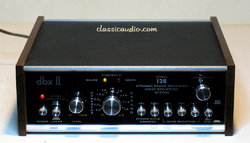
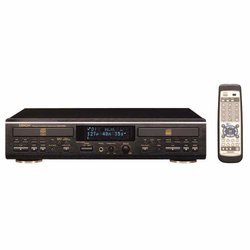
The way I make MP3s from Vinyl and Cassettes is using a DBX Noise reduction unit in between the Cassette Player/ Turntable and a Denon STEREO CD Recorder, using a Music Stereo Blank. This give me the highest quality CD which I can then rip to MP3.
dbx128.jpg
41V16TCP84L._SS500_.jpg
 
I run either a turntable or cassette deck through my mixer into an M-Audio Fast Track Pro and into Sony Sound Forge. I've restored the audio in some files with a ton of pops and crackling and Sound Forge has been amazing.

So would I be better off using my Denon mixer - hooking the cassette deck to an input and then hooking the sound card to the mixer and then the sound cards's USB into the desktop?

And would Windows media player work as software to record it to a WAV file?

Since the cassettes are in mono, would one of those Behringer sound cards suffice?
 
..and how much does this option cost? assuming any of this equipment is still available?


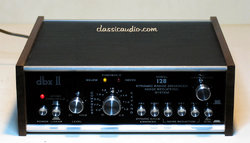
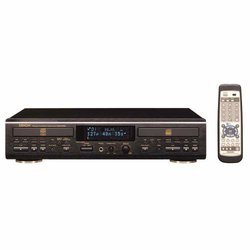
The way I make MP3s from Vinyl and Cassettes is using a DBX Noise reduction unit in between the Cassette Player/ Turntable and a Denon STEREO CD Recorder, using a Music Stereo Blank. This give me the highest quality CD which I can then rip to MP3.
dbx128.jpg
41V16TCP84L._SS500_.jpg
 
So would I be better off using my Denon mixer - hooking the cassette deck to an input and then hooking the sound card to the mixer and then the sound cards's USB into the desktop?

And would Windows media player work as software to record it to a WAV file?

Since the cassettes are in mono, would one of those Behringer sound cards suffice?

You'd have more control that way regarding levels. You can use Audacity to do the sound capture and edit the file (It's free) or you can get the following which let's you adjust more parameters and clean up the audio.
http://www.sonycreativesoftware.com/audiostudio
 
..and how much does this option cost? assuming any of this equipment is still available?
You can do a lot of the functions of the older hardware inside the recording software, whether Soundforge, Audacity, or any of the paid options.
 
Ditto on the Sound Forge, now known as the Sony Audio Studio. It's a wonderful program. Use it with a quality soundcard (mine is a tascam us122 that I've been using since 2002) and you will be very happy.
 
You can do a lot of the functions of the older hardware inside the recording software, whether Soundforge, Audacity, or any of the paid options.
That is true but if one already has the hardware why not use it. My Vinyls, Cassettes and Reel to Reels are in pristine condition. One setting on the DBX takes out all hiss from cassettes and any pops from vinyl. The Denon delivers an awesome digital file.

If I did not have the hardware then I would go the other route.;)
 
That is true but if one already has the hardware why not use it. My Vinyls, Cassettes and Reel to Reels are in pristine condition. One setting on the DBX takes out all hiss from cassettes and any pops from vinyl. The Denon delivers an awesome digital file.

If I did not have the hardware then I would go the other route.;)
The reason is that the software has better algorithms for removing hiss and pops/clicks (does less damage to the underlying signal). That unit was state-of-the-art over 30 years ago, not that it doesn't work, it's just there are better things for the same purpose.
 
The reason is that the software has better algorithms for removing hiss and pops/clicks (does less damage to the underlying signal). That unit was state-of-the-art over 30 years ago, not that it doesn't work, it's just there are better things for the same purpose.
Steve,
Let me explain something to you. I mostly rip Vinyl, as needed, I have over 8,000 albums in the house (Last count was in 1983). I dare you to find one fingerprint on one of those pieces of vinyl. It does not require much tweaking for me to get a CDA recording from them. Why would I discard something that I already have that works? That does not make much business sense. The Denon is only about ten years old. I purchased quality gear from the beginning so it would last for many years.
 
Steve,
Let me explain something to you. I mostly rip Vinyl, as needed, I have over 8,000 albums in the house (Last count was in 1983). I dare you to find one fingerprint on one of those pieces of vinyl. It does not require much tweaking for me to get a CDA recording from them. Why would I discard something that I already have that works? That does not make much business sense. The Denon is only about ten years old. I purchased quality gear from the beginning so it would last for many years.
Fingerprints on discs aren't usually the culprit, it's the microscopic dust, it's static charge and it's irregularities of the pressing process. While the dbx unit may still work for you, it does not mean there aren't BETTER and free (in some cases) alternatives. That, and the advice was for the OP Jeff, who presumably would not be in possession of a 30 year old dbx unit.