Video Problem

To many ads? Support ODJT and see no ads!

ahoustondj

Mac Daddy DJ
Aug 13, 2007
20,235
3,465
Texas
OK you Computer Gurus who specialize in Video. Houston has a problem, LOL! Normally for Video output when I want to use two TV/Monitors I would use a S-Video(4 Pin) Y connector from my Laptop to the two TVs/Monitors.
This particular Bar where I played once and will be playing again next week has their TVs bolted to the wall and the only connections available/visible is the HDMI, Component (3 RCA) and Coax. I purchased a 7 pin s-Video to Component and decided to try it out at home. The image is there but the color is all wrong. It is mostly all purplish/dark pink. The laptop is an older Dell Inspiron that does NOT have the HDMI outputs. What seems to be the problem? Is there some setting I can change?
 
N
did you just say "Y" connector?? just buy a laptop with hdmi,problem solved.
Not an option. I have all kinds of connectors, cables etc for different TVs and Monitors but I just wanted to know why I was getting a purple image.
 
You can get a VGA to component cable. Most VGA connectors will support component.. You can't directly convert S-Video to Component .. HDMI is a digital signal, so if you don't have DVI or HDMI out on your lappy, it's not recommended to go that way ... VGA to Component is probably the easiest.
 
You can get a VGA to component cable. Most VGA connectors will support component.. You can't directly convert S-Video to Component .. HDMI is a digital signal, so if you don't have DVI or HDMI out on your lappy, it's not recommended to go that way ... VGA to Component is probably the easiest.
I just ordered a VGA to Component Cable. So if I am going to feed two extra TVs/Monitors then I can split the outputs of the Component cables (3) to the two monitors, right?
 
I just ordered a VGA to Component Cable. So if I am going to feed two extra TVs/Monitors then I can split the outputs of the Component cables (3) to the two monitors, right?

In theory yes, practictly you may hit and miss results. IMHO the best way to go is to get an rf modulator and go vga to coax via modulator. It gets rid of a ton of issues for you, and you can split into as many tv's as you want. Coax is cheap. You may have slightly less signal quality than with s-video, but depending on what you are showing on the TV's most people won't notice at all. I have use the same system for a few off track betting operations. Used several modulators set to different channels and dumped it all into a distribution hub. It gave them the most diversity as to what was showing where.
 
Right now I use extended Desktop to one extra Monitor/TV via my S-Video output. So if I decide to use both the VGA and the S-Video Outputs together, one each to a different Monitor/TV, I will have to further extend the desktop to an additional TV/Monitor (Total 2), right?
 
I think so .. never tried it
 
I run mine from my desktop, And have a Dual Head video Card..One goes to my Monitor, the other goes to my 16 ch video matrix. I can then split it to 16 t.v.s if wanted. My rig is all VGA.
I can split to an S-video, but then i can only hit 1 extra tv.
 
You need all the CORRECT Software/Drivers to make sure it works

how about some details on what all you have and i'll see what I can match up
it will be to say 98% but you wont know till its all installed and working

if you dont know much on it i'll need to see pics from every angle inc serials etc (to search databases etc)

ok let me know
 
i'm not sure if the wiring is different here in the uk than over there...but here goes...the pub" and clubs i work in have multiple screens...may be 8 or 15...to get round to connecting to all the screens at the same time ..and without running cables all over the place. we cut into the tv system by using the in house satellite signal.
we find that usually there is a cable system or satellite system in place....(for sports channels etc)...there are two scart sockets at the back of the satellite or cable box..
...one feeding the satellite or cable tv to the multiple televisons/screens..and the other(usually the bottom scart socket) for connecting other devices (dvd/blu ray etc).
put in a scart like this and connecting the video signal from the laptop to the scart should be easy. either using the s video options on the scart.
once everything is connected when you put the cablebox/satellite box on standby, the tv's should automatically pick up the signal from the laptop as default signal.
this works so much so, that we don't know of any pubs that use the input for anything elses..so we just leave the plug inserted in the box with an s video cable running to the point where the dj usually is at. so that there is no fecking about with the system..and takes minutes to hook up whenever the screens are called for.
no boosters or anything like that are needed as the satellite/cable box does all the work for you as when the system was installed, if boosters or amplifiers where needed to run multiple screens in house, the installation company has done all the work for you.
nx6ZL2TyEhWM1BhDGediQaiKy5ecPrPmeBIOINwY2mY1rxdXRvmPBGPWkcYDut4Bl4FjosgIcaOcMku-plBFGdSK_3vBfAT3r2Na4SfFRbuFJQnB6z8HYMzs0kGEZIs
 
but.... it can also be a software issue where is not using the correct drivers...

you dont know till its tested
 
" Normally for Video output when I want to use two TV/Monitors I would use a S-Video(4 Pin) Y connector from my Laptop to the two TVs/Monitors."

so obviously works..

so why doesn't it work ?

use a 4 pin s video cable. you know it works ..


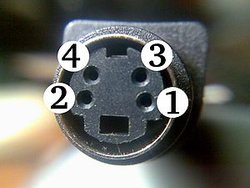
300px-Close-up_of_S-video_female_connector.jpg


lose the 7 pin..you know it doesn't work.
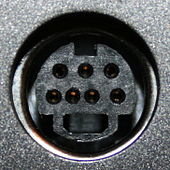
"This is a non standard 7-pin mini-DIN connectors (this variant is called "7P"). These are used on computer equipment (PCs). A 7-pin socket accepts and is pin compatible with standard 4-pin S-Video plug.The three extra sockets may be used to supply composite (CVBS) or an RGB or YPbPr video signal, or an I²C interface. The pin out usage varies between manufacturers.In some implementations, the remaining pin needs to be grounded to enable the composite output (or disable the S-Video output on some of those implementations)."

These are used on graphics systems that feature the ability to input video as well as output it.
Again, there is no standardisation between manufacturers as to which pin does what (also given that there 2 known variants of the connector in use).


170px-S-Video_7-pin_quasi-DIN_connector.jpg
 
" Normally for Video output when I want to use two TV/Monitors I would use a S-Video(4 Pin) Y connector from my Laptop to the two TVs/Monitors."

so obviously works..

so why doesn't it work ?

use a 4 pin s video cable. you know it works ..


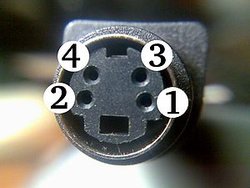
300px-Close-up_of_S-video_female_connector.jpg


lose the 7 pin..you know it doesn't work.
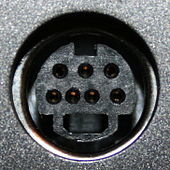
"This is a non standard 7-pin mini-DIN connectors (this variant is called "7P"). These are used on computer equipment (PCs). A 7-pin socket accepts and is pin compatible with standard 4-pin S-Video plug.The three extra sockets may be used to supply composite (CVBS) or an RGB or YPbPr video signal, or an I²C interface. The pin out usage varies between manufacturers.In some implementations, the remaining pin needs to be grounded to enable the composite output (or disable the S-Video output on some of those implementations)."

These are used on graphics systems that feature the ability to input video as well as output it.
Again, there is no standardisation between manufacturers as to which pin does what (also given that there 2 known variants of the connector in use).


170px-S-Video_7-pin_quasi-DIN_connector.jpg
My friend I have always used a 4 pin S-Video Y Connector, one to my TV screen for singers and the other to the Venue's. This particular TV does not have a S-Video input. My Laptop does not have HDMI outputs. Hence the reason for looking for other options/conversions.

Yesterday I went over to the Club and saw the solution. That first night, when all else was not working, I tried to connect a regular Coax to the TVs Cable via a Modulator. Problem is that when I unscrewed their Coax from the wall plate and used a coupler to connect to mine, I thought it was going straight to the TV. It was not! It was going to a Cable Box and then out via HDMI. In other words I was not connecting direct. So this weekend, I will use my Modulator again and go straight to the TVs Cable (Coax) input. It should work!
 
ok have a nice day!
 
ahoustondj


getting our wired crossed here..you mentioned "I purchased a 7 pin s-Video to Component "
thats where your problem lies..as you can get it to work using 4 pin s video..not 7 pin .

now the confusion does set in..

you quoted "My friend I have always used a 4 pin S-Video Y Connector, one to my TV screen for singers and the other to the Venue's. This particular TV does not have a S-Video input"


if the televison has component rca..and they are the same as the ones we get in europe..it's an s video in .


you said "only connections available/visible is the HDMI, Component (3 RCA) and Coax"
if this is the case..the tv has got an s video input...as shown below
images


the yellow plug is effectivelly a s video in if you choose that option on televison input selector on the tv remote control..

so if i was connecting this way..the route i would personaly take would be


s video to rca composite (that is why the plug input is coloured yellow..to match the tv input)
s-video-4-pin-to-rca-ac-068gold.jpg


and do what you normally do..only using rca cabling to the yellow input of the television.
if using more than 1 televison..use this

Adpt-2RcfRcmS.jpg

i'm only trying to be helpful..as i come across these situations frequently.

i don't work in mcdonalds so i wont say "have a nice day"...lol..as it derogatory to say that to someone over this way.
but hope this sorts out your problem, as it's the easiest way that i know to connect to tv using rca plugs..using component inputs.

Slàinte mhath!
 
ahoustondj


getting our wired crossed here..you mentioned "I purchased a 7 pin s-Video to Component "
thats where your problem lies..as you can get it to work using 4 pin s video..not 7 pin .

now the confusion does set in..

you quoted "My friend I have always used a 4 pin S-Video Y Connector, one to my TV screen for singers and the other to the Venue's. This particular TV does not have a S-Video input"


if the televison has component rca..and they are the same as the ones we get in europe..it's an s video in .


you said "only connections available/visible is the HDMI, Component (3 RCA) and Coax"
if this is the case..the tv has got an s video input...as shown below
images


the yellow plug is effectivelly a s video in if you choose that option on televison input selector on the tv remote control..

so if i was connecting this way..the route i would personaly take would be


s video to rca composite (that is why the plug input is coloured yellow..to match the tv input)
s-video-4-pin-to-rca-ac-068gold.jpg


and do what you normally do..only using rca cabling to the yellow input of the television.
if using more than 1 televison..use this

Adpt-2RcfRcmS.jpg

i'm only trying to be helpful..as i come across these situations frequently.

i don't work in mcdonalds so i wont say "have a nice day"...lol..as it derogatory to say that to someone over this way.
but hope this sorts out your problem, as it's the easiest way that i know to connect to tv using rca plugs..using component inputs.

Slàinte mhath!
I see that further clarification is needed. The reason I recently purchased the 7 pin s-video adapter was to try and convert 7 pin to Component. I thought it would work. I got an image but it was all purple!

There is also NO Composite (Yellow) inputs on that TV in question. I have used one of those before but on other TVs.

I have all the jacks and adapters you have shown and then some. Like I stated above, I now see the solution. I will use a modulator to convert one of my S-video splits to regular TV coax. There is an input for that one.
Thanks for trying to help.