Computer Sound Card

To many ads? Support ODJT and see no ads!
That sucks because I prefer to DJ with my DJ software useing my DN HD2500 and karaoke program for karaoke.... however if I start the one requiring ASIO and then the karaoke program it causes karaoke to endlessly loop only about 4 seconds of any track loaded until the stop is clicked.... however if I start the karaoke program first and then my DJ software its fine.... maybe the software us taking exclusive use is causing the problem?
For Karaoke I use the onboard soundcard that I custom ordered with my Laptop. For DJing I use the Gigaport. I open both and there has never been an issue.
 
Mike, I have a Realtek High Definition audio card on board my Vaio and it sounds pretty good for home use and webcasting, but I wouldn't use it for a job.
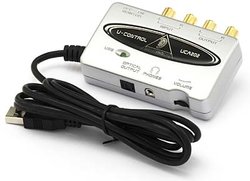
Having an external device that's made to do the specific task of playback does make a difference. Here are a few examples...

Behringer UCA202 USB $30
uca202.jpg

American Audio Versaport $99
versaport.jpg


Sound Blaster X-Fi Laptop
$69
img9864472med.jpg

I still don't understand.If I get one of the berry's and plug usb out of the computer and then run rca to rca to one channel in on the mixer,and the same for the other channel I can use my mixer fader to fade from side 1 to side 2.Do I have to change config in the computer?I also can monitor with the headphones side1 and 2 .Do I have this right? any help would be appreciated.
 
I still don't understand.If I get one of the berry's and plug usb out of the computer and then run rca to rca to one channel in on the mixer,and the same for the other channel I can use my mixer fader to fade from side 1 to side 2.Do I have to change config in the computer?I also can monitor with the headphones side1 and 2 .Do I have this right? any help would be appreciated.
Questions are:
What DJ Program are you using?
Are you doing auto mixing internally or are you using an external mixer.
How many stereo outputs do you want?
Please note that some DJ Programs only allow you to select ONE Soundcard at a time.
 
Bizzy,

Check out my sample setups page. It gives a brief overview of how DJ software is generally setup to run outputs.

Mine is geared towards my software at the bottom setup, but the basic setups I outline, pretty much works the same in most popular software (VDJ, Traktor, Rockit, ClubDJPro, etc).

http://softjock.com/rockitprodj-soundcardsetups.htm


I know Houston is a fan of a single sound card, with multi outs -- I'm a fan of the opposite, multi sound cards. I believe this builds redundancy into the system, and allows each DAC to function to its max, and not be multi-tasking among several outputs. In my tests, multiple cards have better sound quality overall, and better sound stage.

YMMV...
 
Bizzy,

Check out my sample setups page. It gives a brief overview of how DJ software is generally setup to run outputs.

Mine is geared towards my software at the bottom setup, but the basic setups I outline, pretty much works the same in most popular software (VDJ, Traktor, Rockit, ClubDJPro, etc).

http://softjock.com/rockitprodj-soundcardsetups.htm


I know Houston is a fan of a single sound card, with multi outs -- I'm a fan of the opposite, multi sound cards. I believe this builds redundancy into the system, and allows each DAC to function to its max, and not be multi-tasking among several outputs. In my tests, multiple cards have better sound quality overall, and better sound stage.

YMMV...

Rick,
You are not taking into account a couple of things; first, what if you only have one USB available? Second, what if your DJ program only recognizes one sound card at a time? Then what do you do? How do you solve those two programs by using two sound cards.
I am not disputing the quality or integrity of the cards that you use what I am disputing is the versatility of using one soundcard versus two sound cards. To me using two soundcards means there are more things to plug in, more cables to attach on more things to jiggle around and cause complications.

Using your setup recommendations here is what I find:

Sample Setup #1 - Simple single output from a computer's internal sound card:

Unless I am running Mono, this will not work for me. I do both internal as well as external mixing. Added to that I need the ability of being able to cue/preview a song within the software before it gets to the mixer.

Sample Setup #2 - One external sound card, along with the computer's internal sound card:

This setup also lacks multiple outputs so it would not work for me.

Sample Setup #3 - Two external sound cards, to two separate mixer channels:

When I set up my audio in Traktor, it would only recognize one sound card at a time. Some other DJ programs may do the same.

Sample Setup #4 - One external multi channel sound card, to two separate mixer channels:

This is the method that I use because I use either two decks and a headphone or four decks and a headphone. I switch between internal as well as external mixing depending on the situation either way I cue/preview internally..

Sample Setup #5 - Using a dual channel USB enabled mixer:

This to me is the same as sample set up number three.
 
Rick,
You are not taking into account a couple of things; first, what if you only have one USB available? Second, what if your DJ program only recognizes one sound card at a time? Then what do you do? How do you solve those two programs by using two sound cards.
I am not disputing the quality or integrity of the cards that you use what I am disputing is the versatility of using one soundcard versus two sound cards. To me using two soundcards means there are more things to plug in, more cables to attach on more things to jiggle around and cause complications.

If you only have one USB available, then you should upgrade your computer. You wouldn't buy a mixer with only one channel, would you...? My two lappies have 4 USB ports, Firewire, and eSata. If you are going to use a computer as a professional source for music playback -- don't get it at Wally World, and don't skimp on what you need... ;)

I'm not aware of any popular DJ software, that can handle only one sound card at a time...

I like the redundancy factor of using two cards. If one fails, you can switch both decks to the remaining working card on the fly (at least in my software you can). No need to restart the software, just a mouse click or two. I also like the fact of a DAC handling a single output at a time, and not multi-tasking.

Yer always hootin' and holerin' about using pro grade gear, yet it sounds like yer using a consumer grade computer. If that's the case, then you will have to make compromises...
 
If you only have one USB available, then you should upgrade your computer. My Laptop has Four USB Ports. You wouldn't buy a mixer with only one channel, would you...? My two lappies have 4 USB ports, Firewire, and eSata. If you are going to use a computer as a professional source for music playback -- don't get it at Wally World, and don't skimp on what you need... ;) I Custom/Special Ordered my Laptop from Dell complete with Top Of the line Sound Card at the time for a price of $1,500.00 in January 2006. What is so skimpy about that?

I'm not aware of any popular DJ software, that can handle only one sound card at a time...

I like the redundancy factor of using two cards. If one fails, you can switch both decks to the remaining working card on the fly (at least in my software you can). I have several solutions for anything in my system that fails including soundcards. No need to restart the software, just a mouse click or two. I also like the fact of a DAC handling a single output at a time, and not multi-tasking.

Yer always hootin' and holerin' about using pro grade gear, yet it sounds like yer using a consumer grade computer. See above statement. If that's the case, then you will have to make compromises...

I want you to put your expertise where your mouth is or shut up so here is my question. How would YOU set up Traktor so you can independently use its 4 decks plus headphones for internal cueing/previewing?(External Hard Drive and Wireless mouse use up two of the available ports.)
By the way, my laptop was an excellent investment because it is still running and its pure profit when I do a gig, since everything is already been paid off. It ain't broken so it does not need fixing.
I am waiting on your answer to my question.


See the answers above in Red.
 
I want you to put your expertise where your mouth is or shut up so here is my question. How would YOU set up Traktor so you can independently use its 4 decks plus headphones for internal cueing/previewing?(External Hard Drive and Wireless mouse use up two of the available ports.)
By the way, my laptop was an excellent investment because it is still running and its pure profit when I do a gig, since everything is already been paid off. It ain't broken so it does not need fixing.
I am waiting on your answer to my question.


See the answers above in Red.


Don't know -- I don't use Traktor, and haven't played with it for a while...

If it's like any other software, just use your headphone out for internally cueing via the software. It's not all that complicated.

If I were to use an external hard drive (which I do not like to do), I would use an eSata drive. My mouse is Bluetooth. That leaves me with 4 open USB ports for sound cards.
 
Don't know -- I don't use Traktor, and haven't played with it for a while...

If it's like any other software, just use your headphone out for internally cueing via the software. It's not all that complicated.

If I were to use an external hard drive (which I do not like to do), I would use an eSata drive. My mouse is Bluetooth. That leaves me with 4 open USB ports for sound cards.
Just as I figured, you are like a politician... you can't specifically and directly answer the question. You can only answer with "ifs". I described what I have and what I am using and you can't figure it out! Whats the matter, is Traktor and a Multi channel soundcard too complicated for you? Don't feel too bad, it is to a lot of people...too many features, benefits, bells and whistles. It is for advance uses not for the ones who want to just push play!
Now go upgrade Rockit!
 
Just as I figured, you are like a politician... you can't specifically and directly answer the question. You can only answer with "ifs". I described what I have and what I am using and you can't figure it out! Whats the matter, is Traktor and a Multi channel soundcard too complicated for you? Don't feel too bad, it is to a lot of people...too many features, benefits, bells and whistles. It is for advance uses not for the ones who want to just push play!
Now go upgrade Rockit!

Dude, you are entirely out in the ozone layer today... :yofaint:

I DO NOT use Traktor, as mentioned before. But, I have used it before, and they have a configuration, where you can setup the sound cards. I am not going to load up that thing on my computer, and do your job for you -- just because you can't figure out how to do it yourself... RTFM... ;)
 
Dude, you are entirely out in the ozone layer today... :yofaint:

I DO NOT use Traktor, as mentioned before. But, I have used it before, and they have a configuration, where you can setup the sound cards. I am not going to load up that thing on my computer, and do your job for you -- just because you can't figure out how to do it yourself... RTFM... ;)

And I am not going to explain you how it works other than in the setup it will show all the soundcards that are installed on the laptop. You then have to choose ONE that you want to configure, then when you do, you enter your settings on the one you choose. Don't tell me you are intellectually handicapped!
yorofl:yorofl:yorofl:
 
And I am not going to explain you how it works other than in the setup it will show all the soundcards that are installed on the laptop. You then have to choose ONE that you want to configure, then when you do, you enter your settings on the one you choose. Don't tell me you are intellectually handicapped!
yorofl:yorofl:yorofl:


Since you are apparently too lazy to Google your problem with Traktor, I did it for you... :sqrolleyes:

Traktor (Win version), apparently cannot handle multiple cards simultaneously by itself, you have to use ASIO4ALL. I'm not that nice of a guy, that I'm going to give you a tutorial -- you can go Google it yourself, and read it...

As I've mentioned elsewhere, some folks should not be DJ'ing on a computer, especially if they can't even figure out how to use Google search... ;)
 
I ran out of popcorn and had to go make some more. I'm back now. Carry on. :tribiggrin:


Buttered, or un-buttered...? :)


Come to think of it, maybe that's what would work on the DC plug -- somebody go tell maestro... hmmm :D
 
Just as I figured, you are like a politician... you can't specifically and directly answer the question. You can only answer with "ifs". I described what I have and what I am using and you can't figure it out! Whats the matter, is Traktor and a Multi channel soundcard too complicated for you? Don't feel too bad, it is to a lot of people...too many features, benefits, bells and whistles. It is for advance uses not for the ones who want to just push play!
Now go upgrade Rockit!

Asking a owner of a software program how another program works is like asking Arnold Schwarzenegger about how to fix problems in Ohio. Why would anyone think he should know about that?
 
Rick,
You are not taking into account a couple of things; first, what if you only have one USB available? Second, what if your DJ program only recognizes one sound card at a time? Then what do you do? How do you solve those two programs by using two sound cards. .

If you only have one usb, a usb hub will solve that issue. For me, every computer I have has at least 4 usb's, so that's not an issue for me. I would guess having more than one is a safe assumption for most.

If your DJ program only recognizes one sound card at a time, it's time to get out of the 80's and get some modern software.:)

There is a reason that prices vary for different software.
 
Asking a owner of a software program how another program works is like asking Arnold Schwarzenegger about how to fix problems in Ohio. Why would anyone think he should know about that?

:yoDur:He seems to know everything from the way he posts! As a software developer he ought to know the competition. If he really knew he would not be making these asinine assumptions and conclusions. No disrespect for what he does but he needs to ask questions before spouting off. :yopolitician: