Looking for advice from Rick or others in the know

To many ads? Support ODJT and see no ads!

nextgen1

Mac Daddy DJ
Sep 23, 2006
3,178
784
65
Waterford, CA.
www.tngdj.com
OK guys I'm beginning to move ahead with my somewhat costly system. I'm going to be adding one of these two hard drive raids systems and I need to know which one would work the best. Also Right now I have a 4 Tb WD setup that is Esata there are two (2TB) drives in that. I will be using those drives in this system. I'm wondering an maybe Rick would know. For this San Digital product do all the drive bays need to be full.

Or would it be ok for it to have 2 drives in it for now and then later I could add two if I need it. The first setup (Sans Digital) is my main choice because I have the drives if they work and the OWC drive my second if I can't use my own drives. I'am trying to contact some of these sites and ask these questions. I want Esata and USB 3 I want it to work with any of my computers using Vista or Windows 7 and with USB 3 I think future systems would be covered.

http://www.newegg.com/Product/Produ..._re=sans_digital_4_bay-_-16-111-152-_-Product


http://eshop.macsales.com/shop/hard-drives/RAID/Rack_Mount/FireWire_eSATA_USB2_RAID
 
Never tried either unit, although I would imagine they would work fine without all bays full -- I would call the companies to double check though.

One thing to keep in mind, is most of these RAID units require you to format the drives before they will work. Which means you could use your existing drives, but you'd have to let the unit format them, then copy all your stuff back on.


Another thing I noticed, is that both units are deep -- the first is 21" deep, the second is 18" deep! Make sure they'll fit in your case...
 
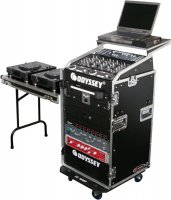
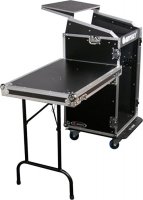
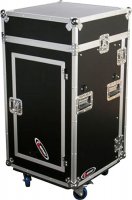
Hmmm good point Rick about the size. I'll check it right now. Here are the specs right now to the case that I would be putting it in. It looks like either one would fit though the first one just by a couple of inches. And yes it would weigh a lot once filled 100 pounds plus but I do have a van and I do have a ramp. ) It will probably weigh in when done about 130 lbs but it would be quick to setup. My evil schemes are finally coming true muhahaha

Odyssey ATA Flight Ready Combo Rack Case Specifications:


  • Approximate Dimensions (exterior): 22"W x 44.5"H x 23"D
  • Weight: 76.4 lb.
  • Shipping weight: 80.2 lb.
http://www.guitarcenter.com/Odyssey-ATA-Flight-Ready-Combo-Rack-Case-105308290-i1474063.gc
 

Attachments

  • 697015.jpg
    697015.jpg
    36.6 KB · Views: 1
  • 697016.jpg
    697016.jpg
    50.3 KB · Views: 0
  • 697017.jpg
    697017.jpg
    45.5 KB · Views: 0
  • 697019.jpg
    697019.jpg
    31.2 KB · Views: 0
  • 697020.jpg
    697020.jpg
    31.3 KB · Views: 0
Rick here is the specs of the 2 hard drives that I would be adding. Do you see anything wrong with them and any reason they may not work. Again thanks for your help and info.


Product Description My Book Studio Edition II WDH2Q40000 - hard drive arrayDevice
Type Hard drive arrayTotal Array Capacity 4 TBInterface FireWire 800, Hi-Speed USB, Serial ATA-300, FireWire 400Installed Devices
/ Modules Qty 2 (installed) / 2 (max)Dimensions (WxDxH) 3.9 in x 6.1 in x 6.5 inWeight 5.7 lbsLocalization United StatesStorage Controller RAID - RAID 0, 1Hard Drive 2 x 2 TB standardOS Required Microsoft Windows Vista / 2000 / XP, Apple MacOS X 10.4.10 or later, Apple MacOS X 10.5.2 or laterPower AC 120/230 V ( 50/60 Hz )Manufacturer Warranty 5 years warrantyGeneral

Information
Device Type Hard drive arrayWidth 3.9 inDepth 6.1 inHeight 6.5 inWeight 5.7 lbsLocalization United StatesCabinet (Chassis) Installed Devices / Modules Qty 2Supported Devices / Modules Qty 2Storage Total Array Capacity 4 TBHDD Array External Interface FireWire 800, Hi-Speed USB, Serial ATA-300, FireWire 400Storage Controller Type RAIDSupported Devices Hard driveRAID Level RAID 0, RAID 1Storage Hard Drive Type Standard - internalCapacity 2 x 2 TBExpansion / Connectivity Interfaces 2 x IEEE 1394b (FireWire 800) - 9 pin FireWire 800
1 x Hi-Speed USB - mini-USB Type B
1 x eSATA-300 - 7 pin external Serial ATASystem Requirements OS Required Microsoft Windows Vista / 2000 / XP, Apple MacOS X 10.4.10 or later, Apple MacOS X 10.5.2 or laterMiscellaneous Cables Included 1 x IEEE 1394b cable
1 x IEEE 1394 cable
1 x USB cableSoftware Included Drivers & UtilitiesCompliant Standards RoHSPower Power Device Power adapter - externalVoltage Required AC 120/230 V ( 50/60 Hz )Manufacturer Warranty Service & Support 5 years warrantyService & Support Details Limited warranty - 5 years

Sorry for the jumble it did not look like that when I pasted it also it seems the drives are easy to take out based on this image.
 

Attachments

  • IMG_97103.jpg
    IMG_97103.jpg
    16.7 KB · Views: 0
Don't see any reason why they wouldn't work, as long as they are SATA drives...

Me, I'd probably just buy new drives for the rack unit -- drives are cheap these days, and you'd still have the old setup for a backup.


I'd be real concerned about those rack units fitting into the case you mentioned though. The depth is 23" (exterior). I'd wanna know the interior depth, and also if there's any extra depth required on the array unit, that might stick out the back (cables, etc.). The rack arrays also have their fans at the rear, so even if they squeeze in there, there might end up being ventilation issues...
 
Well can you tell if they are sata drives with all the gibberish and again you make great since and thats why I'm asking. The other unit keeps looking better and better minus the fact I would have to buy it with the hard drives are inside and it would cost more. Hmm I'm wondering if I could add my drives to that unit and have the other 2 (1TB) units inside maybe I should give them a call as well.
 
OK Rick thanks for your time and your effort on my project here. I think I'm going with the more expensive drive. Its smaller and lighter, as well as having multiple outlets. It has 3 fans for cooling as well as 2 years warranty. It will allow me to pull out 2 of the (1 TB) drives and use my 4TB drives though if I do it like that then it will see it has (4) separate drives. I like the versatility. Of course I will probably leave the drives alone because of the size but just that fact that I can do all that make it and item that travel well into our future. Video in our area is very small even by the large multi ops. Its where I want to take us. Being different is making me money and getting us business.

http://eshop.macsales.com/shop/hard-drives/RAID/Rack_Mount/FireWire_eSATA_USB2_RAID
 
Video in our area is very small even by the large multi ops. Its where I want to take us. Being different is making me money and getting us business.http://eshop.macsales.com/shop/hard-drives/RAID/Rack_Mount/FireWire_eSATA_USB2_RAID

You call yourself "next generation". Congrats for (1) staying true to your word and (2) recognizing the opportunity and seizing it.

And I totally agree...video is a huge area where we can separate the real pros from start-up wannabe's.

Best of luck and let us know how it pans out for you.
 
Never tried either unit, although I would imagine they would work fine without all bays full -- I would call the companies to double check though.

One thing to keep in mind, is most of these RAID units require you to format the drives before they will work. Which means you could use your existing drives, but you'd have to let the unit format them, then copy all your stuff back on.

I completely agree.
 
use my 4TB drives though if I do it like that then it will see it has (4) separate drives.

Depending on the RAID level you use (and if configured as one large drive) with (4) 4 TB drives, you could end up with 8 TB (mirroring) to 12 TB (striping).
 
Depending on the RAID level you use (and if configured as one large drive) with (4) 4 TB drives, you could end up with 8 TB (mirroring) to 12 TB (striping).

I'm a strict RAID 1 guy -- I just want mirrors. The fail safe is more important to me than the write speed.

Given Dave's use for this, I would simply set it up as a mirror, as it's rare he will be writing to the array, and in need of any super speed in that area...


I'd also only use 2 drives, as Murphy's Law will tell you that something else will break, before both the drives at the same time -- rendering the entire array useless anyway... ;)
 
I'm a strict RAID 1 guy -- I just want mirrors. The fail safe is more important to me than the write speed.

Given Dave's use for this, I would simply set it up as a mirror, as it's rare he will be writing to the array, and in need of any super speed in that area...

I'd also only use 2 drives, as Murphy's Law will tell you that something else will break, before both the drives at the same time -- rendering the entire array useless anyway... ;)

I'd probably do the same. Currently, I use (2) 1 TB drives, duplicated, not mirrored (there is a difference) - although truth be told, the duplication is done often and then 1 drive is stored off line (disaster recovery). Raid striping (and all the flavors of) has its benefits too although I don't see them in this particular scenario. Raid mirrors have other configurations too. I agree that RAID 1 is probably the best for this scenario.