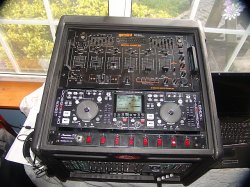
Denon 2500HD Gone

To many ads? Support ODJT and see no ads!
My apologies if this should be in the gear forum... or is there one of those here? ;)

Anyway, was wondering if any other Denon HD2500 users have had their Internal HD go MIA? In other words, I boot up the unit (the 2500, Ron)... and it says "No Internal HDD found" .

I have had this unit since May '07 & have the latest firmware installed (V1400).

I went into service mode & reformatted the HD - I then reloaded my songs back on the HD. And all was well for about 2-3 weeks. Last night when I turned the unit on, poof... "No internal HDD found" WTF????

Silvio? Ben? Anyone?

Speaking of possible causes, could static electricity wipe out the HD? I'm using a plastic SKB case to hold all of my gear - all is plugged into a Furman Voltage regulator. But at one point, when I was moving the gear case, I had a little static electricity build up, and I felt a little shock (NOTHING was plugged in) as I touched the plastic case.

Just wondering...

Cheers,

Joe
 
My apologies if this should be in the gear forum... or is there one of those here? ;)

Anyway, was wondering if any other Denon HD2500 users have had their Internal HD go MIA? In other words, I boot up the unit (the 2500, Ron)... and it says "No Internal HDD found" .

I have had this unit since May '07 & have the latest firmware installed (V1400).

I went into service mode & reformatted the HD - I then reloaded my songs back on the HD. And all was well for about 2-3 weeks. Last night when I turned the unit on, poof... "No internal HDD found" WTF????

Silvio? Ben? Anyone?

Speaking of possible causes, could static electricity wipe out the HD? I'm using a plastic SKB case to hold all of my gear - all is plugged into a Furman Voltage regulator. But at one point, when I was moving the gear case, I had a little static electricity build up, and I felt a little shock (NOTHING was plugged in) as I touched the plastic case.

Just wondering...

Cheers,

Joe

This has been a repeat problem with the Denon 2500, your not the first. If you can get access to the drive I'd try the physical connections first. (The obvious) Several folks I know have had a series of visits back to the service depot for this problem.

I think Denon are in denial on this one. I doubt it's the drive myself.

I would ask for a replacement unit though as this has been done for a couple of customers I know.

Maybe a bad controller ?? But it has kept me away from an otherwise nice unit. Did you check the Denon forums?
 
Also take out the hard drive and connect it to a computer and see if you can see it at all

no seeing the hard drive then its a DOA dead one and then it needs replacing
 
Hey all,

Thanks for your responses. Ok, I'm not the only one... :)

Yes, the first time this happened, I unplugged the unit from the AC power, then opened the side case & physically removed & reinserted the HD. All connections were snug. Nothing loose found.

I booted it up & then - poof, still no HDD found.

BTW, my EXTERNAL HD's are fine. But I like the security of having those "must have back-ups" on my internal HD, if my external HD went down. I usually get to a gig, setup & run from the external HD all night long with no problems. Yes, the internal drive is one of my backups.

Yes, I did post this on the DJ Forum under the HD2500 - I think I'll have to update my post from "Fixed" to "NOT AGAIN"! ;)

I'm wishing Silvio would jump in -- b/c when I called Denon Support, they didn't want to do anything over the phone, but give me the # to 3 different service centers.

The 2nd place I called (In Orlando, FL) actually talked me through getting the unit into "Service" mode by pressing 2 buttons (I believe it's the following: Close loop on A-drive & the Parameters knob on the B-drive) while powering on the unit. This actually allowed me to reformat the HD & when I powered it up in regular user mode, the HD was there... Making me think it's a software/firmware bug. Hey it's a SWAG...LOL.

Good luck all - & if Silvio is a member here, please, can someone get him to respond? Thanks.

Cheers,

Joe
 
It's likely a firmware issue.. I have a Drobo in my office. We store basically all of our electronic docs on it. Yesterday I discovered close to 300 photos "gone". Researching the net, I see this isn't an isolated issue. Interestingly enough, I upgraded the firmware last week....

The consensus wrt firmware updates seems to be if it's working, don't update it...at least not right away, until the firmware release is stable.....
 
Joe,
I think you won't be able to talk to Silvio due to to Las Vegas at this time he should be very busy. I would wait on that until the week after Vegas and buy another external and load it up so you'll have another backup.
 
SVO, all,

Thank you for your replies. I was just over on the DenonDJ forum for the HD2500 - There are at least 3 other active posts with users having the same problem.

Like Thatmusicguy suggested, I wonder if it's an issue with the latest Firmware update - V1400?

I know Silvio's a busy guy, but maybe he'll see these messages (me & the other users on the Denon forum) & chime in...

Thanks,

Joe

PS: I don't know if anyone over there tried a new internal HDD & then it re-occurred or not.
 
SVO,

Yes, I normally travel with 2 External HDs - using one & the other sits in it's travel case - a nice UDG bag for a single Denon CD1000 player. It holds/transports these units & now my external HD for the Macbook safely, securely.

Plus at home, sits a master backup HD that holds all of my music files - in case I need to reinstall the files on a new drive at some point.

Thanks,

Joe
 
I have been using the HDN 2500 for about 8 months now. Other than the sensitivity of the file tag structure, it has been a wonderful tool for me.

I must admit, that i do not upgrade my Firmware every time a revision comes out.

I see no reason to FIX it if it ain't BROKE!

I know that when the new Music Manager update came out last August, there were small problems with it. The general DENON advice was to roll back to the old Music Manager.

Sometimes re-inventing the wheel doesn't make it any rounder or ride any smoother.
 
Good luck all - & if Silvio is a member here, please, can someone get him to respond? Thanks.

Cheers,

Joe


Silvio only comes on when he has something he want to promote. Otherwise, we don't exist.
 
Joe,
Did you call him yourself directly. You know when you have a problem, talking about it here in open forum isn't a respectable way to air such issues. You should have the decency to make a person to person call to handle such issues. Give him time to respond before things get carried away. After all it's not about business but a personal thing. You know him by his first name and everything so you've taken the business aspect out of it. I would think that a call man to man or even a PM would have this situation dealt with so the rest of us don't have to read your personal issues.:sqembarrassed:

Oooop, wrong chat board.:sqerr: Never mind:sqwink:

You are free to use this post for anyone you choose. Just insert names as you see fit.:sqwink:


P.S.
If mine sh!#s the bed like this I'm going to do more than just ask questions. Since they know there's a problem I better not here "well maybe it's", or "it could be".
 
Joe did you gain any insight to this issue?

I still have the problem. Silvio? I have opened and reseated the drive and it will work for one round and then disappear as quickly as it showed itself again. Care to solve the mystery? I use a external but would like the 40 gig as a solid backup. I would have simply bought a 4500 if I wanted less.
 
Well, I hate to say "I told you so".

I did not like the idea of this unit when it first arrived. However, if the external drive works, I don't really see why anyone would want to use the very limited on board drive. Why split the library when it can all be in one place?

.
 
Jon,

After the episode in Feb '09, I had it shipped out to a service center in FLA. They said there was no problem & sent it back. I forget what I paid.

Hasn't had a problem since. Either with the internal or external HDD being found. Have been at the same venue where it took a major dump too... no issues.

Still working for every gig since then. But I always go out with my Macbook / Traktor backup. (Knock on wood).


Cheers,

Joe
 
My unit developed the NO HD disease about 6 weeks ago. Since I use an external drive 99% of the time, I said *&%@ that's just the way it is.

Then, this past Monday, I decided to read the Denon Forum and try to get to the bottom of the issue.

Although the problem is prevalent, and an abundance of fixes appear on the forum, none seemed to address my "problem".

Yesterday, I switched the power on and off several times, and voila, the internal HD is back!

I quickly downloaded the music i had on it,along with some great play lists, and put it all on my external drive. I then tried loading some new music on to the 40Gig internal. I overloaded it and it crashed!! Oh well!

Just for the sake of it, I deleted all of my internal HD music and uploaded 20 gigs worth of my most requested music.

The internal is running well, the search is quick, and there seems to be no problems. Its operating like it did when it was new!

One of the things I discovered is that if you have an abundance of files with that are not acceptable to the Denon format, the had drive can "hic-cup" if you will.

I don't know if I had some bad files, or if the hard drive is dying , or what. But with only 20 gigs on it, it runs nice.

I am going to re-fit the internal with a new 120 gig hard drive. 3 times the storage space, as well as being a new drive.

The Denon HD 2500 should have never been discontinued. It is a great solution for music media playback and mixing. BTW--it is a fantastic re-mixing tool! The hot start buttons, echo. filter, dump, reverse, and brake effects and pitch bend effects are awesome.

The internal hard drive--convenient, but certainly not necessary.
 

Attachments

  • New rack top view DSC03040.jpg
    New rack top view DSC03040.jpg
    112.3 KB · Views: 7
Stevie Cie - I disagree. This is supposed to be a "professional" piece of gear. Yet as you and Joe and Tuck have related, it appears "flaky" and "untrustworthy". I know i wouldn't trust it. Maybe that's why it was discontinued.....

as I side note. I wonder if the problem continues if the on board drive is upgraded?
 
Any equipment is subject to flaws and occasional breakdown.
I have used my Denon HD 2500 at over 300 events over the past 2 and a half years and have had only two incidents.

In contrast I had dozens of freeze-ups over the years with my laptops.

For 2011, I am switching to a video format for my show, and will have to go back to a laptop operation, but I will most certainly be "mapping" my Denon HD 2500 to run my Virtual DJ Software.
 
In contrast I had dozens of freeze-ups over the years with my laptops.

Dozens? I think maybe getting to know your computer better is in order. :triwink:

Stevie Cie - I disagree. This is supposed to be a "professional" piece of gear. Yet as you and Joe and Tuck have related, it appears "flaky" and "untrustworthy". I know i wouldn't trust it. Maybe that's why it was discontinued.....

as I side note. I wonder if the problem continues if the on board drive is upgraded?

I agree. I used to service booths at clubs and the Denon product repairs/replacements came only second to blown subs. Let's face it. That HD thing is between an iPod and a laptop/PC. Yes, all gear is subject to mishaps, but honestly, I have had a far better track record with a good laptop over any other playback device I've owned.


.