well i've had my little home system for about 2 years now.it includes Ricks software,numark cm200 usb,crown 1000 and a mpx3 dual deck.all along i've been playing mostly automix from my playlist so i have a continuous play.i just bought a headphone for the system and i cant for the life of me get the headphone to work properly.it might be something simple as a setting in Rockit but i cant put my hands on it.
Headphone.
- Thread starter CMWAT
- Start date
You are using an out of date browser. It may not display this or other websites correctly.
You should upgrade or use an alternative browser.
You should upgrade or use an alternative browser.

well i've had my little home system for about 2 years now.it includes Ricks software,numark cm200 usb,crown 1000 and a mpx3 dual deck.all along i've been playing mostly automix from my playlist so i have a continuous play.i just bought a headphone for the system and i cant for the life of me get the headphone to work properly.it might be something simple as a setting in Rockit but i cant put my hands on it.
Rick's Customer Support of Rockit includes flying to your place and personally setting it up for you!


well i've had my little home system for about 2 years now.it includes Ricks software,numark cm200 usb,crown 1000 and a mpx3 dual deck.all along i've been playing mostly automix from my playlist so i have a continuous play.i just bought a headphone for the system and i cant for the life of me get the headphone to work properly.it might be something simple as a setting in Rockit but i cant put my hands on it.
Are you using a sound card with multiple outs or just the onboard sound card that most PC come loaded with?
If you are trying to play one song on one deck while cueing the other on another deck but don't want that one to play through the system and only on your headphones you need either two sound cards or one with multiple outs like a Maya 44.
correct,thats what i'm aiming to do.Are you using a sound card with multiple outs or just the onboard sound card that most PC come loaded with?
If you are trying to play one song on one deck while cueing the other on another deck but don't want that one to play through the system and only on your headphones you need either two sound cards or one with multiple outs like a Maya 44.
correct,thats what i'm aiming to do.
I don't know about your other gear... but if you were just using a computer and Rockit I'd tell you to invest in either a Maya 44 USB sound card or 2 USB Turtle beach sound cards... either way that would give you two sound outputs.... one could be used as your Mains and the other as Headphone for Cueing purposes.
If you mixer has three channels then you could connect the MPX3 Deck plus use the Main out from one of the sound cards and then just plug your headphones into the other sound card...
the mixer has 5 chs,i'm wondering whats my best option.
Either way you look at it in order to preview music through Rockit you'll need dual sound cards for the PC....
Nice mixer by the way.... without reading the manual are the USB's sound cards or just a way to connect to your pc for control?
This could get quite complicated...
You have 5 inputs....
Ok so
Inputs:
1 and 2 your CD Decks
3 - rockit's main (sound card or output 1)
4 - Rockit's headphone (sound card or output 2)
Then use the mixer's Cue features for each deck... when you want to cue your decks set 1 or 2 to cue...
and when you want to cue in rockit set 4 as the cue source...
Assumeing your mixer does this for you I didn't see any buttons on the channels that said Cue on them so I'm not real sure without the manual if the above would work or not...
You have 5 inputs....
Ok so
Inputs:
1 and 2 your CD Decks
3 - rockit's main (sound card or output 1)
4 - Rockit's headphone (sound card or output 2)
Then use the mixer's Cue features for each deck... when you want to cue your decks set 1 or 2 to cue...
and when you want to cue in rockit set 4 as the cue source...
Assumeing your mixer does this for you I didn't see any buttons on the channels that said Cue on them so I'm not real sure without the manual if the above would work or not...
This could get quite complicated...
You have 5 inputs....
Ok so
Inputs:
1 and 2 your CD Decks
3 - rockit's main (sound card or output 1)
4 - Rockit's headphone (sound card or output 2)
Then use the mixer's Cue features for each deck... when you want to cue your decks set 1 or 2 to cue...
and when you want to cue in rockit set 4 as the cue source...
Assumeing your mixer does this for you I didn't see any buttons on the channels that said Cue on them so I'm not real sure without the manual if the above would work or not...
1 and 2 CD deck
3 and 4 rockit decks
5 not in use at present.
1 and 2 CD deck
3 and 4 rockit decks
5 not in use at present.
That should work too.... can you cue them individually through your headphone connected to the mixer without what you're cueing being heard through your mains?
With Rockit each deck needs to be assigned to a separate audio out on your soundcard(s) for it to work... your decks shoud work fine however.
If both decks in Rockit are set to the same sound card for both Mains and Monitor then yeah you're gonna hear both the main mix and the cue (monitor)...
If you want to be able to send deck one to one input on your mixer and deck two on a different channel on your mixer you have to set Deck 1 to Sound Card 1 and Deck 2 to Sound Card 2.... this will give you independent outputs for each deck to your mixer....
then you would just use the cue functions on the mixer to listen to each deck independent of the others and the main out....
Without having a mixer such as yours I can only go on what would work on a mixer that has cue mutes that redirect the channel outputs to the headphone jack on the mixer itself.
If your mixer isn't capable of this then it wont work and you will hear the cue in the mains.
If you want to be able to send deck one to one input on your mixer and deck two on a different channel on your mixer you have to set Deck 1 to Sound Card 1 and Deck 2 to Sound Card 2.... this will give you independent outputs for each deck to your mixer....
then you would just use the cue functions on the mixer to listen to each deck independent of the others and the main out....
Without having a mixer such as yours I can only go on what would work on a mixer that has cue mutes that redirect the channel outputs to the headphone jack on the mixer itself.
If your mixer isn't capable of this then it wont work and you will hear the cue in the mains.
ok i seem to have it working to a point.headphone plugged into mixer now works how it should but when rockits headphone button is depressed then it doesnt work properly,so i might have a compatibility or some issue where only one can work.
Could very well be... if you are running a single sound card then I would get a second one and then just dedicate the decks 1 to each sound card so that once in your mixer you use your mixer to cue rather than the software.

well i've had my little home system for about 2 years now.it includes Ricks software,numark cm200 usb,crown 1000 and a mpx3 dual deck.all along I've been playing mostly automix from my playlist so i have a continuous play.i just bought a headphone for the system and i cant for the life of me get the headphone to work properly.it might be something simple as a setting in Rockit but i cant put my hands on it.
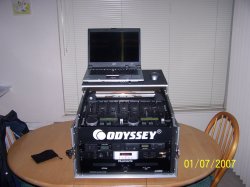
I use this mixer myself and it's nice enough. You actually should have 2 usb sound cards on that mixer. I personally don't use head phones at all. But once in a while if a bride or groom does come up with a CD at there event. I might have to check it out with my head phones (I do have a set). Not really sure how you would set it up with rock it. I use that channel for an extra Mic. Hopefully this video will help you out. I'm pretty sure you have to tell the program to use the other usb soundcard. Then Don't turn it up just use it as your headphone out channel. Also here is a picture of our setup. This is old but the only difference is we have newer computers now for video.
YouTube - numark cm200 usb mixer