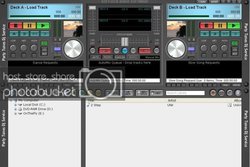
Rockit 4

To many ads? Support ODJT and see no ads!
Status
Not open for further replies.
You'll get the hang of skinning it Randy -- I have Faith :sqbiggrin:


As I work on the skin program, I'm putting together a tutorial on how it all works together. It was a little deep for the Rockit manual, and I didn't want to turn folks off by putting too much technical jargon in.


I look forward to seeing what others can do with it, as my skins always seem to look kinda bland to me...
 
New skin available :)

This is my Bright Silver creation :sqerr:

Please note, the About, Help, Minimize and Close buttons are on the bottom right, since I put a slider on the top right. I sorta like this one, as it has all the stuff I need, and none of the stuff I never use (like Pitch controls). You also get to see how Rockit works when the search list isn't showing, but the search box is...

It's available at Rockit Skins Page

Enjoy :)

BrightSilverThumb600.gif
 
I love the large library section many of the other softwares I've liked over the yrs didnt have as much library playlist area.
 
Yes Sir :)

Rockit essentially has 3 searches.

The little search box, that says Search Library, interfaces with the on-screen search list. If the on-screen list is not visible, it will pop up another box with the search results, or a message that no matches were found.

There is also a button for another library search (works similar), plus the Advanced HDD search.


I have not tried every possible combination at once, so feel free to experiment, and let us know which setup works best for you... :)
 
Ahhh, the Advanced Search needs its own box -- sorta like its creator :sqlaugh: :sqwink:

It's a inter-thread comm. thingy, that would potentially deadlock if I put it on the main screen, and it would then act like other software... ;)


Me, I like the keyboard shortcuts for that:

Map a key or key combo (I use Ctrl+Alt + A ), and just pop it up, type in what yer looking for, then close it while it does its thing. Come back when you get a chance, and whatever it found is waiting for you.

Life is simple, time is short, and desktop space is valuable... :sqlaugh: :sqbiggrin:
 
Ahhh, the Advanced Search needs its own box -- sorta like its creator :sqlaugh: :sqwink:

It's a inter-thread comm. thingy, that would potentially deadlock if I put it on the main screen, and it would then act like other software... ;)
We can never confuse you with someone who likes to be like the others!! :sqwink: :sqlaugh:

Btw, I decided to put the test to the RockIt and the lappy last night. Turned it on and opened up almost everything on the lappy....Excel, Word, Explorer, MsPaint, RockIt 3.2 and then did an Advanced Search on top of all of it. Not a glitch in playback!! I go live tonight for it's first gig debut.
 
please no (having nightmares of TRON) Randy Come Back please
Randy NOOOOOOOOOOOOOOOOOOOOOOOOOOOOOOOOO!!!!!
 
Wow, is all I can say! Going digital has been one of the best and most fun things I've done in 15 years of djing. I'll start a new thread later (with pics) about my first digital gig, but it was just awesome!

RockIt performed like a champ.

(BTW Rick, I'll be putting everything back into the RockIt Library. Adv Search is too darn slow and cumbersome......ok, I'll say it -- "You were right!!")
 
Oh Mr. RockIt ---- I have a question for you.

If I have song in the AutoMix Que and want to move it around, is there a keyboard shortcut that does the trick? Right-clicking and selecting was getting old. In fact, is there a way you could make it grab-and-drag-and-drop to where a user wants it played? Dragging within the Que box only makes your song disappear. If I send you a keg? :)
 
Currently, those commands are not in the keyboard mapping table.


It has gone into my notebook, and will be in the next release... :sqbiggrin:

BTW, that won't be long, as I've found a few other things I would like to add, and a couple minor "undocumented features" ;)

Probably next month sometime...
 
Btw, I decided to put the test to the RockIt and the lappy last night. Turned it on and opened up almost everything on the lappy....Excel, Word, Explorer, MsPaint, RockIt 3.2

Just my opinion, but I suggest that you remove those things from your laptop. I removed everything from mine that had nothing to do with DJing. Lappy also has never been on the internet ; it's sole purpose is for DJing. All of those other programs take up valuable hard drive space and could possibly cause a slow down or crash...just my thoughts...thx

You are right, going digital several years ago was the best thing that has happened to my business hands down.
 
Just my opinion, but I suggest that you remove those things from your laptop. I removed everything from mine that had nothing to do with DJing. Lappy also has never been on the internet ; it's sole purpose is for DJing. All of those other programs take up valuable hard drive space and could possibly cause a slow down or crash...just my thoughts...thx

You are right, going digital several years ago was the best thing that has happened to my business hands down.

With other software, I would hands down agree with you, but I don't think that's the case with RockIt. But, I'll monitor it very closely and adjust if needed.
 
With other software, I would hands down agree with you, but I don't think that's the case with RockIt.

That would be correct :)

Rockit is tested with more junk running, then you would care to know about, on purpose. Very few things effect it, due to the amount of threading we do.

Browsers can effect it, and cause it to skip, if they are running CPU intensive pages, like stuff with lots of Flash or JavaScript running. For example, if you load CNN.Com's home page, and take a look in Task Manager, depending on the ads displayed, the browser can eat anywhere from 30-100% CPU cycles. :sqerr:

Anything is gonna skip once you start approaching those higher levels...
 
Status
Not open for further replies.