RE-Reworking My Small System... AGAIN

To many ads? Support ODJT and see no ads!
Most days I'm so busy I gotta pencil in a poop. Where do you find the time to do all this??

An hour here... an hour there.[emoji1] Not really VERY much time in this project fortunately. Just like you, I have PLENTY going on, so project time is limited.[emoji4]


Sent from my iPhone using Tapatalk
 
  • Like
Reactions: ittigger
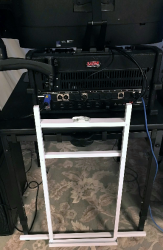
Got the bracket painted. It's out in the garage while the paint drys. I also cut the hole for the Bluetooth receiver. Unfortunately, drilling the hole blistered the paint around the edge of the hole. I touched up the paint, but brushing on paint (even an 1/8 inch stripe around the edge of the hole) never looks a good as paint sprayed on. I hate to think I might have to repaint the whole panel just for that little hand-painted strip. Looks like it's gonna work, though, repaint or not.[emoji4]

Sent from my iPhone using Tapatalk
 
  • Like
Reactions: ittigger
You need to add 1 or 2 of these to either system .. XLR to RJ45 breakout box | eBay

I'm not big on green, but it's a lot smaller than the other BobCat ...

media_a88b1738-a91e-4395-a458-24afc0859149.jpg
 
Got the bracket painted. It's out in the garage while the paint drys. I also cut the hole for the Bluetooth receiver. Unfortunately, drilling the hole blistered the paint around the edge of the hole. I touched up the paint, but brushing on paint (even an 1/8 inch stripe around the edge of the hole) never looks a good as paint sprayed on. I hate to think I might have to repaint the whole panel just for that little hand-painted strip. Looks like it's gonna work, though, repaint or not.[emoji4]

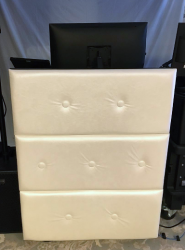
Here's the hanging bracket...

1532481145493.png

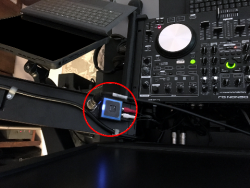
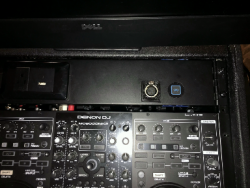
... Painted it white because... because I had two cans of white paint. Not sure how I feel about the white???:-/ Here's what my Bluetooth receiver looks like...
1532481295423.png

... It's just taped on the back with blue tape in this pic... until I decide if I need to repaint the panel. Once it's mounted with 3M tape, it will be a BEAR to take off.
 
  • Like
Reactions: ittigger
Today... not a great day for this project. Didn't get anything done, and the power supply (for my Surface Pro) came, but it's NOT what I ordered... It's just a standard power (block) supply instead of one where the transformer is in the plug end. Now I have to send it back. I ordered a different one that was like the one I expected, but it won't be here until Friday... CR@P!!!... This is the down side of ordering stuff online.


Sent from my iPhone using Tapatalk
 
  • Like
Reactions: ittigger
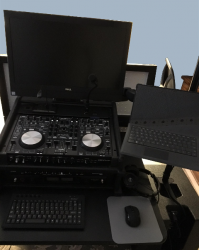
My Floating Facade now attaches beautifully to my DJ table (used for my Small System) via my Hanging Bracket :djsmug:...

1532622082138.png

... and I think I'm gonna leave it white... you can't see it anyway, and it's easier for me to see what I'm doing when attaching it in low light situations. Another task completed!:)
 
Last edited:
Here's a pic looking down at the table from above, between the Floating Facade and my Small System rack case...

1532630885853.png

You can really see how the latch on the Hanging Bracket attaches to the Floating Facade. This is the same type of latch I use on my Large System, only it was painted black.

And here's what it looks like from where I will be standing when performing...

1532631108068.png
 
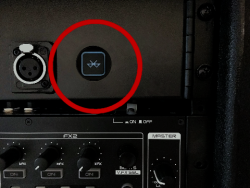
Got the Bluetooth receiver mounted on the back of the 2U hinged rack panel (same one as the gooseneck mic and the LED light)...

1532655839027.png

... The 3M 2-sided tape holds firmly, even when I press down pretty hard on the connect button. Normally, you wouldn't need to press the connect button very hard though.

Here's the front...

1532657345023.png

Works PERFECTLY!!!... It's plugged into Channel 4 on the Rolls mixer. So now I have Bluetooth in my Small System. Another completed task.:djsmug:

... And yes... I repainted the hinged rack panel.[emoji23]
 
Last edited:
Of course you did...:nod:

I still say that your "small" system is beefier than many "regular" systems folks 'round here have.

Still consider having that as your go-to system....

It WAS already a nice little system, and it looks like it’s gonna be even better, with the features I’m adding. I think it will get used a lot more than before. However, if I’m gonna need to have dance lights, my Large System is the best option. I have done nothing (and it’s not one of the objectives of this project) to address the dance light issue with this Small System, and I’m not sure I want to.[emoji4]
 
Today I need to decide what to do about a LAN... My Large System contains a 5 Port network switch, to which my two Nano PC’s attach, with a third connection attached to the rear patch panel so the system can be connected to my home network (to download the latest music files from my Media Server and/or gain Internet access for software updates). Having the two computers connected to a switch allowed them to share a mouse and keyboard.

My Small System never needed an Ethernet switch because it only had one active computer. Now, if I plan to have the Dell AIO PC and the Surface Pro active at the same time, I think I’d like to add the switch. However, I really don’t need 5 ports; 3 would be sufficient. Small, light and fast are the other requirements. This looks like the perfect choice...

CyberData 3-Port Gigabit Ethernet Switch

https://www.amazon.com/dp/B00HAM4UN4/ref=cm_sw_r_sms_c_api_KSXwBb1513A14

... Not easy to find a 3 Port Gigabit Switch. The price ($75) however, is STUPID! I can buy a 5 Port Switch for less than $20. Seems the fewer the number of ports, the higher the price, until you need more than 16 ports. I could put a 16 Port, rack-mounted switch in for $70. There are a couple of 4 Port switches available in the $50 range... CRAZY!!!... While I have no use for the extra ports, looks like the smart thing to do would be to buy the smallest 5 Port switch I can find. Maybe this one...

TP-Link 5 Port Gigabit Ethernet Network Switch

https://www.amazon.com/dp/B00A128S24/ref=cm_sw_r_sms_c_api_X3XwBbF75A914

The power cord for the Surface Pro (the second one) shows it’s “Out For Delivery”. Hopefully this one will work.[emoji4]
 
Last edited:
I want a wireless access point in my racks so I can control it with an iPad if needed. My mini system had a tiny Zyxel wireless router in it .. moving to a TP-Link AC1200 I had laying around.
 
I want a wireless access point in my racks so I can control it with an iPad if needed. My mini system had a tiny Zyxel wireless router in it .. moving to a TP-Link AC1200 I had laying around.

I have a TP-Link 3G/4G WiFi router with a USB port, into which I can plug a USB MiFi device for Internet access... On my Large System, I just plug it into the patch panel (which is attached to the switch), so the PC’s are still essentially hooked up to it (wired) as soon as it’s connected. The router used to sit on top of my old rack, but just under the table top. The PC’s obviously didn’t need the WiFi access, but I carried a Laptop for backup, which could connect via WiFi, or I could provide GUEST access to it. I haven’t actually needed it much, so I haven’t tried to figure out where I’ll set it with my new Large System. I can set it on the table and behind my Small System rack when I want to use it with that system, after I get the gigabyte switch. Again, I never had this feature with my old small system.


Sent from my iPhone using Tapatalk
 
Last edited:
I think I've decided that my system will be 2 smaller racks and an expander.

I don't need a "large" system aymore, occasionally might need 2 small systems (or a backup) and there are a few pieces that I need only every so often. 1 small system will be the MC6000, the other will probably be based on a live sound mixer (not sure if my A&H ZED12FX or another). Not sure where my Rane fits in or the accompanying Denon 4500. The expander will have pieces for larger events (more wireless mic receivers, backup mixer, etc.). Not sure what to include.
 
I think I've decided that my system will be 2 smaller racks and an expander.

I don't need a "large" system aymore, occasionally might need 2 small systems (or a backup) and there are a few pieces that I need only every so often. 1 small system will be the MC6000, the other will probably be based on a live sound mixer (not sure if my A&H ZED12FX or another). Not sure where my Rane fits in or the accompanying Denon 4500. The expander will have pieces for larger events (more wireless mic receivers, backup mixer, etc.). Not sure what to include.

You got some CONTEMPLATIN’ to do, it sounds like.[emoji4]


Sent from my iPhone using Tapatalk
 
You got some CONTEMPLATIN’ to do, it sounds like.[emoji4]


Sent from my iPhone using Tapatalk
Yea .. I did a quick count of 7 or 8 rackable mixers I have to start ... and that's not including the Rane or MC6000 ...
 
Yea .. I did a quick count of 7 or 8 rackable mixers I have to start ... and that's not including the Rane or MC6000 ...

Mixer’s???... Yea, I have too many as well, but some are pretty low end, and not worth using or selling. I also have too many controllers. I gotta sell a couple of them. On the other hand, I might keep the Pioneer DDJ-T1 to use in the next system I’m thinkin’ about building. It won’t need to be rack mountable, and the larger (but lighter weight) size might work pretty good. I think I might just build the new system without using ANY of the components of my current racks. The problem with using existing components from either my large or small systems is the system is then out of commission until the new build is done. I wanna keep both of my current systems available for use during the next build.[emoji4]


Sent from my iPhone using Tapatalk
 
  • Like
Reactions: ittigger