



Houston, we have a problem!
- Thread starter Handinon
- Start date
You are using an out of date browser. It may not display this or other websites correctly.
You should upgrade or use an alternative browser.
You should upgrade or use an alternative browser.

Hehe, sorry if I'm trying to live in a perfecter world.
The other thing to consider is that now that most pro dj software supports flac, you don't even have to go through the two step process anymore to create the additional mp3 file.
You only need to do this for a portable player that doesn't support flac and even those players are in the minority now. Don't know about apple but most android based phones out in the last couple of years support it as well.
The other thing to consider is that now that most pro dj software supports flac, you don't even have to go through the two step process anymore to create the additional mp3 file.
You only need to do this for a portable player that doesn't support flac and even those players are in the minority now. Don't know about apple but most android based phones out in the last couple of years support it as well.
For me, most of what I spin is NOT in the pools (60s-90s), so I HAVE to buy CDs and rip
I also prefer to rip my own mp3's because of the dismal quality of many legal mp3 downloads. It really irks me to look at a newly acquired mp3 in Audacity (to do some editing), and see lots and lots of red (clipping) in the waveform - are FLAC's also done this poorly?

Having a pile of CD's stacked in my house works as an archive for me - stuff I rip is for frequent DJ use.
Agreed. It's true we may someday be able to stream everything we need, but how you use it will greatly depend on what kind of a DJ you are. My son is a beta tester for Serato, and Serato DJ 1.9 beta just went live with Pulselocker integration - 44 million tracks! Pretty cool if you're a wedding or party DJ, but if you're a real performing or club DJ, you will still have to put a playlist together ahead of time, do beatgrids, que points, etc., etc.. A lot of time consuming preparation, which is why they are so protective of their libraries. Another example - Stems hasn't even been mentioned on this forum. There are DJ's and there are DJ's, all different and all good, so please do not take this as a judgement call. My point - I just don't see HD's with prepared playlists (filled with FLAC files) going away anytime soon.
Imo, for most mobile peeps, there is no way to know what type of crowd and what songs may move the floor. To get rid of what you have collected is akin to playing russian roulette - especially for those that do not use WiFi while at an event. Why you would get rid of the very thing you invest in is beyond me. Incidentally, if you own CD's and toss them in the trash or get rid of them, you must also delete them from your library.
Truth be told, if we were lugging CD's or records around, the entire library most likely would not come. With things being digital - why not, you have the room, There's no additional weight or anything. Most people's libraries will not consume a 2TB drive
Gold - is really not a valuable metal - but I don't see anyone tossing it in the dumpster.
Last edited:
Do you know where most record collections ended up?
In dumpsters.
Do you know most CDs end up?
In dumpsters.
It's not a mistake - they just aren't valuable and not very useful anymore.
I don't know of any music people tossing records in the trash. In fact, records are making a comeback. That doesn't sound very useless to me. I also don't know many people in the music business that toss music CD's in the trash.
Last edited:
I've been at it since 1984.
I do not have any of that original vinyl anymore, nor did I keep any turntables.
I had 5 CD systems at one time. I have one heavily reduced collection of CDs right now, and I'm about to get rid of those as well.
The stuff is obsolete for business purposes. I am not running a museum.
That's your own personal view and opinion. That does not reflect the majority of DJ or music professionals out there. I know alot of DJ's - and most of them still own records and turntables. Some DJ's still use turntables with coded vinyl at events. Quite a few still carry CD's and CD players.
BTW, by law, if you get rid of discs you purchased or legally obtained, you must also get rid of any copies (digital or other) you have.
Last edited:
You're in Maryland not the Antarctic Circle. You make it sound like you know nothing about the event in advance and drop in out of the sky to a place void of civilization.
I make a point to know what my customer wants before I arrive at the event. I do that with conversation - not by spending all my time and money trying to predict and cover all possibilities before I'm even booked.
I'm making business decisions about the music. I am not holding out my collection to gratify my ego. It's fine to be proud of my collection but, managing collections is not the business I am in.
Wow .. you're really reaching. I never said anything about not knowing about an event in advance .. that said, outside of your customer, there's no way you can possibly know what the guests may want to hear at an event before you get there. Like you, I also know what my customer wants to hear. That may or may not be what moves the floor or what the guests want to hear .. or a mixture. Again, you're the cook offering a limited menu (by your own admission) - I'm one of the fancy cooks and I have a large selection of what someone can choose to eat. I'm willing to bet that the DJ's in the Antarctic Circle also come prepared for whatever may come in the door.
FWIW, I'm also not spending my time and money trying to predict and cover all possibilities .. that's been done already. Considering it's been done (and continuously grows), I'd be an idiot to toss my money away for stuff I've already purchased and may need in the future. It's called being prepared. Do you have backup equipment? If so, why? If so, you have it so that you're prepared just in case you need it. Similarly, it's a waste of an investment if you never use it. Same / same. You seem to be ok with tossing your money away and having to possibly rebuy music. That's your opinion and you are entitled. If we're talking about carrying records, cassettes or CD's, I might agree that they all don't need to come - but we're not - we're talking about MP3's on a hard drive. You claim that you'd just get online and play whatever someone wants to hear that you don't have. Why bother if I already have it in my library (because I didn't delete it). You never know what you may need. I'd rather have it and not need it than not have it and need it. Contrary to popular belief, the Internet is not available everywhere, nor is every song available online.
Tossing your turntables away is one thing. Tossing your music is another. A mechanic might toss an old floor jack that he doesn't need any more (because he / she has a lift now) .. but I guarantee that they're not throwing their tools out (wrenches, socket sets, air guns, etc).
Last edited:
Having a pile of CD's stacked in my house works as an archive for me - stuff I rip is for frequent DJ use.
This is true .. until the house burns down and your collection goes with it. By law, you are authorized 1 backup copy of each disc you have for archive purposes.

It really irks me to look at a newly acquired mp3 in Audacity (to do some editing), and see lots and lots of red (clipping) in the waveform - are FLAC's also done this poorly?
My guess is yes, probably. The art of mastering a recording has gone by the wayside in recent years - now, it's all about boosting the volume of a song into the stratosphere, regardless of whether or not it's clipping. It's not a problem exclusive to the MP3 format.
I agree - they did this study with an MJ song which was rereleased over several years - and each rerelease, the volume was boosted.

BTW, by law, if you get rid of discs you purchased or legally obtained, you must also get rid of any copies (digital or other) you have.
There is no such literal dictate in the law. It is simply a logical extrapolation of the copyright: transfer the media and the rights transfer with it.
If you do what Steve does and resell or trade the discs after you rip them then you should not be retaining the ripped files. You will have not only duplicated the material you will also be redistributing it. That's a clear violation of the copyright.
However, if he were to simply destroy the discs there is no transfer of rights - he is still the owner/purchaser. You might technically argue the right was destroyed with the disc but it is a legally null argument. Copyright is a civil action and you would not only be unable to demonstrate any actual damages but, the action is also not considered in the law as grounds for statutory damage.
I have no concern about trashing my old CDs in favor of the digital file. No one is going to hear that lawsuit. It would also be political suicide for the music industry to try to exert such a claim. They have tried in the past and lost - not only in the courtroom but, in the House of Representatives Committee on Music and Copyright. The result of that political backlash was the Home Recording Act, along with other restatements of Congressional intent on Copyright.
Your 1:1 notion is no longer a valid legal concern if the media is not being sold, traded, or gifted. Digital media files are the new standard. Even the karaoke manufacturers who attempted to make an end run by asserting trademark have all folded their tents and closed up shop. It's a brave new world.
In fact, records are making a comeback.
No, they really are not. Don't be a fool.

I think they are. If only based on the fact that a majority of the times an artist is featured on The Tonight Show or shows like it the host introduces the artist while holding an album jacket - not a CD case. Unless there is some conspiracy to make fake album covers that means vinyl is actually being pressed with new music.No, they really are not. Don't be a fool.
I've read a couple of articles that vinyl is coming back into vogue in some circles. It might be a small segment that might grow bigger or maybe not. My guess is it will remain a niche market for hipsters and people that really appreciate music.
I think they are. If only based on the fact that a majority of the times an artist is featured on The Tonight Show or shows like it the host introduces the artist while holding an album jacket - not a CD case. Unless there is some conspiracy to make fake album covers that means vinyl is actually being pressed with new music.
I've read a couple of articles that vinyl is coming back into vogue in some circles. It might be a small segment that might grow bigger or maybe not. My guess is it will remain a niche market for hipsters and people that really appreciate music.
No, it really is not.
The is the age of digital smart phones and you are essentially claiming that the CB radio is making a comeback.
Vinyl will always be a fully functional historical novelty - but, that is all it will ever be. Even the time code discs will fade into obscurity as better emulation surfaces come along and the last of the nostalgic DJs like myself who began in the vinyl era fade away.
Some artists still print a limited number of EPs but, it's largely for novelty and/or a promotional stunt (compare the production numbers.) What you see on TV can also be an art board because it makes for a better cam capture.
There will always be someone willing to turn vinyl into their hobby. With each day that hobby will more and more resemble antiquing. Perhaps a few will turn it into a bookable show - but, it will largely be an oldies show.
However, if he were to simply destroy the discs there is no transfer of rights - he is still the owner/purchaser. You might technically argue the right was destroyed with the disc but it is a legally null argument. Copyright is a civil action and you would not only be unable to demonstrate any actual damages but, the action is also not considered in the law as grounds for statutory damage.
I have no concern about trashing my old CDs in favor of the digital file. No one is going to hear that lawsuit. It would also be political suicide for the music industry to try to exert such a claim. They have tried in the past and lost - not only in the courtroom but, in the House of Representatives Committee on Music and Copyright. The result of that political backlash was the Home Recording Act, along with other restatements of Congressional intent on Copyright.
Your 1:1 notion is no longer a valid legal concern if the media is not being sold, traded, or gifted. Digital media files are the new standard. Even the karaoke manufacturers who attempted to make an end run by asserting trademark have all folded their tents and closed up shop. It's a brave new world.
You just attempted to tilt the law in your favor.
You just attempted to tilt the law in your favor.
Well, duh! ...there's a whole profession devoted to doing just that.
I am going to try to sum up this thread.
First, a big thank you to everyone - I have learned a lot.
At the present time, if you have the HD space, FLAC seems to be the best way to rip CD's. My one reservation was I couldn't find a stand-alone normalizing program (like mp3Gain) for FLAC - looks like Sound Normalizer will work (thanks Navydiver).
If you don't have the HD space, or if you really cannot hear the difference (like me), mp3's are still fine using the following -
Newest LAME encoder using -b 320 or --preset insane for 320 bit CBR files. Note the lack of the -m s switch.
These are the LAME default settings for 320 CBR files, which yield joint-stereo files with no high frequency content above 20.5khz. The high frequencies are cut off because mp3 encoders apparently have a hard time encoding high frequencies, and we supposedly can't hear it, so it cuts off at 20.5khz leaving more bits to encode the parts we can hear. This is a major difference to the Fraunhofer encoder used by iTunes and Windows Media Player.
The default setting also enables joint-stereo, so when the encoder detects little difference between the right and left channels, joint-stereo will kick in, again freeing up more bits to encode the music. When joint-stereo is enabled, it encodes (L +R) and the difference between them (L -R). Those of you who are old like me will recognize this as the encoding scheme for FM Multiplex radio - and it is in fact exactly the same thing. The decoder simply adds and subtracts the (L -R) data from the (L +R) data yielding 2L and 2R. This type of computation is a joke for the kinds of computers we run today, so there is no down side.
Lastly, the VBR setting of -V0 will probably yield the same audible results with even smaller file sizes, but it may not always work properly with DJ software. I have personally seen it cause timing problems - the song plays fine, but file size and length are not read properly.
Most of my rips have been done with AudioGrabber because it is old like me. The following link for setting it up has already been posted -
RockIt 2000 Pro DJ Software - Ripping Songs Using AudioGrabber
Here is another one with more detail on setting up Freedb -
Best way to rip my CD's - iAudiophile.net Forums
Ignore the encoder settings they show - I recommend using only %s %d -b 320. Additionally, I use the External Encoder option, and select rip all first, before encoding. I use external encoder because, even though AudioGrabber is a 32 bit, I point it to a 64 bit version of LAME (probably makes no difference, just future-proofing myself). By selecting rip all first, you can actually follow the encoding in the Windows Command line.
Thanks.
First, a big thank you to everyone - I have learned a lot.
At the present time, if you have the HD space, FLAC seems to be the best way to rip CD's. My one reservation was I couldn't find a stand-alone normalizing program (like mp3Gain) for FLAC - looks like Sound Normalizer will work (thanks Navydiver).
If you don't have the HD space, or if you really cannot hear the difference (like me), mp3's are still fine using the following -
Newest LAME encoder using -b 320 or --preset insane for 320 bit CBR files. Note the lack of the -m s switch.
These are the LAME default settings for 320 CBR files, which yield joint-stereo files with no high frequency content above 20.5khz. The high frequencies are cut off because mp3 encoders apparently have a hard time encoding high frequencies, and we supposedly can't hear it, so it cuts off at 20.5khz leaving more bits to encode the parts we can hear. This is a major difference to the Fraunhofer encoder used by iTunes and Windows Media Player.
The default setting also enables joint-stereo, so when the encoder detects little difference between the right and left channels, joint-stereo will kick in, again freeing up more bits to encode the music. When joint-stereo is enabled, it encodes (L +R) and the difference between them (L -R). Those of you who are old like me will recognize this as the encoding scheme for FM Multiplex radio - and it is in fact exactly the same thing. The decoder simply adds and subtracts the (L -R) data from the (L +R) data yielding 2L and 2R. This type of computation is a joke for the kinds of computers we run today, so there is no down side.
Lastly, the VBR setting of -V0 will probably yield the same audible results with even smaller file sizes, but it may not always work properly with DJ software. I have personally seen it cause timing problems - the song plays fine, but file size and length are not read properly.
Most of my rips have been done with AudioGrabber because it is old like me. The following link for setting it up has already been posted -
RockIt 2000 Pro DJ Software - Ripping Songs Using AudioGrabber
Here is another one with more detail on setting up Freedb -
Best way to rip my CD's - iAudiophile.net Forums
Ignore the encoder settings they show - I recommend using only %s %d -b 320. Additionally, I use the External Encoder option, and select rip all first, before encoding. I use external encoder because, even though AudioGrabber is a 32 bit, I point it to a 64 bit version of LAME (probably makes no difference, just future-proofing myself). By selecting rip all first, you can actually follow the encoding in the Windows Command line.
Thanks.
Last edited:
Well, duh! ...there's a whole profession devoted to doing just that.
I don't believe you have a degree in that profession - so play with fire all you like - one of these days you might get burned. You're a funny little creature - hop all over someone for what you think they do improperly yet you defy laws yourself and just turn the table so you think you're doing right.
There is no such literal dictate in the law. It is simply a logical extrapolation of the copyright: transfer the media and the rights transfer with it.
If you do what Steve does and resell or trade the discs after you rip them then you should not be retaining the ripped files. You will have not only duplicated the material you will also be redistributing it. That's a clear violation of the copyright.
Clarification ... I DO NOT sell discs after I rip them .. I sell off discs I decide NOT to rip. I hold on to any disc I rip.
One more piece to the equation - I have Normalize turned on in AudioGrabber with the Average level set to 57% for newly released music. This prevents clipping from Quantization (noise due to encoding) being added to the waveform. If the waveform is already at or near 0db, there is no place to go.
Wav file grabbed from Now 55
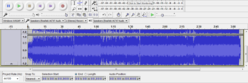
Same file encoded mp3. Hey, this looks like the mp3 I just paid for from (insert whatever)!! I've actually seen a lot worse.
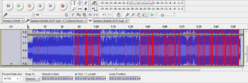
Same file normalized before encoding -
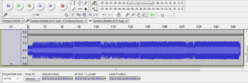
This is pretty close to 94db in mp3Gain - right were I want my levels, and no clipping.
Wav file grabbed from Now 55
Same file encoded mp3. Hey, this looks like the mp3 I just paid for from (insert whatever)!! I've actually seen a lot worse.
Same file normalized before encoding -
This is pretty close to 94db in mp3Gain - right were I want my levels, and no clipping.
Last edited: