


Good Deal On A BenQ Projector

To many ads? Support ODJT and see no ads!
Short throws are great for karaoke (I have one) or video, but not sure about the gobo use as you may get too much spread to the surface. They usually like to be within 6-8 ft' or so from the target or you lose a lot of light and start getting heavy distortion. A medium or long throw is usually better for gobos and such.
 
Short throws are great for karaoke (I have one) or video, but not sure about the gobo use as you may get too much spread to the surface. They usually like to be within 6-8 ft' or so from the target or you lose a lot of light and start getting heavy distortion. A medium or long throw is usually better for gobos and such.

You're correct however sometimes I find myself in a corner with a bare wall opposite of my light tree. This will give me some options at smaller venues.

 
  • Like
Reactions: 1 person
you're correct however sometimes i find myself in a corner with a bare wall opposite of my light tree. This will give me some options at smaller venues.
omg!!!!!!
Confused+cat+2.jpg
 
Last edited:
  • Like
Reactions: 1 person
Yes Houston...I can negotiate with the best of them but sometimes my station is in a corner. It doesn't happen often and like I said this projector will give me some options when I find myself in that situation. So long as I can setup my speakers properly it doesn't really matter where I am.
 
  • Like
Reactions: 4 people
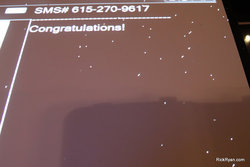
I'll 2nd what Steve said about gobo use. Short throws are useless for that, IMHO. I have 2 long-throw Epson projectors, a medium-throw Viewsonic and an extreme short-throw Viewsonic (my main projector for live-pics). Speaking of which, my ultra-short-throw unit is doing some weird stuff. I'm getting little white dots over the image. This appears to be coming from the projector. Any ideas?
ckRyan.com_Franklin_Bowling_Green%2520%252870%2529.jpg
 
Ill see for myself about gobo use. You guys may be right. Im going to test when it gets in.

As far as dots on that image it looks like dead pixels. I came across this a few times when I was in the AV biz.

As I remember now we had a few Optoma H30s back in the early 2000s that had this problem. Something failed on the DLP chip that needed repair. Check your warranty.
 
Last edited:
Yes Houston...I can negotiate with the best of them but sometimes my station is in a corner. It doesn't happen often and like I said this projector will give me some options when I find myself in that situation. So long as I can setup my speakers properly it doesn't really matter where I am.
Oh, there is nothing wrong with setting up in a corner as long as your speakers are spread out where you want them to be. It is those who are stuffed in the corner WITH the speakers that are the issue. I have no problems being in a corner with my operating gear. One does not always have to be in the middle of the speaker spread. ;)
 
  • Like
Reactions: 3 people
I have the previous version of this projector, and it's no more of a short-throw projector than my five-year-old Epson projector (which is not short-throw). The SVGA resolution is poor for anything with detail - it will make your Wii games more fun to play, but that's about it. The native 4:3 aspect ratio is outdated. Try to run anything with detail through it and you'll get what's known as the "screen door" effect.

If I needed a projector, I wouldn't choose this one even at $300. Just my thoughts.
 
  • Like
Reactions: 2 people
I'll 2nd what Steve said about gobo use. Short throws are useless for that, IMHO. I have 2 long-throw Epson projectors, a medium-throw Viewsonic and an extreme short-throw Viewsonic (my main projector for live-pics). Speaking of which, my ultra-short-throw unit is doing some weird stuff. I'm getting little white dots over the image. This appears to be coming from the projector. Any ideas?
ckRyan.com_Franklin_Bowling_Green%2520%252870%2529.jpg

Yup .. dead pixels ... that many isn't normal. Just call it a starry background effect.

- - - Updated - - -

Oh, there is nothing wrong with setting up in a corner as long as your speakers are spread out where you want them to be. It is those who are stuffed in the corner WITH the speakers that are the issue. I have no problems being in a corner with my operating gear. One does not always have to be in the middle of the speaker spread. ;)

There's also nothing wrong with setting up with speakers in a corner either, assuming the table is at a 45 across the corner and the speakers in line with the table. Only issue would be if you have > 90 degree dispersion on your horns, as you will get bounce off the side walls at that point.

Sometimes the corner IS the best place to be depending on the setup.
 
There's also nothing wrong with setting up with speakers in a corner either, assuming the table is at a 45 across the corner and the speakers in line with the table. Only issue would be if you have > 90 degree dispersion on your horns, as you will get bounce off the side walls at that point.

Sometimes the corner IS the best place to be depending on the setup.
Don't get too technical with the troops you will only succeed in confusing them. ;)
 
Yup .. dead pixels ... that many isn't normal. Just call it a starry background effect

Or, include stars in ALL of your gobo designs!
;)
and, of course, charge extra for this exclusive "special effect" that only YOU can deliver!
 
I second what Brendan said, SVGA (800x600) resolution is dead product. Prices dropped until inventory levels hit a point where they stabilized due to the only people purchasing them are people that needs to match existing hardware. They will then disappear from the market and good riddance! 1280x800 is the lowest resolution I would purchase.
 
I second what Brendan said, SVGA (800x600) resolution is dead product. Prices dropped until inventory levels hit a point where they stabilized due to the only people purchasing them are people that needs to match existing hardware. They will then disappear from the market and good riddance! 1280x800 is the lowest resolution I would purchase.
So this will pass the test? http://www.optomausa.com/products/detail/DW339
 
  • Like
Reactions: 2 people
I second what Brendan said, SVGA (800x600) resolution is dead product. Prices dropped until inventory levels hit a point where they stabilized due to the only people purchasing them are people that needs to match existing hardware. They will then disappear from the market and good riddance! 1280x800 is the lowest resolution I would purchase.

From what I've seen, most monograms/logos/etc. are closer to the 4:3 ratio of the older projectors than the 16:9 of the widescreen ones, so depending on how you normally lay things out, an 800x600 projector might actually give you just as much working area if you can get one at a good price.
 
From what I've seen, most monograms/logos/etc. are closer to the 4:3 ratio of the older projectors than the 16:9 of the widescreen ones, so depending on how you normally lay things out, an 800x600 projector might actually give you just as much working area if you can get one at a good price.

Don't confuse aspect ratio with resolution. With a native resolution of 800x600, there are simply fewer pixels used to render the image. The result is that fine details can appear blocky and the distance between the pixels is magnified depending on the distance that you're projecting from. The magnification creates what's known as the "Screen Door" effect (because it appears that a window screen has been placed over the image).

A higher native resolution means more pixels are being used to render the image. Even if your image has a 4:3 resolution, it will still look much better than a projector with lower resolution.
 
  • Like
Reactions: 1 person