


Photoshop help....
- Thread starter Randy A
- Start date
You are using an out of date browser. It may not display this or other websites correctly.
You should upgrade or use an alternative browser.
You should upgrade or use an alternative browser.

Geez Hank - the peanut gallery is is a fowl mood aren't they....
It's probably the wheels that are buggin them.... LOL
<<<Runs and hides>>>
Awesome Hank.
If I send you my photo, can you make me handsome and get rid of my potbelly?
Hey maybe he can photoshop some money in my pocket.... it's a thought.

I tried my hand at it. There are a few spots that need a little love, but if you reduce the size you wouldn't even notice.


As strictly a suggestion, I might suggest putting the new right side copy on a new layer, and then using a paint mask to erase over top of the light fixtures on this new right side layer to allow the old fixtures and speakers to become visible, allowing it to look more natural, and not so perfectly symetrical. The slight differences in fixture reflections will make it look more realistic.
Attachments
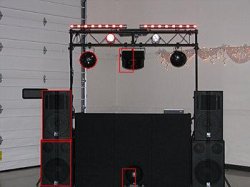
Might consider erasing/cloning some of the dangling christmas lights randomly, to create some differences as well.
Perhaps warping and stretching the swags... for subtle differences... to keep it from looking mirrored.
Perhaps warping and stretching the swags... for subtle differences... to keep it from looking mirrored.

Good Grief! Are we still on this topic?
Hey, here's an idea...."Set the stuff up against a blank wall or curtain and take another picture!"
Sheesh.
Randy, send me the original picture (large) and tell me what you want in the background.
(brick wall, red curtain, etc.)
Hey, here's an idea...."Set the stuff up against a blank wall or curtain and take another picture!"
Sheesh.
Randy, send me the original picture (large) and tell me what you want in the background.
(brick wall, red curtain, etc.)