need help

To many ads? Support ODJT and see no ads!
Oct 9, 2008
999
12
51
EL PASO TEXAS
ok i need help in finding the right cable to upload vids to you tube. i have the canon zr100 camcorder, now ive been looking for the cable to link to camcorder to my desktop. cant seem to find it. now i was looking at ebay and came across this one.


4-pin DV-i iLink to 6-pin firewire connection


IEEE 1394 DV-i firewire standard 400 megabits transfer rate


This cable will allow you to connect your digital camcorder to the PC or MAC and transfer the home movie to the computer


COMPATIBLE WITH:


MODEL LIST IN THE TITLE DESCRIPTION


note: if you have a Sony PC or most laptop you will need a firewire cable with 4-pin to 4pin DV-i to i-Link

make sure your PC or laptop has a firewire port to connect to also


now can i use this cable? i tired of going out and picking the wrong ones..lol

can some one help me out here

thanks
jaime
 
From Canon's website,

What's in the Box

ZR100 Camcorder
NB-2LH Battery Pack
CA-570 Compact Power Adapter
STV-250N Stereo Video Cable

3067a002.jpg


Do you have a yellow composite jack on your PC's video card?

You should be able to use that.
 
OK, I'm trying to find a picture of the back of your PC.
 
We need to figure out what video connection you have on the back.

Do you have any other model specific info on your 5100? Any other numbers?
 
We need to figure out what video connection you have on the back.

Do you have any other model specific info on your 5100? Any other numbers?

as for video connection i dont know, and for other info that i know

512 of ram
80 gb hard drive
2 usb ports in front

umm not to good with computers, so thats all i know it has..
 
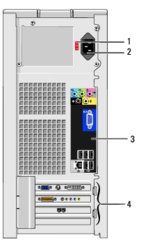
This should be the back of your PC. Is their anything in section 4 at the bottom ?

If so, which one?
 

Attachments

  • 5100.jpg
    5100.jpg
    14.7 KB · Views: 4
It looks like you will HAVE to have a video card with a firewire port per Canon's FAQs.

Issue: Camcorder is not recognized when connected to the computer via USB

--------------------------------------------------------------------------------
Solution: The USB connection is for downloading still images from the memory card only.


The USB connection is for downloading still images from the memory card only. Video transfer via USB or other ports is not supported. To transfer video onto the computer an IEEE-1394 (Firewire) connection must be installed on the computer.
IEEE-1394 connections are built into many computers or may be added to most computers.
 
It looks like you will HAVE to have a video card with a firewire port per Canon's FAQs.

Issue: Camcorder is not recognized when connected to the computer via USB

--------------------------------------------------------------------------------
Solution: The USB connection is for downloading still images from the memory card only.


The USB connection is for downloading still images from the memory card only. Video transfer via USB or other ports is not supported. To transfer video onto the computer an IEEE-1394 (Firewire) connection must be installed on the computer.
IEEE-1394 connections are built into many computers or may be added to most computers.

awww man that suks,, more money to invest:sqmad: thanks for your help
 
More info:

Issue: How do I transfer video tape recordings to a computer via Firewire?

--------------------------------------------------------------------------------
Solution: Transferring video recordings to a computer ZR100, ZR200, ZR300, and ZR400


Transferring Video Recordings to a Computer
You can transfer recordings to a computer equipped with a IEEE1394 (DV) terminal or IEEE1394 capture board. Use the editing software supplied with your computer/capture board to transfer video recording from tape to computer. Refer to the instruction manual of the software. A driver is preinstalled on Windows operating systems later than Windows 98 Second Edition and Mac operating systems later than Mac OS 9, and will be installed automatically.
 

Attachments

  • Connect_to_computer_DV_cabl.gif
    Connect_to_computer_DV_cabl.gif
    6.1 KB · Views: 4
We need to figure out what available slots you have and what type, i.e. pci or pci express and then you can choose a video card based on that.
 
I gotta get ready for a gig tonight and tomorrow, maybe someone else can take over from here?
 
ok before you go anywhere what I will do is get what info is needed
all I need is

the Camera all details on what you have so I can look at the manual (online)

then your computer what it is (motherboard a must) then I can look at that motherboard to see what it can do and if you can attach the camera to the computer

thanks