No Voice using Google Maps

To many ads? Support ODJT and see no ads!
I've been using Apple maps in my Explorer, since it has Apple Car Play (or whatever they call it) and the maps on the phone are displayed on the 8" LCD monitor in the car. Not much need for a Nav system these days.

Is apple maps an app you had to download on your Iphone? I don't see it on mine.
 
Is apple maps an app you had to download on your Iphone? I don't see it on mine.
Yea .. just called Maps. It's the only one (at least now) that works with the Apple CarPlay built into the Ford.
 
  • Like
Reactions: ittigger
The thing I like about Google maps is the offline maps. So I can download maps so if I get into a place with no cell service, my phone will still work with the GPS.

Please explain! I've done that with my Sygic, but didn't see that option in Google Maps.
 
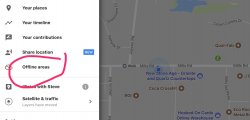
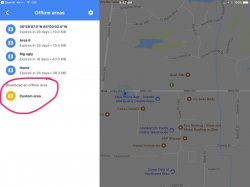
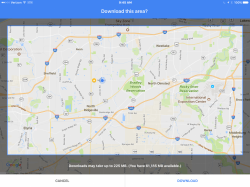
IMG_0641.jpg IMG_0642.jpg IMG_0643.PNG
Please explain! I've done that with my Sygic, but didn't see that option in Google Maps.

Select settings, offline areas, custom area, move the map and zoom in or out as desired, then download area and name it if you like. Area needs to be updated every 30 days
 
I use Waze a lot too. No issues that I know of.

The thing I like about Google maps is the offline maps. So I can download maps so if I get into a place with no cell service, my phone will still work with the GPS. Waze, owned by Google doesn't have this feature yet.
Apple maps continues to get better

You can use offline maps in Waze - similar to Google maps, you have to cache them.

------------------------------------------------

If you want to get a Waze map offline, you have to open Waze application ahead with your WiFi or data connection and enter the address you want to go. Once the routing is completed, Waze will keep this map details in cache until you close the app.

------------------------------------------------
 
  • Like
Reactions: Scott Hanna
Is apple maps an app you had to download on your Iphone? I don't see
You can use offline maps in Waze - similar to Google maps, you have to cache them.

------------------------------------------------

If you want to get a Waze map offline, you have to open Waze application ahead with your WiFi or data connection and enter the address you want to go. Once the routing is completed, Waze will keep this map details in cache until you close the app.

------------------------------------------------

this is very nice to know, very helpful. Although I wish they'd take it a step further and let you download it rather than cache. Reason being is with offline the way Google does it, you can start a navigation when you are in an area with no signal, so it will navigate until you get to cell service. I've had to do this several times. I'm assuming this wouldn't work with the way Waze does it.
 
  • Like
Reactions: ittigger
Also, when I talk to google it sometimes works and sometimes not - may be a 4G thing or something to do with towers and bandwidth.

Pretty sure you are right.
I only use the internet when I have wifi....
and I keep my phone on "NO CELLUAR SERVICE"...so I don't use my data by accident.
The voice function on Google doesn't work if I am not connected.